Join us at FabCon Atlanta from March 16 - 20, 2026, for the ultimate Fabric, Power BI, AI and SQL community-led event. Save $200 with code FABCOMM.
Register now!The Power BI Data Visualization World Championships is back! It's time to submit your entry. Live now!
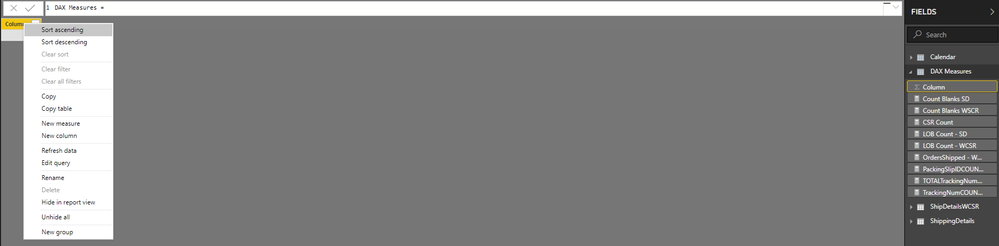
I am trying to delete the blank column in the dedicated DAX Measures table but it won't allow me to delete the column. Not sure what I am doing wrong but I was able to do this successfully before but the delete option is greyed out (see screenshot below). It may seem dumb but I like to see the calculator next to my DAX Measures table.
Any idea on how I can make this work?
I would consider not using a measure table. it can cause issues with the Analyze in Excel feature. See this tweet a few days ago by marcos.
Put measures in the FACT tables they are most relevent to. Hide everything in the FACT table that isn't a measure before publishing.
DAX is for Analysis. Power Query is for Data Modeling
Proud to be a Super User!
MCSA: BI ReportingThe Power BI Data Visualization World Championships is back! It's time to submit your entry.
Check out the January 2026 Power BI update to learn about new features.
| User | Count |
|---|---|
| 60 | |
| 46 | |
| 30 | |
| 24 | |
| 23 |
| User | Count |
|---|---|
| 145 | |
| 111 | |
| 64 | |
| 38 | |
| 32 |