Join us at FabCon Atlanta from March 16 - 20, 2026, for the ultimate Fabric, Power BI, AI and SQL community-led event. Save $200 with code FABCOMM.
Register now!Vote for your favorite vizzies from the Power BI Dataviz World Championship submissions. Vote now!
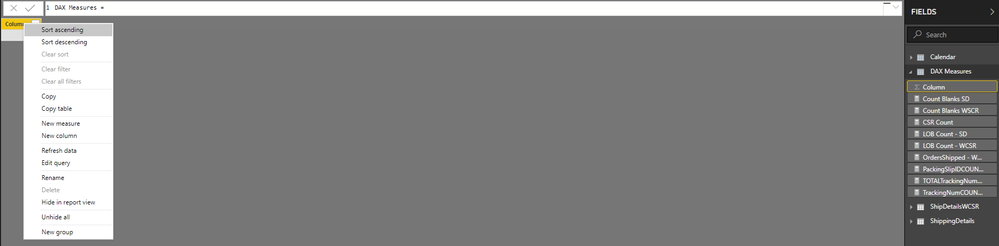
I am trying to delete the blank column in the dedicated DAX Measures table but it won't allow me to delete the column. Not sure what I am doing wrong but I was able to do this successfully before but the delete option is greyed out (see screenshot below). It may seem dumb but I like to see the calculator next to my DAX Measures table.
Any idea on how I can make this work?
I would consider not using a measure table. it can cause issues with the Analyze in Excel feature. See this tweet a few days ago by marcos.
Put measures in the FACT tables they are most relevent to. Hide everything in the FACT table that isn't a measure before publishing.
DAX is for Analysis. Power Query is for Data Modeling
Proud to be a Super User!
MCSA: BI ReportingVote for your favorite vizzies from the Power BI World Championship submissions!
If you love stickers, then you will definitely want to check out our Community Sticker Challenge!
Check out the January 2026 Power BI update to learn about new features.
| User | Count |
|---|---|
| 58 | |
| 53 | |
| 43 | |
| 17 | |
| 16 |
| User | Count |
|---|---|
| 122 | |
| 108 | |
| 44 | |
| 32 | |
| 24 |