Join us at FabCon Atlanta from March 16 - 20, 2026, for the ultimate Fabric, Power BI, AI and SQL community-led event. Save $200 with code FABCOMM.
Register now!The Power BI Data Visualization World Championships is back! It's time to submit your entry. Live now!
How can i create a measure to get the result as shown in the below table? I don't want to use show value as % of grand total.
Table
| Mode |
| Online |
| Offline |
| Online |
| Online |
| Online |
| Offline |
| Offline |
| Offline |
| Offline |
| Offline |
Result
| Mode | Count |
| Online | 4 |
| Offline | 6 |
| Mode | Percentage |
| Online | 40% |
| Offline | 60% |
Solved! Go to Solution.
Hello @InsightSeeker ,
You have to create a measure for the same as below:
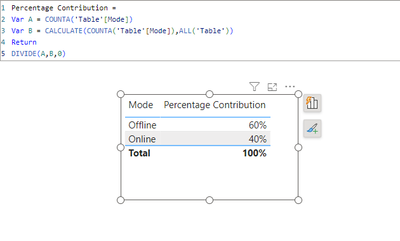
Percentage Contribution =
Var A = COUNTA('Table'[Mode])
Var B = CALCULATE(COUNTA('Table'[Mode]),ALL('Table'))
Return
DIVIDE(A,B,0)
Output looks like this:
If this post helps, then please consider accepting it as the solution to help other members find it more quickly. Thank You!!
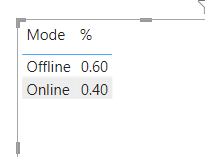
To get the % of Offline/Online use this
% = DIVIDE(CALCULATE(COUNTROWS('DataTable'), 'DataTable'[Mode] = SELECTEDVALUE('DataTable'[Mode])), CALCULATE(COUNTROWS(ALL('DataTable'))))
Regards
Phil
Proud to be a Super User!
To get the % of Offline/Online use this
% = DIVIDE(CALCULATE(COUNTROWS('DataTable'), 'DataTable'[Mode] = SELECTEDVALUE('DataTable'[Mode])), CALCULATE(COUNTROWS(ALL('DataTable'))))
Regards
Phil
Proud to be a Super User!
Hello @InsightSeeker ,
You have to create a measure for the same as below:
Percentage Contribution =
Var A = COUNTA('Table'[Mode])
Var B = CALCULATE(COUNTA('Table'[Mode]),ALL('Table'))
Return
DIVIDE(A,B,0)
Output looks like this:
If this post helps, then please consider accepting it as the solution to help other members find it more quickly. Thank You!!
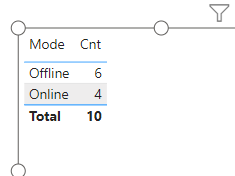
Hi, you can create a measure to count rows for each mode.
In the table, the mode column & the cnt measure used.
If this resolves your problem, then please mark it as solution, Thanks!
| User | Count |
|---|---|
| 53 | |
| 40 | |
| 35 | |
| 24 | |
| 22 |
| User | Count |
|---|---|
| 136 | |
| 111 | |
| 58 | |
| 43 | |
| 38 |