Join us at FabCon Atlanta from March 16 - 20, 2026, for the ultimate Fabric, Power BI, AI and SQL community-led event. Save $200 with code FABCOMM.
Register now!The Power BI Data Visualization World Championships is back! It's time to submit your entry. Live now!
How can i create a measure to get the result as shown in the below table? I don't want to use show value as % of grand total.
Table
| Mode |
| Online |
| Offline |
| Online |
| Online |
| Online |
| Offline |
| Offline |
| Offline |
| Offline |
| Offline |
Result
| Mode | Count |
| Online | 4 |
| Offline | 6 |
| Mode | Percentage |
| Online | 40% |
| Offline | 60% |
Solved! Go to Solution.
Hello @InsightSeeker ,
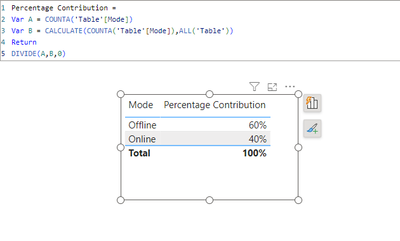
You have to create a measure for the same as below:
Percentage Contribution =
Var A = COUNTA('Table'[Mode])
Var B = CALCULATE(COUNTA('Table'[Mode]),ALL('Table'))
Return
DIVIDE(A,B,0)
Output looks like this:
If this post helps, then please consider accepting it as the solution to help other members find it more quickly. Thank You!!
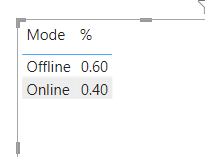
To get the % of Offline/Online use this
% = DIVIDE(CALCULATE(COUNTROWS('DataTable'), 'DataTable'[Mode] = SELECTEDVALUE('DataTable'[Mode])), CALCULATE(COUNTROWS(ALL('DataTable'))))
Regards
Phil
Proud to be a Super User!
To get the % of Offline/Online use this
% = DIVIDE(CALCULATE(COUNTROWS('DataTable'), 'DataTable'[Mode] = SELECTEDVALUE('DataTable'[Mode])), CALCULATE(COUNTROWS(ALL('DataTable'))))
Regards
Phil
Proud to be a Super User!
Hello @InsightSeeker ,
You have to create a measure for the same as below:
Percentage Contribution =
Var A = COUNTA('Table'[Mode])
Var B = CALCULATE(COUNTA('Table'[Mode]),ALL('Table'))
Return
DIVIDE(A,B,0)
Output looks like this:
If this post helps, then please consider accepting it as the solution to help other members find it more quickly. Thank You!!
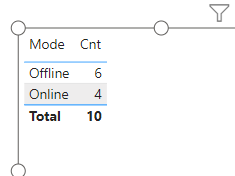
Hi, you can create a measure to count rows for each mode.
In the table, the mode column & the cnt measure used.
If this resolves your problem, then please mark it as solution, Thanks!
The Power BI Data Visualization World Championships is back! It's time to submit your entry.
Check out the January 2026 Power BI update to learn about new features.
| User | Count |
|---|---|
| 56 | |
| 42 | |
| 40 | |
| 21 | |
| 21 |
| User | Count |
|---|---|
| 149 | |
| 105 | |
| 63 | |
| 36 | |
| 36 |