Get Fabric certified for FREE!
Don't miss your chance to take the Fabric Data Engineer (DP-600) exam for FREE! Find out how by attending the DP-600 session on April 23rd (pacific time), live or on-demand.
Learn more- Power BI forums
- Get Help with Power BI
- Desktop
- Service
- Report Server
- Power Query
- Mobile Apps
- Developer
- DAX Commands and Tips
- Custom Visuals Development Discussion
- Health and Life Sciences
- Power BI Spanish forums
- Translated Spanish Desktop
- Training and Consulting
- Instructor Led Training
- Dashboard in a Day for Women, by Women
- Galleries
- Data Stories Gallery
- Themes Gallery
- Contests Gallery
- QuickViz Gallery
- Quick Measures Gallery
- Visual Calculations Gallery
- Notebook Gallery
- Translytical Task Flow Gallery
- TMDL Gallery
- R Script Showcase
- Webinars and Video Gallery
- Ideas
- Custom Visuals Ideas (read-only)
- Issues
- Issues
- Events
- Upcoming Events
Next up in the FabCon + SQLCon recap series: The roadmap for Microsoft SQL and Maximizing Developer experiences in Fabric. All sessions are available on-demand after the live show. Register now
- Power BI forums
- Forums
- Get Help with Power BI
- Desktop
- Re: Measure
- Subscribe to RSS Feed
- Mark Topic as New
- Mark Topic as Read
- Float this Topic for Current User
- Bookmark
- Subscribe
- Printer Friendly Page

- Mark as New
- Bookmark
- Subscribe
- Mute
- Subscribe to RSS Feed
- Permalink
- Report Inappropriate Content
Measure
Hi there,
I have 2 columns of data; Product & Minimum order quantity. However sometimes I can have mission data in column #3 and I want to be able to count those value of a product that are either with data, or blank, if the same product has both a zero & number value. The goal is to count up the number of items that are not uniformly containing the data they should [Apple & Orange], without being skewed by products that are completely blank [Strawberry].
Apple | 50 |
| Apple | 0 |
| Apple | 0 |
| Orange | 0 |
| Orange | 20 |
| Strawberry | 0 |
| Strawberry | 0 |
Solved! Go to Solution.


- Mark as New
- Bookmark
- Subscribe
- Mute
- Subscribe to RSS Feed
- Permalink
- Report Inappropriate Content
@Anonymous , Create a new colum
column =
var _cnt_0 = countx(filter(table,[Product] =earlier([Product]) && [Qty]=0),[Product])
var _cnt = countx(filter(table,[Product] =earlier([Product]),[Product])
return
if(_cnt_0 = 0 || _cnt =0,"Uniform","Non Uniform")

- Mark as New
- Bookmark
- Subscribe
- Mute
- Subscribe to RSS Feed
- Permalink
- Report Inappropriate Content
Hi @Anonymous ,
You may create measure like DAX below.
Measure1 =
VAR _CountAll =
    COUNTROWS ( FILTER ( Table1, Table1[Product] = MAX ( Table1[Product] ) ) )
VAR _CountZero =
    COUNTROWS (
        FILTER (
            Table1,
            Table1[Product] = MAX ( Table1[Product] )
                && Table1[quantity] = 0
        )
    )
VAR _CountNoZero =
    COUNTROWS (
        FILTER (
            Table1,
            Table1[Product] = MAX ( Table1[Product] )
                && Table1[quantity] <> 0
        )
    )
RETURN
    IF (
        _CountZero = _CountAll
            || _CountNoZero = _CountAll,
        "Uniformly",
        "Not Uniformly"
    )
Best Regards,
Amy
Community Support Team _ Amy
If this post helps, then please consider Accept it as the solution to help the other members find it more quickly.
- Mark as New
- Bookmark
- Subscribe
- Mute
- Subscribe to RSS Feed
- Permalink
- Report Inappropriate Content
Hi @Anonymous ,
You may create measure like DAX below.
Measure1 =
VAR _CountAll =
    COUNTROWS ( FILTER ( Table1, Table1[Product] = MAX ( Table1[Product] ) ) )
VAR _CountZero =
    COUNTROWS (
        FILTER (
            Table1,
            Table1[Product] = MAX ( Table1[Product] )
                && Table1[quantity] = 0
        )
    )
VAR _CountNoZero =
    COUNTROWS (
        FILTER (
            Table1,
            Table1[Product] = MAX ( Table1[Product] )
                && Table1[quantity] <> 0
        )
    )
RETURN
    IF (
        _CountZero = _CountAll
            || _CountNoZero = _CountAll,
        "Uniformly",
        "Not Uniformly"
    )
Best Regards,
Amy
Community Support Team _ Amy
If this post helps, then please consider Accept it as the solution to help the other members find it more quickly.
- Mark as New
- Bookmark
- Subscribe
- Mute
- Subscribe to RSS Feed
- Permalink
- Report Inappropriate Content
@Anonymous , Create a new colum
column =
var _cnt_0 = countx(filter(table,[Product] =earlier([Product]) && [Qty]=0),[Product])
var _cnt = countx(filter(table,[Product] =earlier([Product]),[Product])
return
if(_cnt_0 = 0 || _cnt =0,"Uniform","Non Uniform")
- Mark as New
- Bookmark
- Subscribe
- Mute
- Subscribe to RSS Feed
- Permalink
- Report Inappropriate Content
@Anonymous
Can you show what is the expected output from the sample ou have given?
And, you can include more data with your sample for clear understanding.
________________________
Did I answer your question? Mark this post as a solution, this will help others!.
Click on the Thumbs-Up icon on the right if you like this reply 🙂
⭕ Subscribe and learn Power BI from these videos
⚪ Website ⚪ LinkedIn ⚪ PBI User Group
- Mark as New
- Bookmark
- Subscribe
- Mute
- Subscribe to RSS Feed
- Permalink
- Report Inappropriate Content
Hopeful output is to show "2 products have incomplete data [minimum value & zero value recorded], 1 product is a flat zero in minimum order values entered"
- Mark as New
- Bookmark
- Subscribe
- Mute
- Subscribe to RSS Feed
- Permalink
- Report Inappropriate Content
@Anonymous
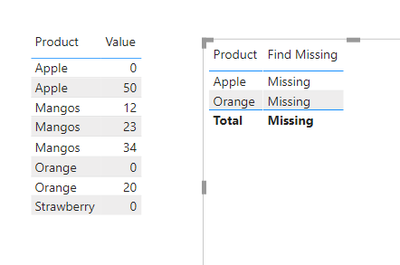
Try this as a measure:
Find Missing =
var crow =COUNTROWS('Table')
var czero =
    CALCULATE(
        COUNTROWS('Table'),
        'Table'[Value] = 0
    )
return
IF(
     crow = czero ||
    (ISBLANK(czero)),
    BLANK(),
    "Missing"
)
________________________
Did I answer your question? Mark this post as a solution, this will help others!.
Click on the Thumbs-Up icon on the right if you like this reply 🙂
⭕ Subscribe and learn Power BI from these videos
⚪ Website ⚪ LinkedIn ⚪ PBI User Group
Helpful resources

New to Fabric Survey
If you have recently started exploring Fabric, we'd love to hear how it's going. Your feedback can help with product improvements.

Power BI DataViz World Championships - June 2026
A new Power BI DataViz World Championship is coming this June! Don't miss out on submitting your entry.

FabCon &SQLCon Highlights
Experience the highlights from FabCon & SQLCon, available live and on-demand starting April 14th.

Power BI Community Update - March 2026
Check out the March 2026 Power BI update to learn about new features.

| User | Count |
|---|---|
| 47 | |
| 44 | |
| 40 | |
| 20 | |
| 15 |


| User | Count |
|---|---|
| 70 | |
| 68 | |
| 32 | |
| 27 | |
| 25 |


