cancel
Showing results for 
Search instead for 
Did you mean: 

The Power BI Data Visualization World Championships is back! Get ahead of the game and start preparing now! Learn more

Reply
Anonymous
Not applicable

[Measure]

Hi guys,


I am new into PowerBI, and I am struggling to create a new measure. 


In my dataset, I have a column with all type of actions realized throughout the year, and there could be the same actions in different lines with different values. For each line (action) there is a column with the number of meters covered and the number of days it took to be accomplished. Then I added another column to calculate the ratio for each line.


Now I want to create a graphic on PowerBI Desktop that can show me the average ratio per type of action. But when I insert the ratio it only appears to option to count, instead of average. I have searched and I think that the only way is to create a new measure with the AverageX function, but I can´t figure out how. 


Hope you can understand my problem and help me out!


Thanks,


Miguel Freire

1 ACCEPTED SOLUTION
v-zhenbw-msft
Community Support
Community Support

Hi @Anonymous ,


Sorry for that we don’t understand your requirement  clearly. But we create a sample and find the following ways you can refer.


1. Create a calculate column to calculate the ratio of each row.


every row = DIVIDE('Table'[values],SUM('Table'[values]))
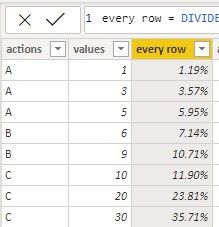
 

[1.jpg


2. Then we can create a column to calculate the average ratio of per type of actions.


average ratio per type of action = 
var x = CALCULATE(SUM('Table'[every row]),FILTER('Table','Table'[actions]=EARLIER('Table'[actions])))
var y = CALCULATE(COUNT('Table'[actions]),FILTER('Table','Table'[actions]=EARLIER('Table'[actions])))
return 
DIVIDE(x,y)
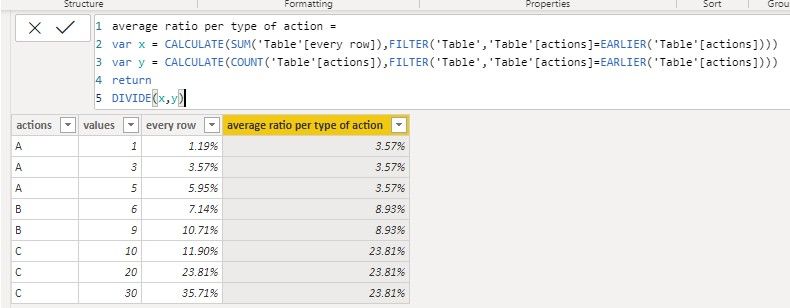
 

[ 2.jpg


If it doesn’t meet your requirement, could you please provide a mockup sample  based on fake data or describe the fields of each tables and the relations between tables simply?


It will be helpful if you can show us the exact expected result based on the tables.


Please upload your files to OneDrive For Business and share the link here. Please don't contain any Confidential Information or Real data in your reply.

BTW, pbix as attached.       


Best regards,


Community Support Team _ zhenbw

If this post helps, then please consider Accept it as the solution to help the other members find it more quickly.

View solution in original post

4 REPLIES 4
v-zhenbw-msft
Community Support
Community Support

Hi @Anonymous ,


Sorry for that we don’t understand your requirement  clearly. But we create a sample and find the following ways you can refer.


1. Create a calculate column to calculate the ratio of each row.


every row = DIVIDE('Table'[values],SUM('Table'[values]))


[1.jpg


2. Then we can create a column to calculate the average ratio of per type of actions.


average ratio per type of action = 
var x = CALCULATE(SUM('Table'[every row]),FILTER('Table','Table'[actions]=EARLIER('Table'[actions])))
var y = CALCULATE(COUNT('Table'[actions]),FILTER('Table','Table'[actions]=EARLIER('Table'[actions])))
return 
DIVIDE(x,y)


[ 2.jpg


If it doesn’t meet your requirement, could you please provide a mockup sample  based on fake data or describe the fields of each tables and the relations between tables simply?


It will be helpful if you can show us the exact expected result based on the tables.


Please upload your files to OneDrive For Business and share the link here. Please don't contain any Confidential Information or Real data in your reply.

BTW, pbix as attached.       


Best regards,


Community Support Team _ zhenbw

If this post helps, then please consider Accept it as the solution to help the other members find it more quickly.

amitchandak
Super User
Super User

@Anonymous , you might to avg of count , refer

https://community.powerbi.com/t5/Desktop/SUM-of-AVERAGE/td-p/197013

Share with Power BI Enthusiasts: Full Power BI Video (20 Hours) YouTube
Microsoft Fabric Series 60+ Videos YouTube
Microsoft Fabric Hindi End to End YouTube
az38
Community Champion
Community Champion

Hi @Anonymous 


try create a measure and put it to Y-Axis

Measure = CALCULATE(AVERAGE(Table[Ratio]), ALLEXCEPT(Table, Table[ActionType]) )

do not hesitate to give a kudo to useful posts and mark solutions as solution
LinkedIn
parry2k
Super User
Super User

@Anonymous Read this post to get your answer quickly.

https://community.powerbi.com/t5/Community-Blog/How-to-Get-Your-Question-Answered-Quickly/ba-p/38490


Subscribe to the @PowerBIHowTo YT channel for an upcoming video on List and Record functions in Power Query!!

Learn Power BI and Fabric - subscribe to our YT channel - Click here: @PowerBIHowTo

If my solution proved useful, I'd be delighted to receive Kudos. When you put effort into asking a question, it's equally thoughtful to acknowledge and give Kudos to the individual who helped you solve the problem. It's a small gesture that shows appreciation and encouragement! ❤


Did I answer your question? Mark my post as a solution. Proud to be a Super User! Appreciate your Kudos 🙂
Feel free to email me with any of your BI needs.

Helpful resources

Announcements
Power BI DataViz World Championships

Power BI Dataviz World Championships

The Power BI Data Visualization World Championships is back! Get ahead of the game and start preparing now!

December 2025 Power BI Update Carousel

Power BI Monthly Update - December 2025

Check out the December 2025 Power BI Holiday Recap!

FabCon Atlanta 2026 carousel

FabCon Atlanta 2026

Join us at FabCon Atlanta, March 16-20, for the ultimate Fabric, Power BI, AI and SQL community-led event. Save $200 with code FABCOMM.