cancel
Showing results for 
Search instead for 
Did you mean: 

The Power BI Data Visualization World Championships is back! Get ahead of the game and start preparing now! Learn more

Reply
Anonymous
Not applicable

Measure works in line chart but it doesn't in table/matrix

Hello guys, I'm sure I'm doing something really wrong but I can't understand what it is exactly, I guess it's about context but I don't know...

I have a calendar table and I created a custom column (NombresSemanasGráficos) so I can rename the weeks to S-Actual (current week), S-1, S-2, S-3... to previous weeks and then I group "S-6 to S-10" and" S-11 to S-15" into both groups S-6-10 and S-11-15.

I want to show Average data for week for both groups of weeks (S-6-10 and S-11-15) and for the rest I want to sum data.

[suscrpciones nuevas] it's just a SUM of data.

So I made this measure:

TEST SEMANAS = 
IF(
    VALUES(Calendario[NombresSemanasGráficos])="S-6-10",
    CALCULATE(
        AVERAGEX(SUMMARIZE(Calendario, Calendario[Semana consecutiva], "Avg", [Suscripciones nuevas]), [Suscripciones nuevas]),
        Calendario[ControlSemana]<=-6 && Calendario[ControlSemana]>=-10
    ),
        IF(
            VALUES(Calendario[NombresSemanasGráficos])="S-11-15",
            CALCULATE(
                AVERAGEX(SUMMARIZE(Calendario, Calendario[Semana consecutiva], "Avg", [Suscripciones nuevas]), [Suscripciones nuevas]),
                Calendario[ControlSemana]<=-11 && Calendario[ControlSemana]>=-15
            ),
    [Suscripciones nuevas]
    )
)

And this is how it's working fine on a line chart with correct values for AVG and SUM:
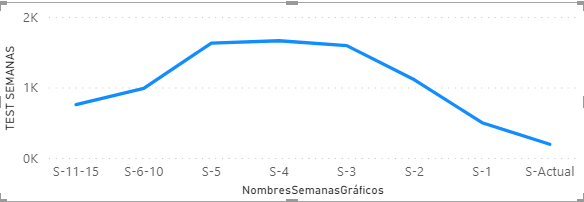
weeks.PNG


But when I try to use it on a table so the customcolumn NombresSemanasGráficos are the columns and the measure the values (same as the line chart) it shows the following error:
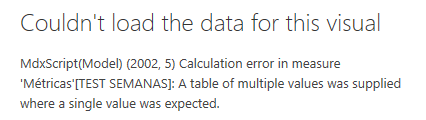
weekserror.PNG

What I'm missing here?
If you need anything I can upload a sample .pbix and translate it if needed.

Thank you!!


1 ACCEPTED SOLUTION
Greg_Deckler
Community Champion
Community Champion

@Anonymous - A sample PBIX would be helpful. That said, my first suspicion is your use of VALUES, try replacing with MAX maybe. 


Follow on LinkedIn
@ me in replies or I'll lose your thread!!!
Instead of a Kudo, please vote for this idea
Become an expert!: Enterprise DNA
External Tools: MSHGQM
YouTube Channel!: Microsoft Hates Greg
Latest book!:
DAX For Humans

DAX is easy, CALCULATE makes DAX hard...

View solution in original post

2 REPLIES 2
Anonymous
Not applicable

Thank you @Greg_Deckler !! MAX instead of VALUES worked for me.

I don't think the measure I made is the best way to get the desired result but it works so I can't complain.

Thanks!

Greg_Deckler
Community Champion
Community Champion

@Anonymous - A sample PBIX would be helpful. That said, my first suspicion is your use of VALUES, try replacing with MAX maybe. 


Follow on LinkedIn
@ me in replies or I'll lose your thread!!!
Instead of a Kudo, please vote for this idea
Become an expert!: Enterprise DNA
External Tools: MSHGQM
YouTube Channel!: Microsoft Hates Greg
Latest book!:
DAX For Humans

DAX is easy, CALCULATE makes DAX hard...

Helpful resources

Announcements
November Power BI Update Carousel

Power BI Monthly Update - November 2025

Check out the November 2025 Power BI update to learn about new features.

Fabric Data Days Carousel

Fabric Data Days

Advance your Data & AI career with 50 days of live learning, contests, hands-on challenges, study groups & certifications and more!

FabCon Atlanta 2026 carousel

FabCon Atlanta 2026

Join us at FabCon Atlanta, March 16-20, for the ultimate Fabric, Power BI, AI and SQL community-led event. Save $200 with code FABCOMM.

Top Solution Authors