cancel
Showing results for 
Search instead for 
Did you mean: 

Get Fabric Certified for FREE during Fabric Data Days. Don't miss your chance! Request now

Reply
Alex-PBIComm
Helper II
Helper II

Measure with customized totals

Good afternoon everyone,


I'll try to be brief as everytime I post this message it goes to spam. Don't hesitate to ask for more info if the request is not clear.
I'd like to create a measure that displays a total calculated differently from the rows. I have a table with the total value of sales in local currencies and through SWITCH + Slicers I allow the user to recalculate the values for all markets converted in dollars.
My goal is, when the "local currency" view is selected, to see the total always in dollars.

Thanks in advance for your help!}

Edit: example

Example of values with Local Currency: https://i.stack.imgur.com/t7kFb.png

And Converted: https://i.stack.imgur.com/MpB4m.png

So in this example, when "Local Currency" is selected in the slicer I'd like to see the first table, but with total 33,213,082 instead of 4,000,837,690.

1 ACCEPTED SOLUTION
Anonymous
Not applicable

Hi @Alex-PBIComm ,


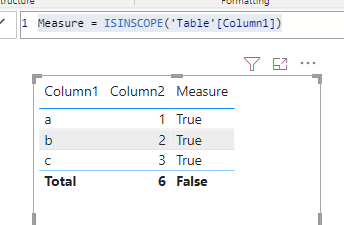
Please try using ISINSCOPE() or ISFILTERED() function.

https://docs.microsoft.com/en-us/dax/isinscope-function-dax 

https://docs.microsoft.com/en-us/dax/isfiltered-function-dax 

It will return TRUE in commen rows and return FALSE in total row.

Capture.PNG

So that you will need to create separate calculations for common rows and total row.

Return total calculation when false and return common calculation when true, like:

Measure = 
var common = [common]

var total = [total]

return
IF(ISINSCOPE([column]),[common],[total])


Best Regards,

Jay

View solution in original post

3 REPLIES 3
Anonymous
Not applicable

Hi @Alex-PBIComm ,


Please try using ISINSCOPE() or ISFILTERED() function.

https://docs.microsoft.com/en-us/dax/isinscope-function-dax 

https://docs.microsoft.com/en-us/dax/isfiltered-function-dax 

It will return TRUE in commen rows and return FALSE in total row.

Capture.PNG

So that you will need to create separate calculations for common rows and total row.

Return total calculation when false and return common calculation when true, like:

Measure = 
var common = [common]

var total = [total]

return
IF(ISINSCOPE([column]),[common],[total])


Best Regards,

Jay

Hello @Anonymous,

It works! Thanks a lot 😃

Thanks a lot @Anonymous , I'll test asap and get back to you

Helpful resources

Announcements
November Power BI Update Carousel

Power BI Monthly Update - November 2025

Check out the November 2025 Power BI update to learn about new features.

Fabric Data Days Carousel

Fabric Data Days

Advance your Data & AI career with 50 days of live learning, contests, hands-on challenges, study groups & certifications and more!

FabCon Atlanta 2026 carousel

FabCon Atlanta 2026

Join us at FabCon Atlanta, March 16-20, for the ultimate Fabric, Power BI, AI and SQL community-led event. Save $200 with code FABCOMM.

Top Solution Authors
Top Kudoed Authors