FabCon is coming to Atlanta
Join us at FabCon Atlanta from March 16 - 20, 2026, for the ultimate Fabric, Power BI, AI and SQL community-led event. Save $200 with code FABCOMM.
Register now!- Power BI forums
- Get Help with Power BI
- Desktop
- Service
- Report Server
- Power Query
- Mobile Apps
- Developer
- DAX Commands and Tips
- Custom Visuals Development Discussion
- Health and Life Sciences
- Power BI Spanish forums
- Translated Spanish Desktop
- Training and Consulting
- Instructor Led Training
- Dashboard in a Day for Women, by Women
- Galleries
- Data Stories Gallery
- Themes Gallery
- Contests Gallery
- QuickViz Gallery
- Quick Measures Gallery
- Visual Calculations Gallery
- Notebook Gallery
- Translytical Task Flow Gallery
- TMDL Gallery
- R Script Showcase
- Webinars and Video Gallery
- Ideas
- Custom Visuals Ideas (read-only)
- Issues
- Issues
- Events
- Upcoming Events
View all the Fabric Data Days sessions on demand. View schedule
- Power BI forums
- Forums
- Get Help with Power BI
- Desktop
- Re: Measure to calculate SUM of Values based on Gr...
- Subscribe to RSS Feed
- Mark Topic as New
- Mark Topic as Read
- Float this Topic for Current User
- Bookmark
- Subscribe
- Printer Friendly Page

- Mark as New
- Bookmark
- Subscribe
- Mute
- Subscribe to RSS Feed
- Permalink
- Report Inappropriate Content
Measure to calculate SUM of Values based on Grouping of columns from two Tables
Hello I am new to Power BI and would appreciate help regarding the following:
Given:
Year Month Day Sales
2010 1 1 300
2010 1 2 100
2010 2 1 300
2010 2 2 200
Expected
Year Month Day Summation of Sales By Month
2010 1 1 400
2010 1 2 400
2010 2 1 500
2010 2 2 500
Constraints:
I am using DirectQuery
In this example the sorting I require Summation by Month
What I actually require is Summation by Month and Age
Solved! Go to Solution.


- Mark as New
- Bookmark
- Subscribe
- Mute
- Subscribe to RSS Feed
- Permalink
- Report Inappropriate Content
Hi @meetgandhi100 ,
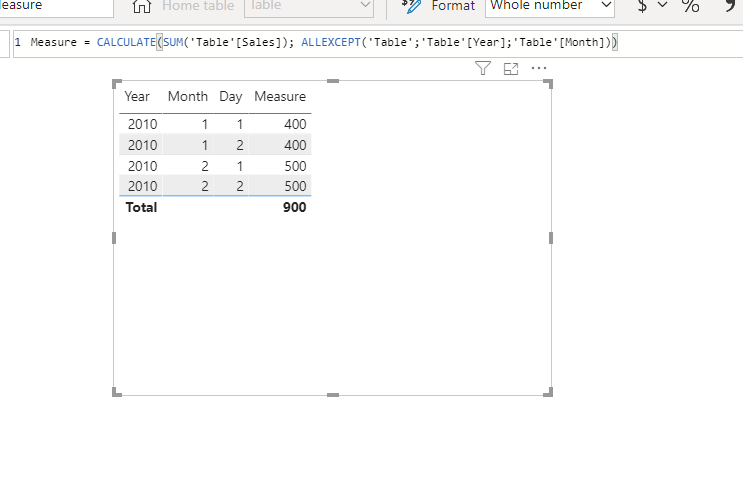
Did I answer your question? Mark my post as a solution!
Proud to be a Super User!


- Mark as New
- Bookmark
- Subscribe
- Mute
- Subscribe to RSS Feed
- Permalink
- Report Inappropriate Content
Hi,
Please try this measure:
Summation of Sales By Month =
CALCULATE (
    SUM ( 'Table'[Sales] ),
    FILTER ( ALLSELECTED ( 'Table' ), 'Table'[Month] IN FILTERS ( 'Table'[Month] ) )
)
The result shows:
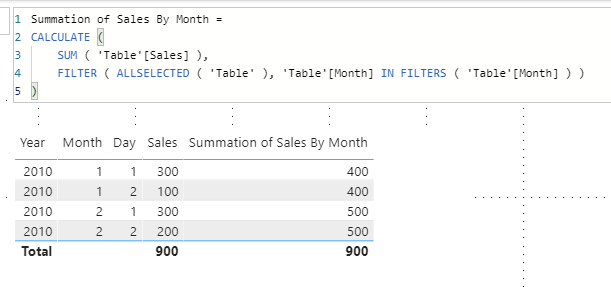
Best Regards,
Giotto

- Mark as New
- Bookmark
- Subscribe
- Mute
- Subscribe to RSS Feed
- Permalink
- Report Inappropriate Content
Try this
Measure =
CALCULATE(
    [Sales],
    ALL( 'Calendar'[Day] )
)Mariusz
If this post helps, then please consider Accepting it as the solution.
Please feel free to connect with me.
- Mark as New
- Bookmark
- Subscribe
- Mute
- Subscribe to RSS Feed
- Permalink
- Report Inappropriate Content
Hi @meetgandhi100 ,
Did I answer your question? Mark my post as a solution!
Proud to be a Super User!
- Mark as New
- Bookmark
- Subscribe
- Mute
- Subscribe to RSS Feed
- Permalink
- Report Inappropriate Content
Thanks @camargos88 . What If I want to Group based on two columns from two different tables?
- Mark as New
- Bookmark
- Subscribe
- Mute
- Subscribe to RSS Feed
- Permalink
- Report Inappropriate Content
Hi @meetgandhi100 ,
It depends on how they are related. But it's possible.
Did I answer your question? Mark my post as a solution!
Proud to be a Super User!
- Mark as New
- Bookmark
- Subscribe
- Mute
- Subscribe to RSS Feed
- Permalink
- Report Inappropriate Content
Great, can you help me with the exact situation.
Dimension 1 Table DImension 2 Table Fact table
Year Month Key1 Category Catkey Key1 Catkey Sum
2010 Jan 1 A 1 1 1 100
2011 Feb 2 A 2 1 2 100
B 3 1 3 100
Required Output
Year Category Sum
2010 A 200
Can you let me know how to create a measure to acheive this using with DirectQuery @camargos88 @v-gizhi-msft @Mariusz
- Mark as New
- Bookmark
- Subscribe
- Mute
- Subscribe to RSS Feed
- Permalink
- Report Inappropriate Content
Hi,
Please try this measure:
Sum = CALCULATE(SUM('Fact Table'[Sum]),FILTER('Fact Table',RELATED('Dimension 2 Table'[Category])="A"))The result shows:

See my attached pbix file.
Best Regards,
Giotto
- Mark as New
- Bookmark
- Subscribe
- Mute
- Subscribe to RSS Feed
- Permalink
- Report Inappropriate Content
Hi @meetgandhi100 ,
I believe if you have them related, you just need to drag the year / category and sum columns to the tables visual. Also filter the category using a slicer.

Did I answer your question? Mark my post as a solution!
Proud to be a Super User!
- Mark as New
- Bookmark
- Subscribe
- Mute
- Subscribe to RSS Feed
- Permalink
- Report Inappropriate Content
I just want them to be shown in a report , wihout any slicers.
- Mark as New
- Bookmark
- Subscribe
- Mute
- Subscribe to RSS Feed
- Permalink
- Report Inappropriate Content
You can use the filter pane.
https://docs.microsoft.com/en-us/power-bi/create-reports/power-bi-report-filter
Just click on the visual and select the filters.
Also you can apply for the page or report.
Did I answer your question? Mark my post as a solution!
Proud to be a Super User!

Helpful resources

Power BI Monthly Update - November 2025
Check out the November 2025 Power BI update to learn about new features.

Fabric Data Days
Advance your Data & AI career with 50 days of live learning, contests, hands-on challenges, study groups & certifications and more!

FabCon Atlanta 2026
Join us at FabCon Atlanta, March 16-20, for the ultimate Fabric, Power BI, AI and SQL community-led event. Save $200 with code FABCOMM.


