Join us at FabCon Atlanta from March 16 - 20, 2026, for the ultimate Fabric, Power BI, AI and SQL community-led event. Save $200 with code FABCOMM.
Register now!The Power BI Data Visualization World Championships is back! Get ahead of the game and start preparing now! Learn more
Hey Guys,
I can't come up with this Measure, I hope you can help me out!
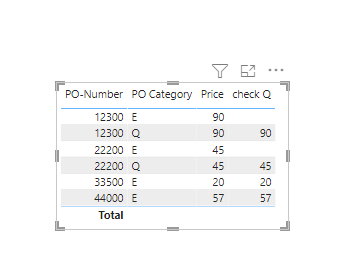
I have following Table:
| PO-Number | PO Category | Price |
| 12300 | E | 90 |
| 12300 | Q | 90 |
| 22200 | E | 45 |
| 22200 | Q | 45 |
| 33500 | E | 20 |
| 44000 | E | 57 |
So the Measure that I am trying to come up with should check if a PO Number has the Category "E", but not the Category "Q".
If that Case is true, and no row has the category "Q", the Price would be added to the Measure.
Thanks a lot!!
Solved! Go to Solution.
Ok,
sO HERE IT IS
wow great, thank you so much!!!
I would have another question that i forgot.
The Price is in another Table with the same PO-Numbers.
Do you know how i could put the price from another table in the variable "selectprice" ?
Yes you can if you put this field in the final report.
Just change teh reference in selectprice
Hi
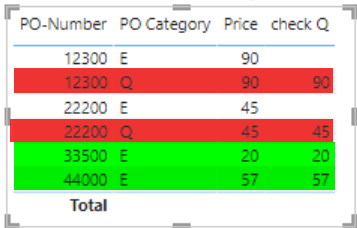
Just to be sure. Is it what youare looking for ?
The red ones should also be blank, as these PO Numbers have a row with "E" and a row with "Q".
The last two ones are correct as they only have a row with "E".
The Power BI Data Visualization World Championships is back! Get ahead of the game and start preparing now!
| User | Count |
|---|---|
| 40 | |
| 36 | |
| 33 | |
| 29 | |
| 26 |
| User | Count |
|---|---|
| 135 | |
| 103 | |
| 65 | |
| 61 | |
| 55 |