Get certified for free when you join Fabric Data Days 2026 and dive into Fabric, Power BI, SQL, AI, and other essential data skills.
Join nowData Days is here! Join us now for 60+ days of learning, challenges, and connection. Learn more
Hello
my doubt is about file structure.
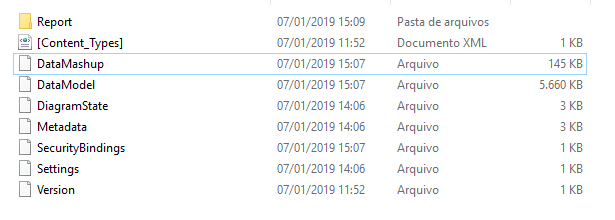
inside pbix I have all these files.
Can someone tell me what the measures I have created?
I want to change them directly at the source.
thank you
Leonardo A. Carlos
Solved! Go to Solution.
Hi @Anonymous,
Editing the files that compose the PBIX file is not recommended because you can cause inconsistencies in the file and corrupt it.
However if you want to try the Tabular Editor, check this post by SQLBI, that teach how to do it.
Regards,
MFelix
Regards
Miguel Félix
Proud to be a Super User!
Check out my blog: Power BI em PortuguêsHi @Anonymous,
Could you please mark the proper answers as solutions?
Best Regards,
Hi Leonardo,
That is definitely a bad idea. Please refer to migration-data-model-from-AS-to-Power-BI, which could give you some ideas.
Best Regards,
Dale
Hi @Anonymous,
Editing the files that compose the PBIX file is not recommended because you can cause inconsistencies in the file and corrupt it.
However if you want to try the Tabular Editor, check this post by SQLBI, that teach how to do it.
Regards,
MFelix
Regards
Miguel Félix
Proud to be a Super User!
Check out my blog: Power BI em PortuguêsDon't miss out on Data Days, June 15 through August 7. Learn Fabric, Power BI, SQL, AI and more.
Check out the May 2026 Power BI update to learn about new features.
| User | Count |
|---|---|
| 23 | |
| 23 | |
| 21 | |
| 17 | |
| 13 |
| User | Count |
|---|---|
| 58 | |
| 51 | |
| 39 | |
| 29 | |
| 24 |