cancel
Showing results for 
Search instead for 
Did you mean: 

The Power BI Data Visualization World Championships is back! Get ahead of the game and start preparing now! Learn more

Reply
marsclone
Helper IV
Helper IV

Measure last dataset

Every week, i put a new dataset in a folder.

I want Power Bi to use (automatic) this latest data to show my values.

Can i achieve this with a measure?

I also want to show the difference with last week?

Another measure i assume?


Which measures do i need to achieve this?


Thank you in advance

Regards Marcel


1 ACCEPTED SOLUTION

Hi @marsclone 

1. Open Edit Queries,

New source->select Folder->select your folder,

Click on the button on "content"
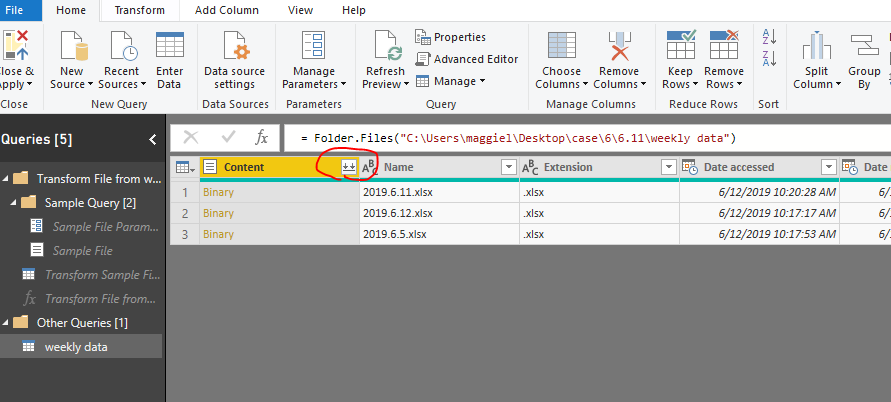
1.png

select any files from the pop-out window,

then get a table with data from all files from this folder.
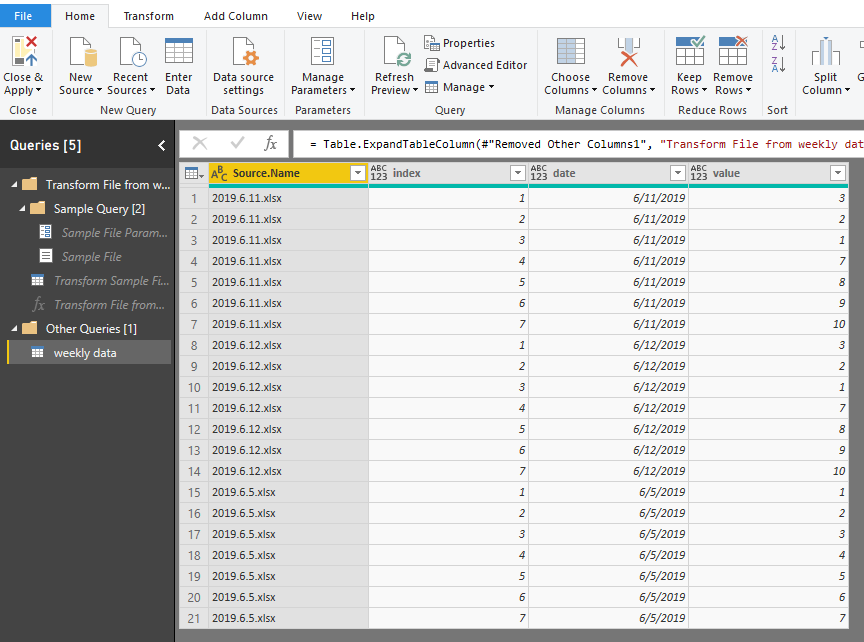
2.png


2.Add two custom column

today=DateTime.Date(DateTime.LocalNow())

day difference=Duration.Days([today]-[date])
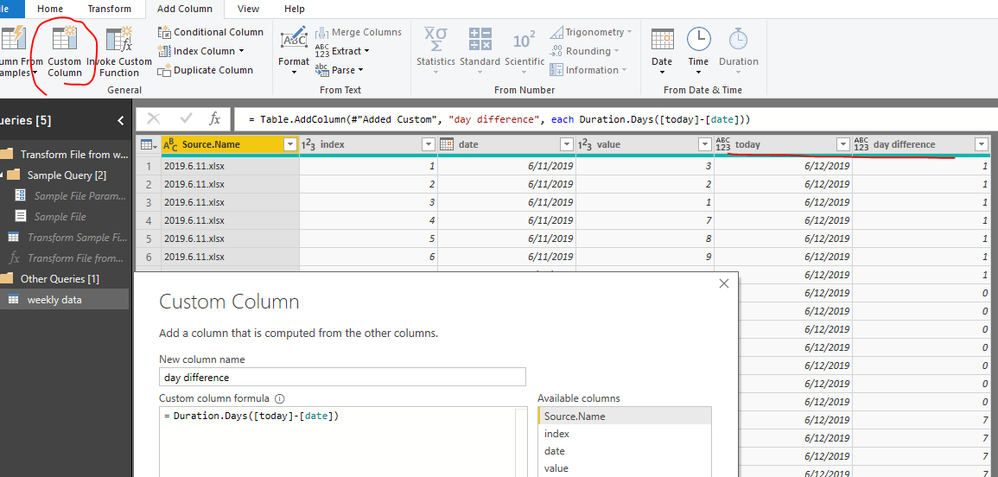
3.png


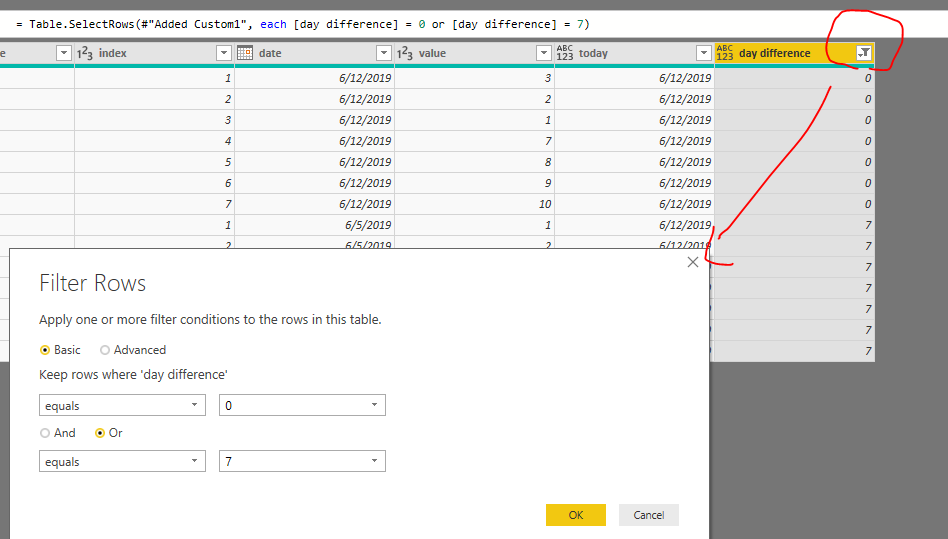
3. Filter "day difference"

4.png


4. Close&&apply, go to report view

create a calendar table

calendar = CALENDARAUTO()

create relationship

5.png


5. Create measures in "weekly data" table

today = TODAY()

flag = IF([today]=MAX('calendar'[Date]),1,0)

last week data = CALCULATE(SUM('weekly data'[value]),FILTER(ALL('calendar'),'calendar'[Date]=MAX('calendar'[Date])-7))

6. Add [date] from "calendar" table in the table visual,

   add [flag] in the viusal level filter of the table visual
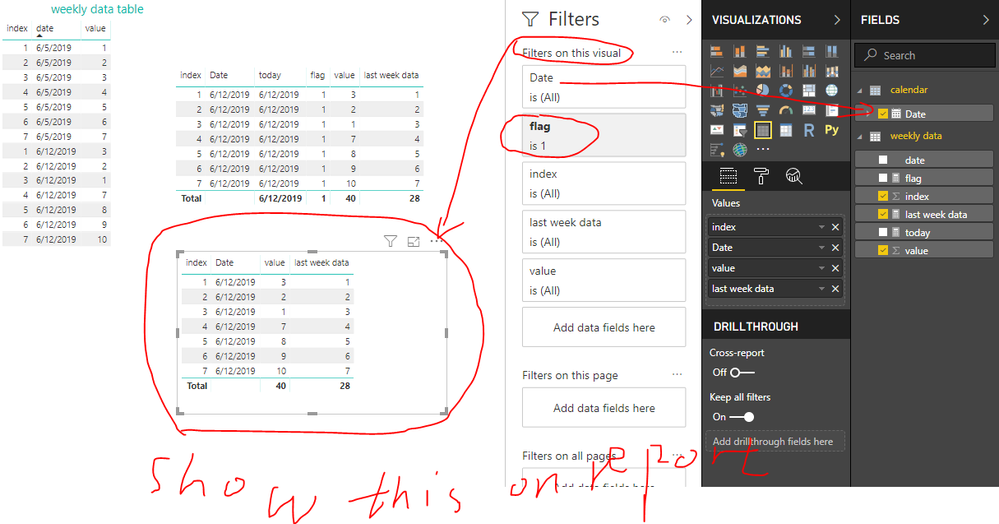
6.png


Best Regards
Maggie


Community Support Team _ Maggie Li
If this post helps, then please consider Accept it as the solution to help the other members find it more quickly.

View solution in original post

4 REPLIES 4
v-juanli-msft
Community Support
Community Support

Hi @marsclone 

It should be possible with Power BI Desktop.

Could you tell me more details so that i can test and provide solid solutions?

or could you show an example with data or screenshot?


questions:

1. which files do you add in the folder every week? excel?


2. do you have data in every single (excel) file or have data all in one (excel) file?


3. how do you define last week?

let's to say, today is 2019.6.4, i add last whole week's data(2019.5.27-6.2) in the folder,

refresh from power bi desktop/service, it shows current value from 2019.5.27-6.2,

then the last week's data should be from 2019.5.20-5.26,

Is my understanding correct?


Best Regards
Maggie


Hi @v-juanli-msft,
 
First my answers, for a testfile i have to manipulate the dataset, that takes time.
 
1) All files are Excel files
2) Each file shows the outstanding items of our debtors on a specific date, this specific date is shown in the file
3) Today i upload a list per 2019.6.4 then Power Bi only shows (automatic) the values of this date
4) But also show the difference from last week 2019.5.28
 
I will try to make a testfile.
 
Thank you!
Regards Marcel

Hi @marsclone 

1. Open Edit Queries,

New source->select Folder->select your folder,

Click on the button on "content"

1.png

select any files from the pop-out window,

then get a table with data from all files from this folder.

2.png


2.Add two custom column

today=DateTime.Date(DateTime.LocalNow())

day difference=Duration.Days([today]-[date])

3.png


3. Filter "day difference"

4.png


4. Close&&apply, go to report view

create a calendar table

calendar = CALENDARAUTO()

create relationship

5.png


5. Create measures in "weekly data" table

today = TODAY()

flag = IF([today]=MAX('calendar'[Date]),1,0)

last week data = CALCULATE(SUM('weekly data'[value]),FILTER(ALL('calendar'),'calendar'[Date]=MAX('calendar'[Date])-7))

6. Add [date] from "calendar" table in the table visual,

   add [flag] in the viusal level filter of the table visual

6.png


Best Regards
Maggie


Community Support Team _ Maggie Li
If this post helps, then please consider Accept it as the solution to help the other members find it more quickly.

Hi @v-juanli-msft,


Thank you very much. 

This worked!


Regards

Marcel

Helpful resources

Announcements
Power BI DataViz World Championships

Power BI Dataviz World Championships

The Power BI Data Visualization World Championships is back! Get ahead of the game and start preparing now!

December 2025 Power BI Update Carousel

Power BI Monthly Update - December 2025

Check out the December 2025 Power BI Holiday Recap!

FabCon Atlanta 2026 carousel

FabCon Atlanta 2026

Join us at FabCon Atlanta, March 16-20, for the ultimate Fabric, Power BI, AI and SQL community-led event. Save $200 with code FABCOMM.