cancel
Showing results for 
Search instead for 
Did you mean: 

Join the FabCon + SQLCon recap series. Up next: Power BI, Real-Time Intelligence, IQ and AI, and Data Factory take center stage. All sessions are available on-demand after the live show. Register now

Reply
Anonymous
Not applicable

Measure grouping

Hi, I'm pretty new to power bi and dax, but haven't had luck with finding an example that fits what I'm trying to do.


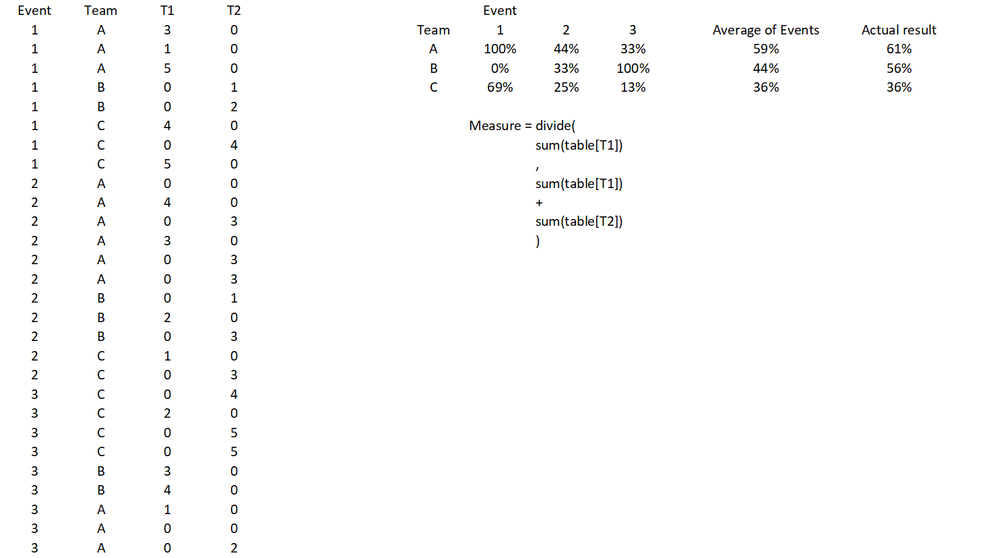
I'm trying to get the following - I've created a new measure as shown in the image below. I've put the results into a matrix with Event as columns and Team as rows and the values come out fine, however what I want for the total column for each team is the Average of Events as opposed to performing the measure without respect to the events.


I think I need some combination of Calculate, Group By or summarize, but I haven't been able to wrap my head around how to get what I want. Any help would be welcome!


Measure Example.png

1 ACCEPTED SOLUTION
MFelix
Super User
Super User

Hi @Anonymous,


Create the following two measures:

Percent_Team =
DIVIDE ( SUM ( 'Table'[T1] ); SUM ( 'Table'[T1] ) + SUM ( 'Table'[T2] ) )


Total Percent =
IF (
    HASONEVALUE ( 'Table'[Event] );
    [Percent_Team];
    AVERAGEX (
        SUMMARIZE (
            'Table';
            'Table'[Team];
            'Table'[Event];
            "Average_Total"; [Percent_Team]
        );
        [Average_Total]
    )
)

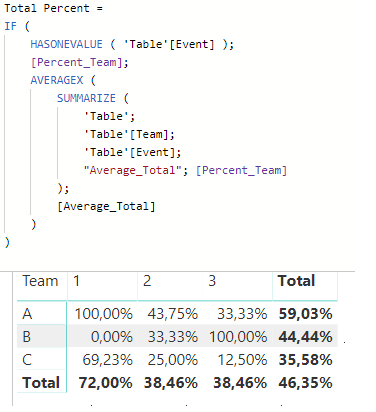
Then use your second measure to create your table visual:


AVertage.png


Regards,

MFelix


Regards

Miguel Félix


Did I answer your question? Mark my post as a solution!

Proud to be a Super User!

Check out my blog: Power BI em Português


View solution in original post

2 REPLIES 2
MFelix
Super User
Super User

Hi @Anonymous,


Create the following two measures:

Percent_Team =
DIVIDE ( SUM ( 'Table'[T1] ); SUM ( 'Table'[T1] ) + SUM ( 'Table'[T2] ) )


Total Percent =
IF (
    HASONEVALUE ( 'Table'[Event] );
    [Percent_Team];
    AVERAGEX (
        SUMMARIZE (
            'Table';
            'Table'[Team];
            'Table'[Event];
            "Average_Total"; [Percent_Team]
        );
        [Average_Total]
    )
)

Then use your second measure to create your table visual:


AVertage.png


Regards,

MFelix


Regards

Miguel Félix


Did I answer your question? Mark my post as a solution!

Proud to be a Super User!

Check out my blog: Power BI em Português


Anonymous
Not applicable

Perfect, thank you!


I thought I had to do it in one stage, but this makes sense and really helps me understand the summarize function too!

Helpful resources

Announcements
April Power BI Update Carousel

Power BI Monthly Update - April 2026

Check out the April 2026 Power BI update to learn about new features.

New to Fabric survey Carousel

New to Fabric Survey

If you have recently started exploring Fabric, we'd love to hear how it's going. Your feedback can help with product improvements.

Power BI DataViz World Championships carousel

Power BI DataViz World Championships - June 2026

A new Power BI DataViz World Championship is coming this June! Don't miss out on submitting your entry.

FabCon and SQLCon Highlights Carousel

FabCon &SQLCon Highlights

Experience the highlights from FabCon & SQLCon, available live and on-demand starting April 14th.