FabCon is coming to Atlanta
Join us at FabCon Atlanta from March 16 - 20, 2026, for the ultimate Fabric, Power BI, AI and SQL community-led event. Save $200 with code FABCOMM.
Register now!- Power BI forums
- Get Help with Power BI
- Desktop
- Service
- Report Server
- Power Query
- Mobile Apps
- Developer
- DAX Commands and Tips
- Custom Visuals Development Discussion
- Health and Life Sciences
- Power BI Spanish forums
- Translated Spanish Desktop
- Training and Consulting
- Instructor Led Training
- Dashboard in a Day for Women, by Women
- Galleries
- Data Stories Gallery
- Themes Gallery
- Contests Gallery
- QuickViz Gallery
- Quick Measures Gallery
- Visual Calculations Gallery
- Notebook Gallery
- Translytical Task Flow Gallery
- TMDL Gallery
- R Script Showcase
- Webinars and Video Gallery
- Ideas
- Custom Visuals Ideas (read-only)
- Issues
- Issues
- Events
- Upcoming Events
The Power BI Data Visualization World Championships is back! Get ahead of the game and start preparing now! Learn more
- Power BI forums
- Forums
- Get Help with Power BI
- Desktop
- Re: Measure for Previous year with custom date tab...
- Subscribe to RSS Feed
- Mark Topic as New
- Mark Topic as Read
- Float this Topic for Current User
- Bookmark
- Subscribe
- Printer Friendly Page

- Mark as New
- Bookmark
- Subscribe
- Mute
- Subscribe to RSS Feed
- Permalink
- Report Inappropriate Content
Measure for Previous year with custom date table
Hi al,
I have a table with this years sales and last year sales on which I want to filter on both Month and Week. However the weeks are based on the ISO weeknumbers and I want to compare ISO week numbers against previous year.
For your infomation below a representation of the ISO week numbers in the date table.
| Date | Normal week | ISO week numer | Month |
| 1-1-2021 | 1 | 53 | 1 |
| 2-1-2021 | 1 | 53 | 1 |
| 3-1-2020 | 1 | 53 | 1 |
| 4-1-2020 | 1 | 1 | 1 |
| 5-1-2020 | 1 | 1 | 1 |
In 2020 it looks like:
| date | normal week number | Iso week numer | month |
| 1-1-2020 | 1 | 1 | 1 |
| 2-1-2020 | 1 | 1 | 1 |
| 3-1-2020 | 1 | 1 | 1 |
| 4-1-2020 | 1 | 1 | 1 |
So if I select the ISO week number 1 want to compare the dates which are on week 1 of last year.
Fortunatly I found the formula below which does that perfectly
Hope you can help me.
Solved! Go to Solution.


- Mark as New
- Bookmark
- Subscribe
- Mute
- Subscribe to RSS Feed
- Permalink
- Report Inappropriate Content
Hi @Anonymous ,
Modify the measure as below:
Sales Last year =
VAR CurrentWeek =
    SELECTEDVALUE ( 'Calendar'[ISO Week Number] )
VAR CurrentYear =
    SELECTEDVALUE ( 'Calendar'[Year] )
VAR currentMonth =
    SELECTEDVALUE ( 'Calendar'[MonthNum] )
RETURN
    IF (
        NOT ( ISFILTERED ( 'Calendar'[Year] ) ),
        "You didnt select a year",
        IF (
            ISFILTERED ( 'Calendar'[Year] ),
            IF (
                ISFILTERED ( 'Calendar'[ISO Week Number] )
                    && NOT ( ISFILTERED ( 'Calendar'[MonthNum] ) ),
                CALCULATE (
                    [Sales],
                    FILTER (
                        ALL ( 'Calendar' ),
                        'Calendar'[ISO Week Number] = CurrentWeek
                            && 'Calendar'[Year] = CurrentYear - 1
                    )
                ),
                IF (
                    ISFILTERED ( 'Calendar'[ISO Week Number] )
                        && ISFILTERED ( 'Calendar'[MonthNum] ),
                    CALCULATE (
                        [Sales],
                        FILTER (
                            ALL ( 'Calendar' ),
                            'Calendar'[ISO Week Number] = CurrentWeek
                                && 'Calendar'[Year] = CurrentYear - 1
                                && 'Calendar'[MonthNum] = currentMonth
                        )
                    ),
                    IF (
                        NOT ( ISFILTERED ( 'Calendar'[ISO Week Number] ) )
                            && ISFILTERED ( 'Calendar'[MonthNum] ),
                        CALCULATE (
                            [Sales],
                            FILTER (
                                ALL ( 'Calendar' ),
                                'Calendar'[MonthNum] = currentMonth
                                    && 'Calendar'[Year] = CurrentYear - 1
                            )
                        ),
                        IF (
                            NOT ( ISFILTERED ( 'Calendar'[ISO Week Number] ) )
                                && NOT ( ISFILTERED ( 'Calendar'[MonthNum] ) ),
                            CALCULATE (
                                [Sales],
                                FILTER ( ALL ( 'Calendar' ), 'Calendar'[Year] = CurrentYear - 1 )
                            ),
                            BLANK ()
                        )
                    )
                )
            )
        )
    )
And you will see:
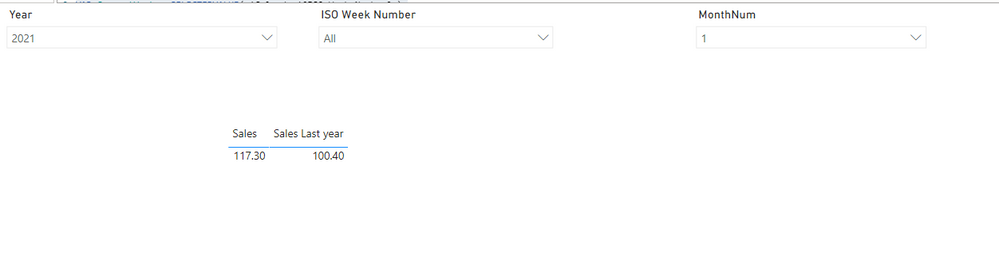

For the related .pbix file,pls see attached.
Best Regards,
Kelly
Did I answer your question? Mark my post as a solution!
- Mark as New
- Bookmark
- Subscribe
- Mute
- Subscribe to RSS Feed
- Permalink
- Report Inappropriate Content
Hi @Anonymous ,
Based on your description,I cant competely reproduce your senario,could you pls provide some sample data with expected output for a test?
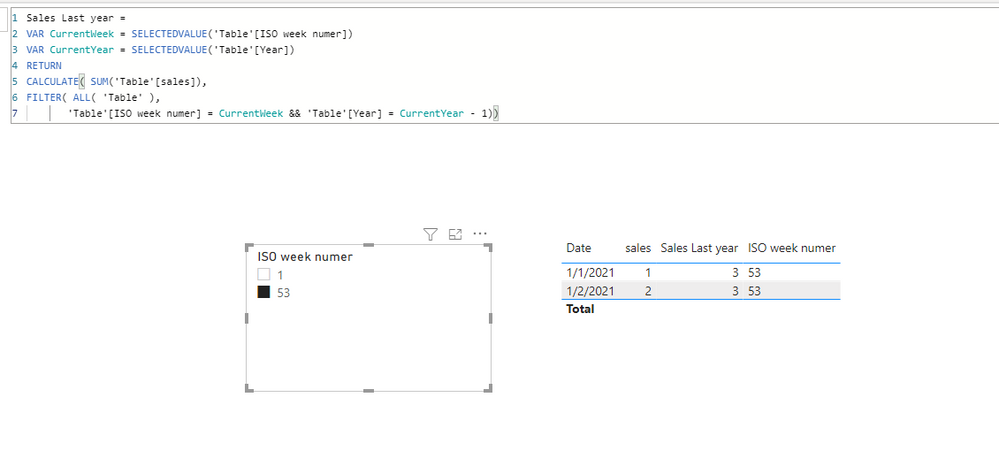
Best Regards,
Kelly
Did I answer your question? Mark my post as a solution!
- Mark as New
- Bookmark
- Subscribe
- Mute
- Subscribe to RSS Feed
- Permalink
- Report Inappropriate Content
Hi Kelly. See the attached file. Hope you can open it.
The problem is when I select o month or only a year the current measure does not give any values. I want this measure to also work when selecting a month and year and only a year.
- Mark as New
- Bookmark
- Subscribe
- Mute
- Subscribe to RSS Feed
- Permalink
- Report Inappropriate Content
Hi @Anonymous ,
After checking,if you have selected a year,then you wont see an error,so modify your measure as below:
Sales Last year =
VAR CurrentWeek = SELECTEDVALUE( 'Calendar'[ISO Week Number] )
VAR CurrentYear = SELECTEDVALUE( 'Calendar'[Year] )

RETURN
IF(ISFILTERED('Calendar'[Year]),
CALCULATE( [Sales],
FILTER( ALL( 'Calendar' ),
        'Calendar'[ISO Week Number] = CurrentWeek && 'Calendar'[Year] = CurrentYear - 1)),
        CALCULATE( [Sales],
FILTER( ALL( 'Calendar' ),
        'Calendar'[ISO Week Number] = CurrentWeek && 'Calendar'[Year] =YEAR(TODAY()) - 1)))+0
And you will see:
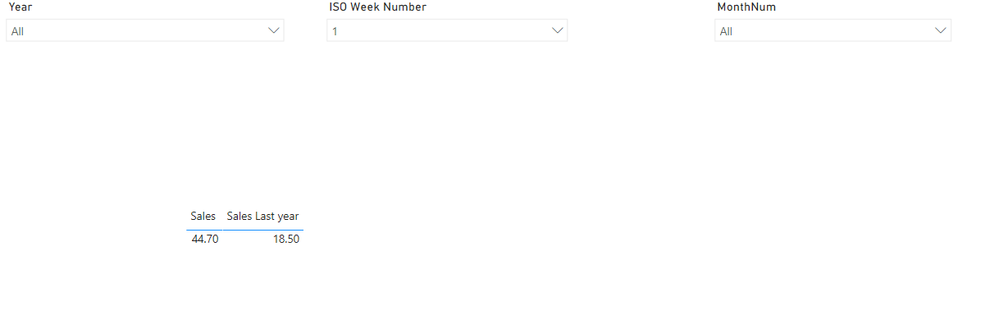
For the related .pbix file,pls see attached.
Best Regards,
Kelly
Did I answer your question? Mark my post as a solution!
- Mark as New
- Bookmark
- Subscribe
- Mute
- Subscribe to RSS Feed
- Permalink
- Report Inappropriate Content
@v-kelly-msft I am Sorry that i am not clear enough but this measure still does not give me a result when only selecting a month.
I also want previous year sales when selection only a Monthnum and a Year:
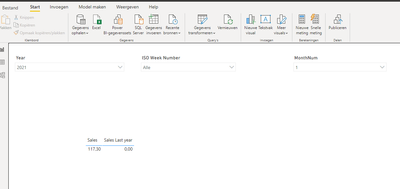
- Mark as New
- Bookmark
- Subscribe
- Mute
- Subscribe to RSS Feed
- Permalink
- Report Inappropriate Content
Hi @Anonymous ,
Modify the measure as below:
Sales Last year =
VAR CurrentWeek =
    SELECTEDVALUE ( 'Calendar'[ISO Week Number] )
VAR CurrentYear =
    SELECTEDVALUE ( 'Calendar'[Year] )
VAR currentMonth =
    SELECTEDVALUE ( 'Calendar'[MonthNum] )
RETURN
    IF (
        NOT ( ISFILTERED ( 'Calendar'[Year] ) ),
        "You didnt select a year",
        IF (
            ISFILTERED ( 'Calendar'[Year] ),
            IF (
                ISFILTERED ( 'Calendar'[ISO Week Number] )
                    && NOT ( ISFILTERED ( 'Calendar'[MonthNum] ) ),
                CALCULATE (
                    [Sales],
                    FILTER (
                        ALL ( 'Calendar' ),
                        'Calendar'[ISO Week Number] = CurrentWeek
                            && 'Calendar'[Year] = CurrentYear - 1
                    )
                ),
                IF (
                    ISFILTERED ( 'Calendar'[ISO Week Number] )
                        && ISFILTERED ( 'Calendar'[MonthNum] ),
                    CALCULATE (
                        [Sales],
                        FILTER (
                            ALL ( 'Calendar' ),
                            'Calendar'[ISO Week Number] = CurrentWeek
                                && 'Calendar'[Year] = CurrentYear - 1
                                && 'Calendar'[MonthNum] = currentMonth
                        )
                    ),
                    IF (
                        NOT ( ISFILTERED ( 'Calendar'[ISO Week Number] ) )
                            && ISFILTERED ( 'Calendar'[MonthNum] ),
                        CALCULATE (
                            [Sales],
                            FILTER (
                                ALL ( 'Calendar' ),
                                'Calendar'[MonthNum] = currentMonth
                                    && 'Calendar'[Year] = CurrentYear - 1
                            )
                        ),
                        IF (
                            NOT ( ISFILTERED ( 'Calendar'[ISO Week Number] ) )
                                && NOT ( ISFILTERED ( 'Calendar'[MonthNum] ) ),
                            CALCULATE (
                                [Sales],
                                FILTER ( ALL ( 'Calendar' ), 'Calendar'[Year] = CurrentYear - 1 )
                            ),
                            BLANK ()
                        )
                    )
                )
            )
        )
    )
And you will see:
For the related .pbix file,pls see attached.
Best Regards,
Kelly
Did I answer your question? Mark my post as a solution!


- Mark as New
- Bookmark
- Subscribe
- Mute
- Subscribe to RSS Feed
- Permalink
- Report Inappropriate Content
@Anonymous , Check if this can work
Sales Last year =
VAR CurrentWeek = maxx(allselected('Calendar'[), 'Calendar'[ISO Week Number] )
VAR CurrentYear = maxx(allselected('Calendar'[), 'Calendar'[Year] )
RETURN
CALCULATE( [Sales],
FILTER( ALL( 'Calendar' ),
'Calendar'[ISO Week Number] = CurrentWeek && 'Calendar'[Year] = CurrentYear - 1))
- Mark as New
- Bookmark
- Subscribe
- Mute
- Subscribe to RSS Feed
- Permalink
- Report Inappropriate Content
Unfortunatly not. Selecting a Month gives wierd results. Weeks still works fine. Have another Idea?
Helpful resources

Power BI Dataviz World Championships
The Power BI Data Visualization World Championships is back! Get ahead of the game and start preparing now!

Power BI Monthly Update - November 2025
Check out the November 2025 Power BI update to learn about new features.

FabCon Atlanta 2026
Join us at FabCon Atlanta, March 16-20, for the ultimate Fabric, Power BI, AI and SQL community-led event. Save $200 with code FABCOMM.

| User | Count |
|---|---|
| 59 | |
| 43 | |
| 42 | |
| 23 | |
| 17 |


| User | Count |
|---|---|
| 190 | |
| 122 | |
| 96 | |
| 66 | |
| 46 |


