cancel
Showing results for 
Search instead for 
Did you mean: 

The Power BI Data Visualization World Championships is back! Get ahead of the game and start preparing now! Learn more

Reply
Anonymous
Not applicable

Measure for Minimum n/sample size

Hi all, I have a tricky issue: how best to suppress low sample sizes which can be inferred from the present of other data? For example, when a male N is 2, and the total of staff is 9, then even when the male count of 2 is suppressed (disincluded), if the female count of 7 is provided then the male count can be readily inferred. (And this is an even simpler example as it's a binary category (for us) as opposed to multiple categories for things such as race/ethnicity and management band.


In order to preserve personal identity markers, I want to suppress any count <5. Looking at these two forum posts (https://community.powerbi.com/t5/Desktop/Exclude-cells-with-small-sample-sizes/m-p/176805 & https://community.powerbi.com/t5/Desktop/applying-filters-with-minimum-sample-size/m-p/659289) I am using the following DAX, which works well when substitute in the value portion of the visualization:


Suppress_Low_Sample = IF(COUNTAX(WORKER_AVG_HC,WORKER_AVG_HC[EEID])<=4, "***", COUNTAX(WORKER_AVG_HC,WORKER_AVG_HC[EEID]))


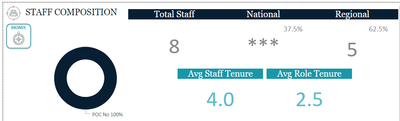
Voila, I got from this Not_Suppressed_Sample_Size.png
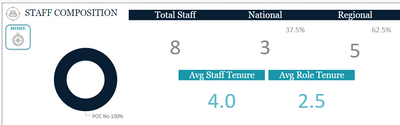
 to this

 Suppressed_Sample_Size.png


Now, my next issue should be apparent. With just a little bit of mental math, one is able to determine the suppessed sample size of 3 is actually 3 -- by subtracting 5 from 8. I've been toying around with various DAX but haven't landed on a workable solution.


I found a potential visual filter solution (https://community.powerbi.com/t5/Desktop/applying-filters-with-minimum-sample-size/m-p/659289), but it's not quite working for me:


MeasureforVisualFilter =
IF (
    CALCULATE ( COUNTROWS ( tableName ), ALLEXCEPT ( tableName, TableName[City] ) ) < 5,
    1
)


 I'd appreciate any thoughts or ideas to make this work, both for binary instances and cases where there are multiple categories to take into account.

1 ACCEPTED SOLUTION
v-frfei-msft
Community Support
Community Support

Hi @Anonymous ,


Does that meet your requirement?

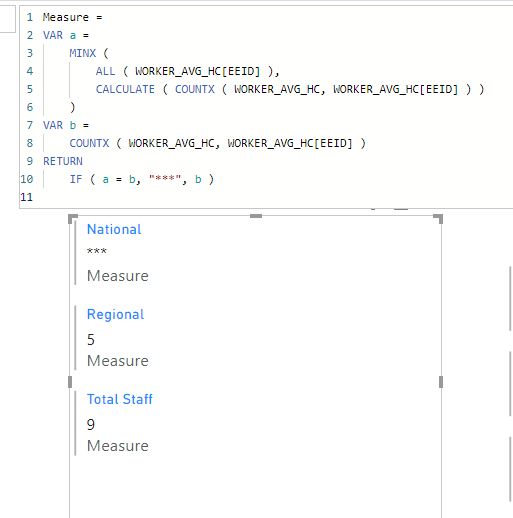
Measure = 
VAR a =
    MINX (
        ALL ( WORKER_AVG_HC[EEID] ),
        CALCULATE ( COUNTX ( WORKER_AVG_HC, WORKER_AVG_HC[EEID] ) )
    )
VAR b =
    COUNTX ( WORKER_AVG_HC, WORKER_AVG_HC[EEID] )
RETURN
    IF ( a = b, "***", b )

Capture.PNG


Pbix as attached. If it doesn't meet your requirement,  kindly share your sample data and excepted result to me if you don't have any Confidential Information. Please upload your files to One Drive and share the link here.


Community Support Team _ Frank
If this post helps, then please consider Accept it as the solution to help the others find it more quickly.

View solution in original post

1 REPLY 1
v-frfei-msft
Community Support
Community Support

Hi @Anonymous ,


Does that meet your requirement?

Measure = 
VAR a =
    MINX (
        ALL ( WORKER_AVG_HC[EEID] ),
        CALCULATE ( COUNTX ( WORKER_AVG_HC, WORKER_AVG_HC[EEID] ) )
    )
VAR b =
    COUNTX ( WORKER_AVG_HC, WORKER_AVG_HC[EEID] )
RETURN
    IF ( a = b, "***", b )

Capture.PNG


Pbix as attached. If it doesn't meet your requirement,  kindly share your sample data and excepted result to me if you don't have any Confidential Information. Please upload your files to One Drive and share the link here.


Community Support Team _ Frank
If this post helps, then please consider Accept it as the solution to help the others find it more quickly.

Helpful resources

Announcements
Power BI DataViz World Championships

Power BI Dataviz World Championships

The Power BI Data Visualization World Championships is back! Get ahead of the game and start preparing now!

December 2025 Power BI Update Carousel

Power BI Monthly Update - December 2025

Check out the December 2025 Power BI Holiday Recap!

FabCon Atlanta 2026 carousel

FabCon Atlanta 2026

Join us at FabCon Atlanta, March 16-20, for the ultimate Fabric, Power BI, AI and SQL community-led event. Save $200 with code FABCOMM.