Get Fabric or SQL Certified for Free.
Get certified for free when you join Fabric Data Days 2026 and dive into Fabric, Power BI, SQL, AI, and other essential data skills.
Join now- Power BI forums
- Get Help with Power BI
- Desktop
- Service
- Report Server
- Power Query
- Mobile Apps
- Developer
- DAX Commands and Tips
- Custom Visuals Development Discussion
- Health and Life Sciences
- Power BI Spanish forums
- Translated Spanish Desktop
- Training and Consulting
- Instructor Led Training
- Dashboard in a Day for Women, by Women
- Galleries
- Data Stories Gallery
- Themes Gallery
- Contests Gallery
- QuickViz Gallery
- Quick Measures Gallery
- Visual Calculations Gallery
- Fabric Apps Gallery
- Notebook Gallery
- Translytical Task Flow Gallery
- TMDL Gallery
- R Script Showcase
- Webinars and Video Gallery
- Ideas
- Custom Visuals Ideas (read-only)
- Issues
- Issues
- Events
- Upcoming Events
July 28 - August 9 | Final Round of the Power BI Dataviz World Championships. This is your chance. Learn more
- Power BI forums
- Forums
- Get Help with Power BI
- Desktop
- Re: Measure for DateDiff
- Subscribe to RSS Feed
- Mark Topic as New
- Mark Topic as Read
- Float this Topic for Current User
- Bookmark
- Subscribe
- Printer Friendly Page

- Mark as New
- Bookmark
- Subscribe
- Mute
- Subscribe to RSS Feed
- Permalink
- Report Inappropriate Content
Measure for DateDiff
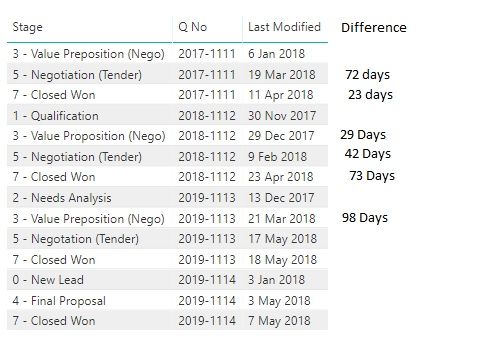
Can someone help me out with the datediff measure for a list of different Stages and different Quotes
Have a look at the screenshot below


- Mark as New
- Bookmark
- Subscribe
- Mute
- Subscribe to RSS Feed
- Permalink
- Report Inappropriate Content
Hi @Anonymous,
DateDiff should be used as a Column, not a measure
Difference = DATEDIFF(Table1[Last Modified], TODAY(), DAY)
If this solves, accept the solution and give a kudos!!
- Mark as New
- Bookmark
- Subscribe
- Mute
- Subscribe to RSS Feed
- Permalink
- Report Inappropriate Content
Your measure does not give an accurate result. See the screenshot below.
I need the first row in the (Diffrence Collumn) of every new Q No to be empty; start of new start stage change, just like my ealier posting !


- Mark as New
- Bookmark
- Subscribe
- Mute
- Subscribe to RSS Feed
- Permalink
- Report Inappropriate Content
Hi BDA2,
To achieve your requirement, firstly you need to create a calculate column [Index By Q No] to set index for every group using DAX below:
Index By Q No = RANKX(FILTER(Table1, Table1[Q No] = EARLIER(Table1[Q No])), RANKX(ALL(Table1), Table1[Last Modified]), , DESC, Dense)
Then create a calcualte column to calculate datediff which is your expected result:
DateDiff =
VAR Previous_Date = CALCULATE(MAX(Table1[Last Modified]), FILTER(Table1, Table1[Index By Q No] = EARLIER(Table1[Index By Q No]) - 1 && Table1[Q No] = EARLIER(Table1[Q No])))
RETURN
DATEDIFF(Previous_Date, Table1[Last Modified], DAY)
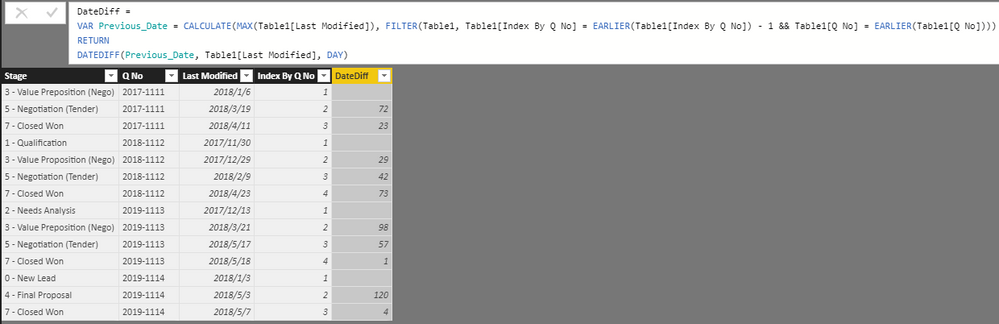
Hope it's helpful to you.
Jimmy Tao
- Mark as New
- Bookmark
- Subscribe
- Mute
- Subscribe to RSS Feed
- Permalink
- Report Inappropriate Content
Hi @v-yuta-msft,
Appreciate your sharing.
However, when I used measure for Index By Q No, I have multiple tables. I have trouble finding EARLIER function in my table and "Dense" is gray out. Refer photo screenshot:-

Once I solve the above Index By Q No, only can I used measure for DateDiff.
Let me know your thoughts
Thank You
- Mark as New
- Bookmark
- Subscribe
- Mute
- Subscribe to RSS Feed
- Permalink
- Report Inappropriate Content
- Mark as New
- Bookmark
- Subscribe
- Mute
- Subscribe to RSS Feed
- Permalink
- Report Inappropriate Content
Hi BDA2,
You should create calculate column, not measure.
Regards,
Jimmy Tao
- Mark as New
- Bookmark
- Subscribe
- Mute
- Subscribe to RSS Feed
- Permalink
- Report Inappropriate Content
- Mark as New
- Bookmark
- Subscribe
- Mute
- Subscribe to RSS Feed
- Permalink
- Report Inappropriate Content
hi @v-yuta-msft
Apparently I came to notice that the formula applies if my stages are distinct/not duplicated.
How should I get the same output for multiple duplicated stages for the same quote ?
- Mark as New
- Bookmark
- Subscribe
- Mute
- Subscribe to RSS Feed
- Permalink
- Report Inappropriate Content
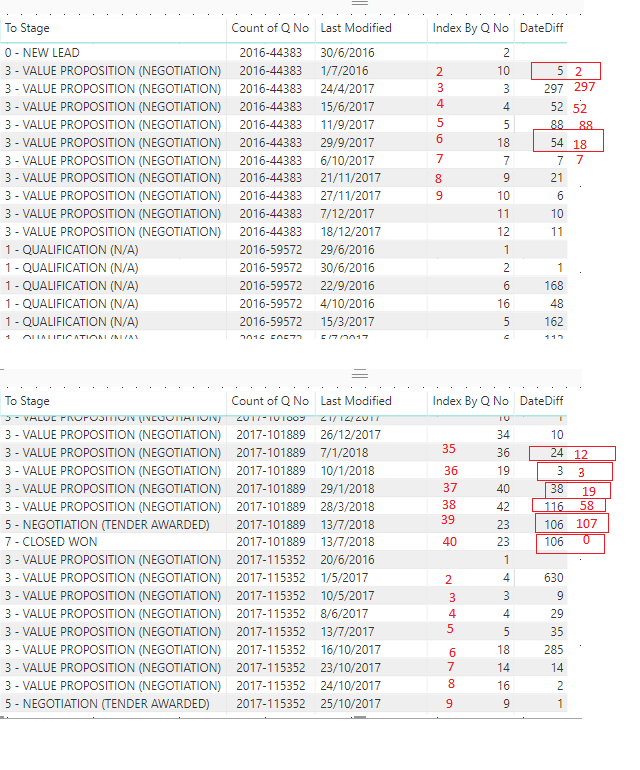
I am still having error for other dashboard I build and the formula does not seems to be accurate. Refer below screenshot.
The index By Q No is not in sequence and the date diff measure shows wrong calculation.
Helpful resources

FabCon & SQLCon – Barcelona 2026
Join us in Barcelona for FabCon and SQLCon, the Fabric, Power BI, SQL, and AI community event. Save €200 with code FABCMTY200.

Fabric Community Sticker Challenge - Barcelona 2026
If you love stickers, then you will definitely want to check out our community sticker challenge, Barcelona edition!

Power BI Monthly Update - July 2026
Check out the July 2026 Power BI update to learn about new features.

Power BI DataViz World Championships - June 2026
A new Power BI DataViz World Championship is coming this June! Don't miss out on submitting your entry.

| User | Count |
|---|---|
| 30 | |
| 28 | |
| 25 | |
| 24 | |
| 16 |


| User | Count |
|---|---|
| 48 | |
| 32 | |
| 17 | |
| 16 | |
| 16 |


