cancel
Showing results for 
Search instead for 
Did you mean: 

The Power BI Data Visualization World Championships is back! It's time to submit your entry. Live now!

Reply
jeongs1
Regular Visitor

Measure Formula Help

Report 1

NameIDAmountMonthDay
Jason1001100May23
Jason1001105May24
Sandy1002200May23
Sandy1002250May

24


Report 2

NameIDAmountMonthDay
Jason1001103May23
Jason1001104May24
Sandy1002200May23
Sandy1002280May

24


I'm a newbie to Power BI and did a lot of research, but can't really find the solution that I'm looking for.. Smiley Sad


On one tab, I have Report 1 and on another tab, I have Report 2. They're two different reports that are I extract using two different softwares. If I want to see the difference between the two how would I do it? 


So I want to see the difference for Jason for May 23. I want the result to show 3. (report 2 - report 1) (See WANT table)

And if it's possible, I'd like to create a line graph between the two reports who the difference...


Technically two questions:

1) Formula to insert to create my own measure

2) Line graph to compare the two reports 


Appreciate help in advance!!! 


WANT 

NameIDAmountMonthDay
Jason10013May23
Jason1001-1May24
Sandy10020May23
Sandy100230May

24

1 ACCEPTED SOLUTION
Phil_Seamark
Microsoft Employee
Microsoft Employee

Hi @jeongs1


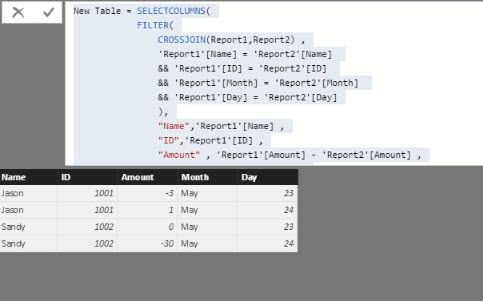
You could try the following calculated table


New Table = SELECTCOLUMNS(
            FILTER(
                CROSSJOIN(Report1,Report2) ,
                'Report1'[Name] = 'Report2'[Name] 
                && 'Report1'[ID] = 'Report2'[ID] 
                && 'Report1'[Month] = 'Report2'[Month] 
                && 'Report1'[Day] = 'Report2'[Day]
                ),
                "Name",'Report1'[Name] ,
                "ID",'Report1'[ID] ,
                "Amount" , 'Report1'[Amount] - 'Report2'[Amount] ,
                "Month" , 'Report1'[Month] ,
                "Day" , 'Report1'[Day]
                )

which for me returns this :


amount.jpg


I'd recommend adding a year column though....


To learn more about DAX visit : aka.ms/practicalDAX

Proud to be a Datanaut!

View solution in original post

2 REPLIES 2
Phil_Seamark
Microsoft Employee
Microsoft Employee

Hi @jeongs1


You could try the following calculated table


New Table = SELECTCOLUMNS(
            FILTER(
                CROSSJOIN(Report1,Report2) ,
                'Report1'[Name] = 'Report2'[Name] 
                && 'Report1'[ID] = 'Report2'[ID] 
                && 'Report1'[Month] = 'Report2'[Month] 
                && 'Report1'[Day] = 'Report2'[Day]
                ),
                "Name",'Report1'[Name] ,
                "ID",'Report1'[ID] ,
                "Amount" , 'Report1'[Amount] - 'Report2'[Amount] ,
                "Month" , 'Report1'[Month] ,
                "Day" , 'Report1'[Day]
                )

which for me returns this :


amount.jpg


I'd recommend adding a year column though....


To learn more about DAX visit : aka.ms/practicalDAX

Proud to be a Datanaut!

Anonymous
Not applicable

You need to create 2 "lookup" tables.  One that has just the unique people, and one that has just the unique dates.


You can probably pull that off in Power Query, but I'm a DAX guy, so... I would create a calculated table:

  People = UNION(DISTINCT(Report1[Name]), DISTINCT(Report2[Name]))


You probably will want to create a single column with an *actual* date as well.  Say, 
  DateKey = DATEVALUE(Report1[Month] & " " & Report1[Day] & ", 2017")


Once you do that (to both tables), you can create a calendar table by Create Table again:
  Dates = CALENDARAUTO( ) 


Then you can create relationships between:
 - people lookup, and both reports
 - calendar table, and both reports (to the new DateKey column)

Then, with your model all nice, you can create some easy measures like:

  Total Amount, Report 1 = SUM(Report1[Amount])
  Total Amount, Report 2 = SUM(Report2[Amount])

  Delta = [Total Amount, Report 1] - [Total Amount, Report 2]


Then you can build whatever tables/charts/visuals you want by using values from the date table + people from the lookup table... against these new measures.


Good luck!

Helpful resources

Announcements
December 2025 Power BI Update Carousel

Power BI Monthly Update - December 2025

Check out the December 2025 Power BI Holiday Recap!

FabCon Atlanta 2026 carousel

FabCon Atlanta 2026

Join us at FabCon Atlanta, March 16-20, for the ultimate Fabric, Power BI, AI and SQL community-led event. Save $200 with code FABCOMM.