Join us at FabCon Atlanta from March 16 - 20, 2026, for the ultimate Fabric, Power BI, AI and SQL community-led event. Save $200 with code FABCOMM.
Register now!The Power BI Data Visualization World Championships is back! It's time to submit your entry. Live now!
Report 1
| Name | ID | Amount | Month | Day |
| Jason | 1001 | 100 | May | 23 |
| Jason | 1001 | 105 | May | 24 |
| Sandy | 1002 | 200 | May | 23 |
| Sandy | 1002 | 250 | May | 24 |
Report 2
| Name | ID | Amount | Month | Day |
| Jason | 1001 | 103 | May | 23 |
| Jason | 1001 | 104 | May | 24 |
| Sandy | 1002 | 200 | May | 23 |
| Sandy | 1002 | 280 | May | 24 |
I'm a newbie to Power BI and did a lot of research, but can't really find the solution that I'm looking for.. ![]()
On one tab, I have Report 1 and on another tab, I have Report 2. They're two different reports that are I extract using two different softwares. If I want to see the difference between the two how would I do it?
So I want to see the difference for Jason for May 23. I want the result to show 3. (report 2 - report 1) (See WANT table)
And if it's possible, I'd like to create a line graph between the two reports who the difference...
Technically two questions:
1) Formula to insert to create my own measure
2) Line graph to compare the two reports
Appreciate help in advance!!!
WANT
| Name | ID | Amount | Month | Day |
| Jason | 1001 | 3 | May | 23 |
| Jason | 1001 | -1 | May | 24 |
| Sandy | 1002 | 0 | May | 23 |
| Sandy | 1002 | 30 | May | 24 |
Solved! Go to Solution.
Hi @jeongs1
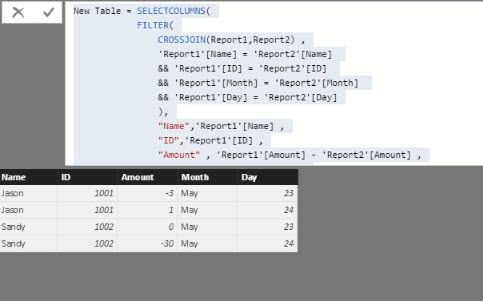
You could try the following calculated table
New Table = SELECTCOLUMNS(
FILTER(
CROSSJOIN(Report1,Report2) ,
'Report1'[Name] = 'Report2'[Name]
&& 'Report1'[ID] = 'Report2'[ID]
&& 'Report1'[Month] = 'Report2'[Month]
&& 'Report1'[Day] = 'Report2'[Day]
),
"Name",'Report1'[Name] ,
"ID",'Report1'[ID] ,
"Amount" , 'Report1'[Amount] - 'Report2'[Amount] ,
"Month" , 'Report1'[Month] ,
"Day" , 'Report1'[Day]
)which for me returns this :
I'd recommend adding a year column though....
Hi @jeongs1
You could try the following calculated table
New Table = SELECTCOLUMNS(
FILTER(
CROSSJOIN(Report1,Report2) ,
'Report1'[Name] = 'Report2'[Name]
&& 'Report1'[ID] = 'Report2'[ID]
&& 'Report1'[Month] = 'Report2'[Month]
&& 'Report1'[Day] = 'Report2'[Day]
),
"Name",'Report1'[Name] ,
"ID",'Report1'[ID] ,
"Amount" , 'Report1'[Amount] - 'Report2'[Amount] ,
"Month" , 'Report1'[Month] ,
"Day" , 'Report1'[Day]
)which for me returns this :
I'd recommend adding a year column though....
You need to create 2 "lookup" tables. One that has just the unique people, and one that has just the unique dates.
You can probably pull that off in Power Query, but I'm a DAX guy, so... I would create a calculated table:
People = UNION(DISTINCT(Report1[Name]), DISTINCT(Report2[Name]))
You probably will want to create a single column with an *actual* date as well. Say,
DateKey = DATEVALUE(Report1[Month] & " " & Report1[Day] & ", 2017")
Once you do that (to both tables), you can create a calendar table by Create Table again:
Dates = CALENDARAUTO( )
Then you can create relationships between:
- people lookup, and both reports
- calendar table, and both reports (to the new DateKey column)
Then, with your model all nice, you can create some easy measures like:
Total Amount, Report 1 = SUM(Report1[Amount])
Total Amount, Report 2 = SUM(Report2[Amount])
Delta = [Total Amount, Report 1] - [Total Amount, Report 2]
Then you can build whatever tables/charts/visuals you want by using values from the date table + people from the lookup table... against these new measures.
Good luck!
The Power BI Data Visualization World Championships is back! It's time to submit your entry.
Check out the January 2026 Power BI update to learn about new features.
| User | Count |
|---|---|
| 61 | |
| 48 | |
| 35 | |
| 25 | |
| 23 |
| User | Count |
|---|---|
| 142 | |
| 111 | |
| 65 | |
| 38 | |
| 33 |