Join us at FabCon Atlanta from March 16 - 20, 2026, for the ultimate Fabric, Power BI, AI and SQL community-led event. Save $200 with code FABCOMM.
Register now!The Power BI Data Visualization World Championships is back! It's time to submit your entry. Live now!
Hi,
I need a measure that the Logic is IF the Level from Table 1 is NOT EQUAL TO Level from Table 2 THEN "PROMOTION", If not THEN "" or BLANK
| Table 1 | Table 2 | |||
| Level | Name | Level | Name | |
| 12 - Associate | natalia | 11 - Analyst | natalia |
How can I do this ?
Thanks
Solved! Go to Solution.
Hi @cristianml
How do the two tables relate?
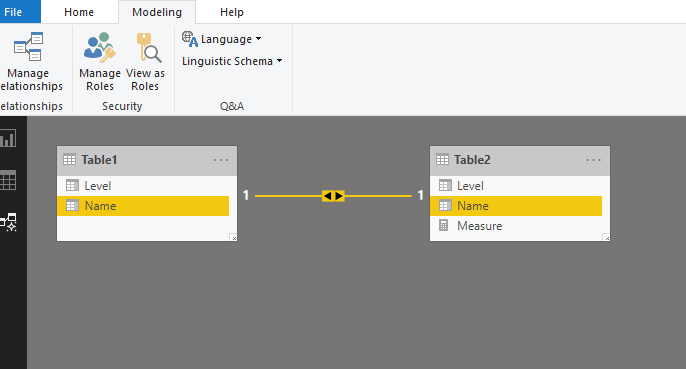
If they have a relationship as below
Then you could create a measure like this
Measure = IF(MAX(Table1[Level])<>MAX(Table2[Level]),"PROMOTION",BLANK())
Best Regards
Maggie
Community Support Team _ Maggie Li
If this post helps, then please consider Accept it as the solution to help the other members find it more quickly.
Hi @cristianml
How do the two tables relate?
If they have a relationship as below
Then you could create a measure like this
Measure = IF(MAX(Table1[Level])<>MAX(Table2[Level]),"PROMOTION",BLANK())
Best Regards
Maggie
Community Support Team _ Maggie Li
If this post helps, then please consider Accept it as the solution to help the other members find it more quickly.
Hi @v-juanli-msft ,
It works but I need to add another variable to say that If column "Name" is equal then "yes". This is Because sometimes I have NEW people and in those cases the previous formula put yes to the promoted measure:
I tried but I donot know where is the error:
I do not quite understand what you need, but you know the function ISINSCOPE. Returns true when the specified column is the level in a hierarchy of levels.
The Power BI Data Visualization World Championships is back! It's time to submit your entry.
Check out the January 2026 Power BI update to learn about new features.
| User | Count |
|---|---|
| 60 | |
| 47 | |
| 29 | |
| 25 | |
| 23 |
| User | Count |
|---|---|
| 126 | |
| 108 | |
| 55 | |
| 39 | |
| 33 |