This time we’re going bigger than ever. Fabric, Power BI, SQL, AI and more. We're covering it all. You won't want to miss it.
Learn moreDid you hear? There's a new SQL AI Developer certification (DP-800). Start preparing now and be one of the first to get certified. Register now
Hi,
I need a measure that the Logic is IF the Level from Table 1 is NOT EQUAL TO Level from Table 2 THEN "PROMOTION", If not THEN "" or BLANK
| Table 1 | Table 2 | |||
| Level | Name | Level | Name | |
| 12 - Associate | natalia | 11 - Analyst | natalia |
How can I do this ?
Thanks
Solved! Go to Solution.
Hi @cristianml
How do the two tables relate?
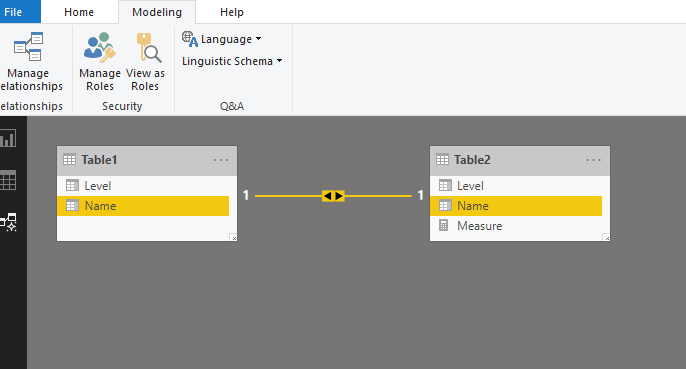
If they have a relationship as below
Then you could create a measure like this
Measure = IF(MAX(Table1[Level])<>MAX(Table2[Level]),"PROMOTION",BLANK())
Best Regards
Maggie
Community Support Team _ Maggie Li
If this post helps, then please consider Accept it as the solution to help the other members find it more quickly.
Hi @cristianml
How do the two tables relate?
If they have a relationship as below
Then you could create a measure like this
Measure = IF(MAX(Table1[Level])<>MAX(Table2[Level]),"PROMOTION",BLANK())
Best Regards
Maggie
Community Support Team _ Maggie Li
If this post helps, then please consider Accept it as the solution to help the other members find it more quickly.
Hi @v-juanli-msft ,
It works but I need to add another variable to say that If column "Name" is equal then "yes". This is Because sometimes I have NEW people and in those cases the previous formula put yes to the promoted measure:
I tried but I donot know where is the error:
I do not quite understand what you need, but you know the function ISINSCOPE. Returns true when the specified column is the level in a hierarchy of levels.
Check out the April 2026 Power BI update to learn about new features.
Sign up to receive a private message when registration opens and key events begin.
If you have recently started exploring Fabric, we'd love to hear how it's going. Your feedback can help with product improvements.
| User | Count |
|---|---|
| 34 | |
| 31 | |
| 30 | |
| 21 | |
| 16 |
| User | Count |
|---|---|
| 62 | |
| 51 | |
| 31 | |
| 23 | |
| 23 |