Join us at FabCon Atlanta from March 16 - 20, 2026, for the ultimate Fabric, Power BI, AI and SQL community-led event. Save $200 with code FABCOMM.
Register now!The Power BI Data Visualization World Championships is back! Get ahead of the game and start preparing now! Learn more
Hello,
I've been trying to figure out this measure for the past couple days and I can't seem to find the solution:
Stock Niveau (Full) =
IF( EOMONTH(MAX('Calendar'[Date]),0) = EOMONTH(TODAY(),0) ,
CALCULATE([Total Orders],DATESINPERIOD('Calendar'[Date], MAX('Calendar'[Date]),-3,MONTH)) + CALCULATE(SUM('Stock Value'[Cost Amount (Actual)]), ALL('Stock Value')) + SUM('Sales Forecast (GS)'[Sales FC aan COGS]),
IF( EOMONTH(MAX('Calendar'[Date]),0) > EOMONTH(TODAY(),0),
[Total Orders] + SUM('Sales Forecast (GS)'[Sales FC aan COGS])))
This measure works and gives me the following result (in sample data):
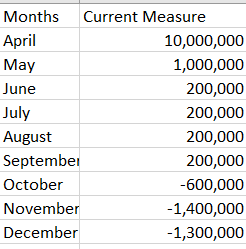
The last piece that is missing however, is the following:
Starting from the month after the current month, take the value of the month + the value of the previous month.
This is the expected result:
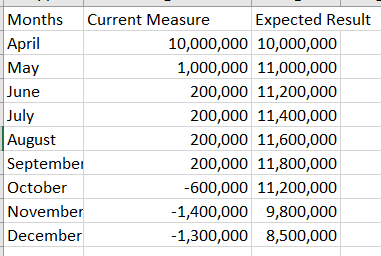
All months before current month have to be blank.
Someone knows how to figure this out?
Solved! Go to Solution.
Hi @Niels_T ,
There should be a [MonthNum] column in whole number format in Calendar table. You can try this code to create a virtul table and then sumx the result to get running total.
Running Total =
VAR _SUMMARIZE =
SUMMARIZE (
ALL ( 'Calendar' ),
'Calendar'[Months],
'Calendar'[MonthNum],
"Stock Niveau (Full)",
IF (
EOMONTH ( MAX ( 'Calendar'[Date] ), 0 ) = EOMONTH ( TODAY (), 0 ),
CALCULATE (
[Total Orders],
DATESINPERIOD ( 'Calendar'[Date], MAX ( 'Calendar'[Date] ), -3, MONTH )
)
+ CALCULATE ( SUM ( 'Stock Value'[Cost Amount (Actual)] ), ALL ( 'Stock Value' ) )
+ SUM ( 'Sales Forecast (GS)'[Sales FC aan COGS] ),
IF (
EOMONTH ( MAX ( 'Calendar'[Date] ), 0 ) > EOMONTH ( TODAY (), 0 ),
[Total Orders] + SUM ( 'Sales Forecast (GS)'[Sales FC aan COGS] )
)
)
)
RETURN
SUMX (
FILTER ( _SUMMARIZE, [MonthNum] <= MAX ( 'Calendar'[MonthNum] ) ),
[Stock Niveau (Full)]
)
Best Regards,
Rico Zhou
If this post helps, then please consider Accept it as the solution to help the other members find it more quickly.
Hi @Niels_T ,
There should be a [MonthNum] column in whole number format in Calendar table. You can try this code to create a virtul table and then sumx the result to get running total.
Running Total =
VAR _SUMMARIZE =
SUMMARIZE (
ALL ( 'Calendar' ),
'Calendar'[Months],
'Calendar'[MonthNum],
"Stock Niveau (Full)",
IF (
EOMONTH ( MAX ( 'Calendar'[Date] ), 0 ) = EOMONTH ( TODAY (), 0 ),
CALCULATE (
[Total Orders],
DATESINPERIOD ( 'Calendar'[Date], MAX ( 'Calendar'[Date] ), -3, MONTH )
)
+ CALCULATE ( SUM ( 'Stock Value'[Cost Amount (Actual)] ), ALL ( 'Stock Value' ) )
+ SUM ( 'Sales Forecast (GS)'[Sales FC aan COGS] ),
IF (
EOMONTH ( MAX ( 'Calendar'[Date] ), 0 ) > EOMONTH ( TODAY (), 0 ),
[Total Orders] + SUM ( 'Sales Forecast (GS)'[Sales FC aan COGS] )
)
)
)
RETURN
SUMX (
FILTER ( _SUMMARIZE, [MonthNum] <= MAX ( 'Calendar'[MonthNum] ) ),
[Stock Niveau (Full)]
)
Best Regards,
Rico Zhou
If this post helps, then please consider Accept it as the solution to help the other members find it more quickly.
This was EXACTLY what I was looking for.
Thank you!
The Power BI Data Visualization World Championships is back! Get ahead of the game and start preparing now!
| User | Count |
|---|---|
| 38 | |
| 36 | |
| 33 | |
| 31 | |
| 28 |
| User | Count |
|---|---|
| 129 | |
| 88 | |
| 79 | |
| 68 | |
| 63 |