Join us at FabCon Atlanta from March 16 - 20, 2026, for the ultimate Fabric, Power BI, AI and SQL community-led event. Save $200 with code FABCOMM.
Register now!The Power BI Data Visualization World Championships is back! It's time to submit your entry. Live now!
Hello Everyone,
New to DAX here. I am trying to calculate the highest RandD Normalization Filtered Percent specifically by Division, taking into account all of the filters in the table. Any idea on how I might do this? Thanks for the help! So for example, the MAX for BID is 0.19%. Below is what some of the data looks like:
Customer | Division | RandD Normalization | RandD Normalization Filtered | RandD Max |
Customer A | BID | 1.16% | 0.17% | 6.24% |
Customer A | BPD | 1.16% | 0.40% | 6.24% |
Customer A | CAD | 1.16% | 0.00% | 6.24% |
Customer A | CMD | 1.16% | 0.14% | 6.24% |
Customer A | CSD | 1.16% | 0.00% | 6.24% |
Customer A | CTD | 1.16% | 0.04% | 6.24% |
Customer A | GSD | 1.16% | 0.04% | 6.24% |
Customer A | IES | 1.16% | 0.07% | 6.24% |
Customer A | LCD | 1.16% | 0.01% | 6.24% |
Customer A | LPD | 1.16% | 0.00% | 6.24% |
Customer A | MBD | 1.16% | 0.00% | 6.24% |
Customer A | MSD | 1.16% | 0.01% | 6.24% |
Customer A | PSD | 1.16% | 0.18% | 6.24% |
Customer A | RSD_OTHER | 1.16% | 0.00% | 6.24% |
Customer A | RSD_SelfMfg | 1.16% | 0.05% | 6.24% |
Customer A | RSD_VENDED | 1.16% | 0.05% | 6.24% |
Customer B | BID | 6.24% | 0.19% | 6.24% |
Customer B | BPD | 6.24% | 0.33% | 6.24% |
Customer B | CAD | 6.24% | 0.01% | 6.24% |
Customer B | CDD | 6.24% | 0.00% | 6.24% |
Customer B | CMD | 6.24% | 0.12% | 6.24% |
Customer B | CSD | 6.24% | 0.01% | 6.24% |
Customer B | CTD | 6.24% | 4.05% | 6.24% |
Customer B | GSD | 6.24% | 0.07% | 6.24% |
Customer B | IES | 6.24% | 0.07% | 6.24% |
Customer B | LCD | 6.24% | 0.03% | 6.24% |
Solved! Go to Solution.
Hi @erin_g ,
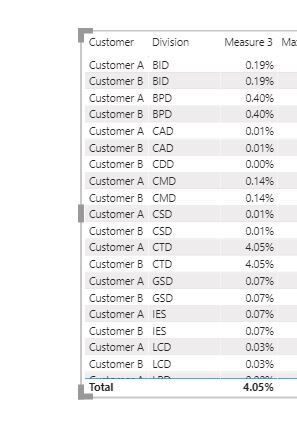
Create a measure and apply it to visual level filter.
Measure =
VAR MAX_PER_DIVISION = CALCULATE(MAX('Table'[Normalization RandD]),ALLEXCEPT('Table','Table'[Division]))
RETURN IF(MAX('Table'[Normalization RandD])=MAX_PER_DIVISION,1,0)
Best Regards,
Liang
If this post helps, then please consider Accept it as the solution to help the other members find it more quickly.
Hi @erin_g ,
Create a measure and apply it to visual level filter.
Measure =
VAR MAX_PER_DIVISION = CALCULATE(MAX('Table'[Normalization RandD]),ALLEXCEPT('Table','Table'[Division]))
RETURN IF(MAX('Table'[Normalization RandD])=MAX_PER_DIVISION,1,0)
Best Regards,
Liang
If this post helps, then please consider Accept it as the solution to help the other members find it more quickly.
Hi @erin_g ,
Not very clear
Just make use of the filter context.
Measure = MAX('Table'[RandD Normalization Filtered])
else
try
Are you wanting this as a measure for showing in reports or a calculated column on the table? I only ask because I see you have a [RandD Max] column in your sample.
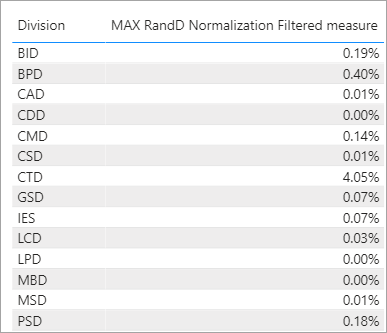
As a measure just use
MAX RandD Normalization Filtered measure = MAX ( Your_Table[RandD Normalization Filtered] )
Then show that next to the divisions:
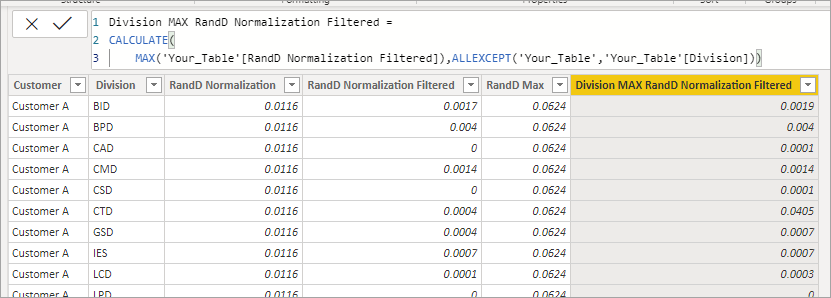
As a calcualated column it would be something like this.
Division MAX RandD Normalization Filtered =
CALCULATE(
MAX('Your_Table'[RandD Normalization Filtered]),ALLEXCEPT('Your_Table','Your_Table'[Division]))
The Power BI Data Visualization World Championships is back! It's time to submit your entry.
Check out the January 2026 Power BI update to learn about new features.
| User | Count |
|---|---|
| 61 | |
| 48 | |
| 35 | |
| 25 | |
| 23 |
| User | Count |
|---|---|
| 142 | |
| 111 | |
| 65 | |
| 38 | |
| 33 |