cancel
Showing results for 
Search instead for 
Did you mean: 

The Power BI Data Visualization World Championships is back! Get ahead of the game and start preparing now! Learn more

Reply
erin_g
Regular Visitor

Max Calculation

Hello Everyone,

New to DAX here. I am trying to calculate the highest RandD Normalization Filtered Percent specifically by Division, taking into account all of the filters in the table. Any idea on how I might do this? Thanks for the help!  So for example, the MAX for BID is 0.19%.  Below is what some of the data looks like:


Customer

Division

RandD Normalization

RandD Normalization Filtered

RandD Max

Customer A

BID

1.16%

0.17%

6.24%

Customer A

BPD

1.16%

0.40%

6.24%

Customer A

CAD

1.16%

0.00%

6.24%

Customer A

CMD

1.16%

0.14%

6.24%

Customer A

CSD

1.16%

0.00%

6.24%

Customer A

CTD

1.16%

0.04%

6.24%

Customer A

GSD

1.16%

0.04%

6.24%

Customer A

IES

1.16%

0.07%

6.24%

Customer A

LCD

1.16%

0.01%

6.24%

Customer A

LPD

1.16%

0.00%

6.24%

Customer A

MBD

1.16%

0.00%

6.24%

Customer A

MSD

1.16%

0.01%

6.24%

Customer A

PSD

1.16%

0.18%

6.24%

Customer A

RSD_OTHER

1.16%

0.00%

6.24%

Customer A

RSD_SelfMfg

1.16%

0.05%

6.24%

Customer A

RSD_VENDED

1.16%

0.05%

6.24%

Customer B

BID

6.24%

0.19%

6.24%

Customer B

BPD

6.24%

0.33%

6.24%

Customer B

CAD

6.24%

0.01%

6.24%

Customer B

CDD

6.24%

0.00%

6.24%

Customer B

CMD

6.24%

0.12%

6.24%

Customer B

CSD

6.24%

0.01%

6.24%

Customer B

CTD

6.24%

4.05%

6.24%

Customer B

GSD

6.24%

0.07%

6.24%

Customer B

IES

6.24%

0.07%

6.24%

Customer B

LCD

6.24%

0.03%

6.24%

1 ACCEPTED SOLUTION
V-lianl-msft
Community Support
Community Support

Hi @erin_g ,


Create a measure and apply it to visual level filter.

Measure = 
VAR MAX_PER_DIVISION = CALCULATE(MAX('Table'[Normalization RandD]),ALLEXCEPT('Table','Table'[Division]))
RETURN IF(MAX('Table'[Normalization RandD])=MAX_PER_DIVISION,1,0)

Sample .pbix


Best Regards,
Liang
If this post helps, then please consider Accept it as the solution to help the other members find it more quickly.

View solution in original post

4 REPLIES 4
V-lianl-msft
Community Support
Community Support

Hi @erin_g ,


Create a measure and apply it to visual level filter.

Measure = 
VAR MAX_PER_DIVISION = CALCULATE(MAX('Table'[Normalization RandD]),ALLEXCEPT('Table','Table'[Division]))
RETURN IF(MAX('Table'[Normalization RandD])=MAX_PER_DIVISION,1,0)

Sample .pbix


Best Regards,
Liang
If this post helps, then please consider Accept it as the solution to help the other members find it more quickly.

harshnathani
Community Champion
Community Champion

Hi @erin_g ,


Not very clear


Just make use of the filter context.


Measure = MAX('Table'[RandD Normalization Filtered])


else 


try


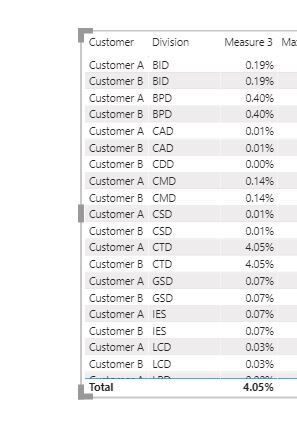
Measure 3 = CALCULATE(MAX('Table'[RandD Normalization Filtered]),ALLEXCEPT('Table','Table'[Division]))
 
 
1.jpg2.JPG
 
Regards,
Harsh Nathani


jdbuchanan71
Super User
Super User

@erin_g 

Are you wanting this as a measure for showing in reports or a calculated column on the table?  I only ask because I see you have a [RandD Max] column in your sample.

As a measure just use

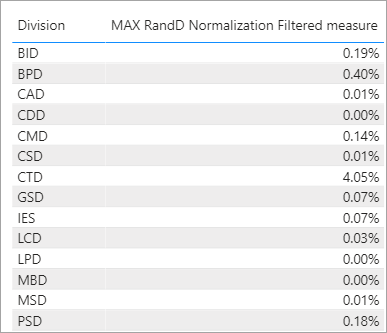
MAX RandD Normalization Filtered measure = MAX ( Your_Table[RandD Normalization Filtered] )

Then show that next to the divisions:

jdbuchanan71_0-1595866286650.png


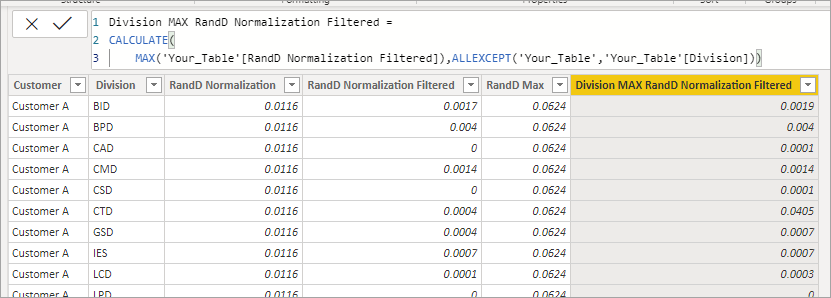
As a calcualated column it would be something like this.

Division MAX RandD Normalization Filtered = 
CALCULATE(
    MAX('Your_Table'[RandD Normalization Filtered]),ALLEXCEPT('Your_Table','Your_Table'[Division]))

jdbuchanan71_1-1595866332652.png


Helpful resources

Announcements
Power BI DataViz World Championships

Power BI Dataviz World Championships

The Power BI Data Visualization World Championships is back! Get ahead of the game and start preparing now!

December 2025 Power BI Update Carousel

Power BI Monthly Update - December 2025

Check out the December 2025 Power BI Holiday Recap!

FabCon Atlanta 2026 carousel

FabCon Atlanta 2026

Join us at FabCon Atlanta, March 16-20, for the ultimate Fabric, Power BI, AI and SQL community-led event. Save $200 with code FABCOMM.