Don't miss your chance to take the Fabric Data Engineer (DP-600) exam for FREE! Find out how by watching the DP-600 session on-demand now through April 28th.
Learn moreJoin the FabCon + SQLCon recap series. Up next: Power BI, Real-Time Intelligence, IQ and AI, and Data Factory take center stage. All sessions are available on-demand after the live show. Register now
Dear Community,
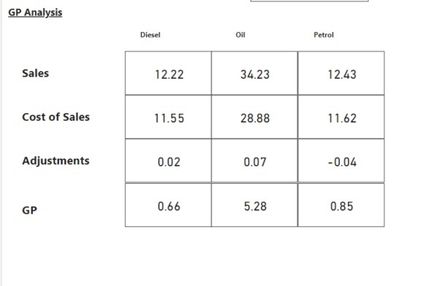
I'm trying to create a visual to show a Gross Profit Analysis using Currency Value/item volume. In this case, it will be currency per liter.
I am currently achieving this by doing multiple measures and displaying each value manually with a card (Sales; Cost of Sales is text boxes).
See the below example:
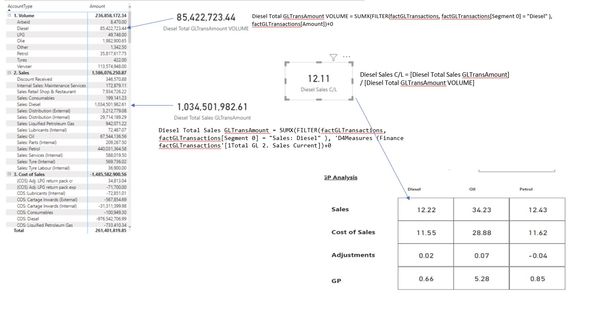
Below is an example of how the table looks and the measures currently used to get the above value:
You will notice the AccountType column item descriptions are different for "1. Volume", however below rows they will only have a prefix, for example, Sales: Diesel; COS Diesel; Adjustment: Diesel.
Is there any other way to do this, maybe with a switch with multiple conditions and measure to display this in a table or matrix?
Look forward to your reply.
Best Regards,
Niel
@niel_orvyn1 , Not very clear. But you can display them in a matrix using show on row, which will move the measure to column and then give account on the column, nothing on row
https://www.burningsuit.co.uk/blog/2019/04/7-secrets-of-the-matrix-visual/
Hi @amitchandak
Many thanks for always assisting. I've made a sample *.pbix to better describe my challenge.
I'm trying to see if I can create a table or matrix rather than an individual as per the file in the link.
Please let me know if you are able to access the file, or maybe an alternative to sharing the file.
https://orvyncom-my.sharepoint.com/:f:/g/personal/niel_orvyn_com/Eualf2cRAJRIiIpHdmR8WaUB9zqHPAKoemi...
Kind regards,
Niel
Check out the April 2026 Power BI update to learn about new features.
If you have recently started exploring Fabric, we'd love to hear how it's going. Your feedback can help with product improvements.
A new Power BI DataViz World Championship is coming this June! Don't miss out on submitting your entry.
| User | Count |
|---|---|
| 45 | |
| 38 | |
| 34 | |
| 21 | |
| 17 |
| User | Count |
|---|---|
| 65 | |
| 63 | |
| 31 | |
| 26 | |
| 25 |