
Join us at FabCon Atlanta from March 16 - 20, 2026, for the ultimate Fabric, Power BI, AI and SQL community-led event. Save $200 with code FABCOMM.
Register now!The Power BI Data Visualization World Championships is back! Get ahead of the game and start preparing now! Learn more
I'm looking for suggestions on how to create a matrix table where some of the columns are based on a dimension (like month) but at last one is just a total not broken down by month. I would like to do this without having to create a measure for each column.
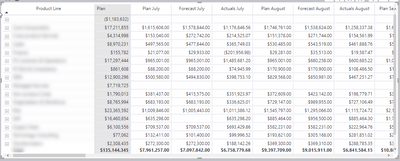
Below is what I would like to see but this uses a measure for every single column.
Below is what it look like with Fiscal Year and Fiscal Month as columns in the matrix visual. Unfortunately I then get Plan broken down by month when I only want to see the total for Plan but the months for the Forecast and Actuals.
Here is one way:
and another example
Add a second column to matrix header
Proud to be a Super User!
Paul on Linkedin.
The Power BI Data Visualization World Championships is back! Get ahead of the game and start preparing now!
Check out the November 2025 Power BI update to learn about new features.
| User | Count |
|---|---|
| 68 | |
| 46 | |
| 44 | |
| 29 | |
| 20 |
| User | Count |
|---|---|
| 202 | |
| 130 | |
| 102 | |
| 71 | |
| 55 |