cancel
Showing results for 
Search instead for 
Did you mean: 

The Power BI Data Visualization World Championships is back! Get ahead of the game and start preparing now! Learn more

Reply
Anonymous
Not applicable

Matrix visual

Hi All,

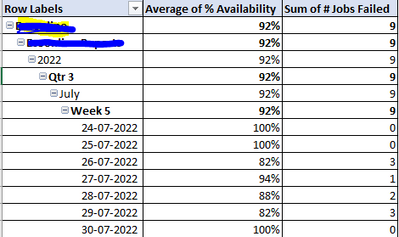
My scenario is to visualize the availability % of the Products in each level of hierarchy in a matrix visual. In which I have to show  % value as 0 even if any one of the job failed to run on a particular date i.e job count > 0 on any date. whereas the other hierachies i.e. Year, Quarter, Month, Week and few other Product and Project levels should show the average of the rows in the columns using DAX formula. Would be really helpfull if I could get this sorted.


Attaching my current output below.

Ezhilmathi_0-1665062382046.png


On daily level, if any job fails, the % value must be 0 where as the other level of hierarchies must be the % average.


Thanks in advance!

2 ACCEPTED SOLUTIONS
v-yalanwu-msft
Community Support
Community Support

Hi,  @Anonymous ;

You could try ISINSCOPE() , Here I create a simple file and i create a measure.

Measure = IF(ISINSCOPE('Table'[Date]),IF(SUM('Table'[job faild])>0,0,AVERAGE('Table'[job faild])),AVERAGE('Table'[job faild]))

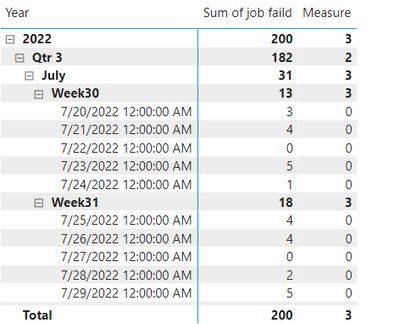
The final show:

vyalanwumsft_0-1665125892397.png


Best Regards,
Community Support Team _ Yalan Wu
If this post helps, then please consider Accept it as the solution to help the other members find it more quickly.

View solution in original post

Anonymous
Not applicable

This is perfect! Got the required output. Thankyou so much @v-yalanwu-msft.

Appreciate your support.

View solution in original post

3 REPLIES 3
Anonymous
Not applicable

Hi @v-yalanwu-msft


In the above result, the weekly drill-up level must have the average of the daily percentage i.e. average of July 20 - July 24 must be count(jobsfailed=0)/number of dates in the week which is [1/5]. Here the '0' will be no job failure and this shows the product is 100% available. This also has a condition where the average value must be based on the count of 0 job failures. This must be the same for the other drill-up levels like month, quarter, year, product, project.


I have tried the below formula to acheive the same. But somehow the output value happen to be wrong.


avg_test =
Var avtest = CALCULATE(AVERAGE(Prod_Jobs_Snow[IsJobFailed]),
ALLEXCEPT(Prod_Jobs_Snow, Prod_Jobs_Snow[Project], Prod_Jobs_Snow[Product], Dim_Date[Year], Dim_Date[Quarter], Dim_Date[Month], Dim_Date[Week of Month], Dim_Date[Date]))
Return
IF(Prod_Jobs_Snow[IsJobFailed] = 1, avtest, 0).


Would really appreciate if I could get a help on this. Thanks in advance.


Anonymous
Not applicable

This is perfect! Got the required output. Thankyou so much @v-yalanwu-msft.

Appreciate your support.

v-yalanwu-msft
Community Support
Community Support

Hi,  @Anonymous ;

You could try ISINSCOPE() , Here I create a simple file and i create a measure.

Measure = IF(ISINSCOPE('Table'[Date]),IF(SUM('Table'[job faild])>0,0,AVERAGE('Table'[job faild])),AVERAGE('Table'[job faild]))

The final show:

vyalanwumsft_0-1665125892397.png


Best Regards,
Community Support Team _ Yalan Wu
If this post helps, then please consider Accept it as the solution to help the other members find it more quickly.

Helpful resources

Announcements
Power BI DataViz World Championships

Power BI Dataviz World Championships

The Power BI Data Visualization World Championships is back! Get ahead of the game and start preparing now!

December 2025 Power BI Update Carousel

Power BI Monthly Update - December 2025

Check out the December 2025 Power BI Holiday Recap!

FabCon Atlanta 2026 carousel

FabCon Atlanta 2026

Join us at FabCon Atlanta, March 16-20, for the ultimate Fabric, Power BI, AI and SQL community-led event. Save $200 with code FABCOMM.