This time we’re going bigger than ever. Fabric, Power BI, SQL, AI and more. We're covering it all. You won't want to miss it.
Learn moreLevel up your Power BI skills this month - build one visual each week and tell better stories with data! Get started
Hi All,
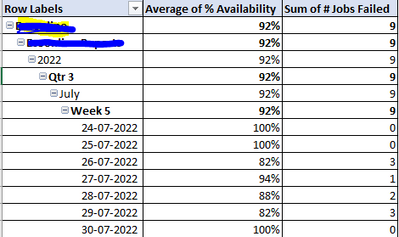
My scenario is to visualize the availability % of the Products in each level of hierarchy in a matrix visual. In which I have to show % value as 0 even if any one of the job failed to run on a particular date i.e job count > 0 on any date. whereas the other hierachies i.e. Year, Quarter, Month, Week and few other Product and Project levels should show the average of the rows in the columns using DAX formula. Would be really helpfull if I could get this sorted.
Attaching my current output below.
On daily level, if any job fails, the % value must be 0 where as the other level of hierarchies must be the % average.
Thanks in advance!
Solved! Go to Solution.
Hi, @Anonymous ;
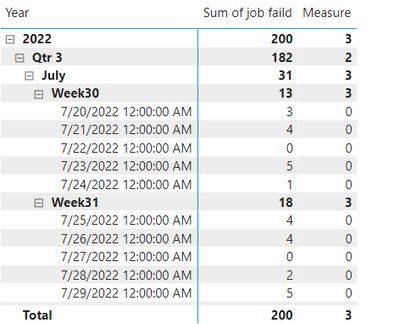
You could try ISINSCOPE() , Here I create a simple file and i create a measure.
Measure = IF(ISINSCOPE('Table'[Date]),IF(SUM('Table'[job faild])>0,0,AVERAGE('Table'[job faild])),AVERAGE('Table'[job faild]))
The final show:
Best Regards,
Community Support Team _ Yalan Wu
If this post helps, then please consider Accept it as the solution to help the other members find it more quickly.
This is perfect! Got the required output. Thankyou so much @v-yalanwu-msft.
Appreciate your support.
In the above result, the weekly drill-up level must have the average of the daily percentage i.e. average of July 20 - July 24 must be count(jobsfailed=0)/number of dates in the week which is [1/5]. Here the '0' will be no job failure and this shows the product is 100% available. This also has a condition where the average value must be based on the count of 0 job failures. This must be the same for the other drill-up levels like month, quarter, year, product, project.
I have tried the below formula to acheive the same. But somehow the output value happen to be wrong.
avg_test =
Var avtest = CALCULATE(AVERAGE(Prod_Jobs_Snow[IsJobFailed]),
ALLEXCEPT(Prod_Jobs_Snow, Prod_Jobs_Snow[Project], Prod_Jobs_Snow[Product], Dim_Date[Year], Dim_Date[Quarter], Dim_Date[Month], Dim_Date[Week of Month], Dim_Date[Date]))
Return
IF(Prod_Jobs_Snow[IsJobFailed] = 1, avtest, 0).
Would really appreciate if I could get a help on this. Thanks in advance.
This is perfect! Got the required output. Thankyou so much @v-yalanwu-msft.
Appreciate your support.
Hi, @Anonymous ;
You could try ISINSCOPE() , Here I create a simple file and i create a measure.
Measure = IF(ISINSCOPE('Table'[Date]),IF(SUM('Table'[job faild])>0,0,AVERAGE('Table'[job faild])),AVERAGE('Table'[job faild]))
The final show:
Best Regards,
Community Support Team _ Yalan Wu
If this post helps, then please consider Accept it as the solution to help the other members find it more quickly.
Check out the April 2026 Power BI update to learn about new features.
Sign up to receive a private message when registration opens and key events begin.
If you have recently started exploring Fabric, we'd love to hear how it's going. Your feedback can help with product improvements.
| User | Count |
|---|---|
| 36 | |
| 33 | |
| 31 | |
| 24 | |
| 18 |
| User | Count |
|---|---|
| 68 | |
| 50 | |
| 33 | |
| 24 | |
| 24 |