cancel
Showing results for 
Search instead for 
Did you mean: 

Try your skills in the Power BI Dataviz World Championship! Round one ends June 26. Join now

Reply
jcastr02
Post Prodigy
Post Prodigy

Matrix visual with 2 split columns

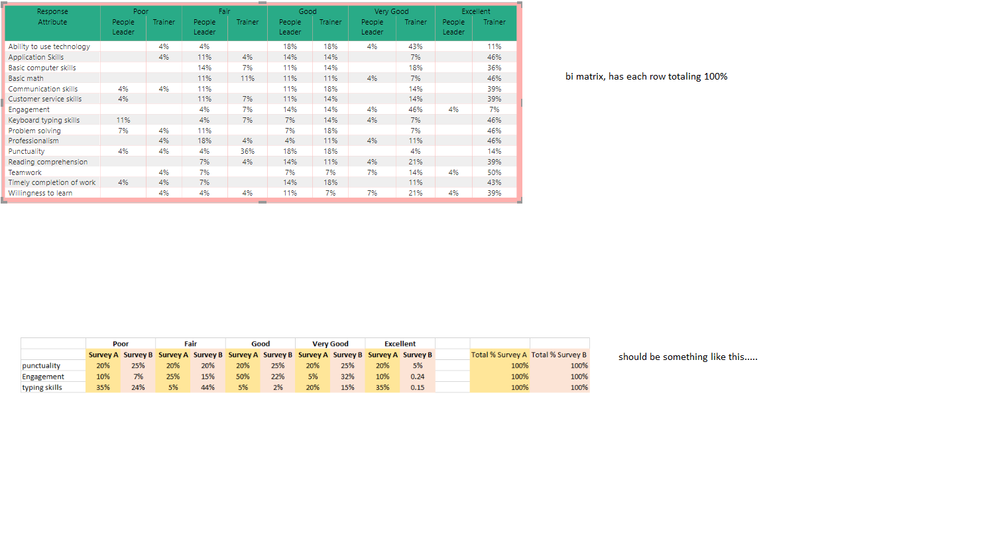
I have two survey types - people leader and Trainer Survey - each fill out different attributes and rate them on a scale from (poor, fair, good, very good, and excellent).  Id like a visual to display each together, but my % of row total is adding up everything vs. seperating by the survey type.  I've attached visual below of what im trying to do (essentially each row should total 200%, 100% sum for each of the survey types).  BI file attached as well - see the recruiting -onboarding tab


onboarding.pnghttps://1drv.ms/u/s!Ava_12t7CNJtkEcQHD-Ralk-Qgjf?e=56kx5j 

1 ACCEPTED SOLUTION
v-alq-msft
Community Support
Community Support

Hi, @jcastr02 


Based on my research, you may try to use the following measure.


Result = 
DIVIDE (
 CALCULATE ( COUNT ( 'Append1'[Response] ) ),
 CALCULATE (
 COUNT ( 'Append1'[Response] ),
 FILTER (
 ALLSELECTED ( 'Append1' ),
 'Append1'[Attribute] IN FILTERS ( 'Append1'[Attribute] )
 && 'Append1'[Survey Type] IN FILTERS ( 'Append1'[Survey Type] )
 )
 )
)


Finally you could go to 'Modeling' ribbon, modify the format to percentage.


Best Regards

Allan


If this post helps, then please consider Accept it as the solution to help the other members find it more quickly.

View solution in original post

2 REPLIES 2
v-alq-msft
Community Support
Community Support

Hi, @jcastr02 


Based on my research, you may try to use the following measure.


Result = 
DIVIDE (
 CALCULATE ( COUNT ( 'Append1'[Response] ) ),
 CALCULATE (
 COUNT ( 'Append1'[Response] ),
 FILTER (
 ALLSELECTED ( 'Append1' ),
 'Append1'[Attribute] IN FILTERS ( 'Append1'[Attribute] )
 && 'Append1'[Survey Type] IN FILTERS ( 'Append1'[Survey Type] )
 )
 )
)


Finally you could go to 'Modeling' ribbon, modify the format to percentage.


Best Regards

Allan


If this post helps, then please consider Accept it as the solution to help the other members find it more quickly.

This worked @v-alq-msft Thank you! 

Helpful resources

Announcements
Fabric Data Days is here Carousel

Fabric Data Days 2026

Don't miss out on Data Days, June 15 through August 7. Learn Fabric, Power BI, SQL, AI and more.

Power BI DataViz World Championships carousel

Power BI DataViz World Championships - June 2026

A new Power BI DataViz World Championship is coming this June! Don't miss out on submitting your entry.