Join us at FabCon Atlanta from March 16 - 20, 2026, for the ultimate Fabric, Power BI, AI and SQL community-led event. Save $200 with code FABCOMM.
Register now!The Power BI Data Visualization World Championships is back! It's time to submit your entry. Live now!
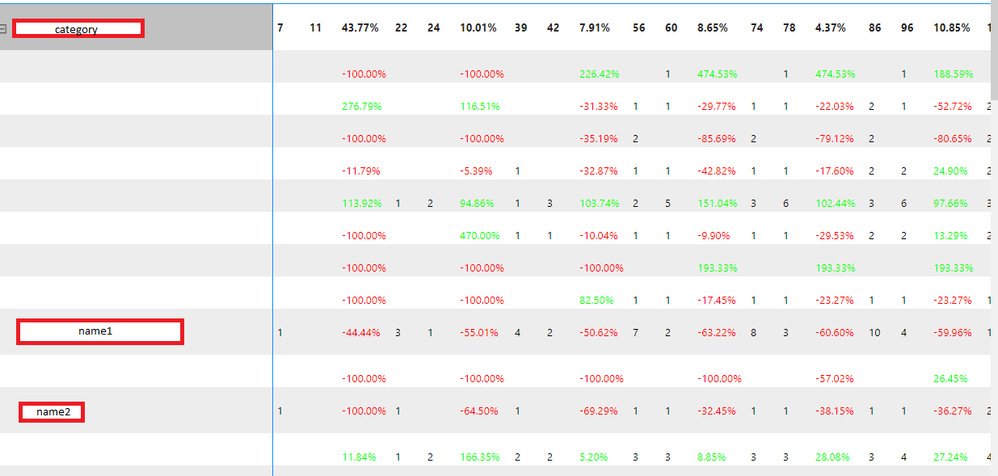
I inherited a dashboard which has an issue I haven't come across yet. The matrix visual skips many rows that are, on average, lower in value. I already tried "show items with no data" and even after increasing the "Grid - row padding" to the maximum 20, there are still no row names, though if I hover over it with the cursor, it gives a preview of that given name. Below you can see the exact table (with masked data, as it contains personal names):

Have any of you encountered an issue like this? Have you managed to fix it somehow?
(If needed, I can give a more detailed explanation of the matrix visual, as it is rather complicated.)
Best regards,
Hi @Anonymous ,
Do all the data in your visual come from the same source table? Have you used measure? If so, what is it?
Sorry for that the information you have provided is not making the problem clear to me. Can you please share more details to help us clarify your scenario?
Please provide me with more details about your table and your problem or share me with your pbix file after removing sensitive data.
Refer to:
How to provide sample data in the Power BI Forum
How to Get Your Question Answered Quickly
Best Regards,
Jianbo Li
If this post helps, then please consider Accept it as the solution to help the other members find it more quickly.
| User | Count |
|---|---|
| 51 | |
| 38 | |
| 33 | |
| 22 | |
| 19 |
| User | Count |
|---|---|
| 136 | |
| 102 | |
| 59 | |
| 36 | |
| 35 |