Join us at FabCon Atlanta from March 16 - 20, 2026, for the ultimate Fabric, Power BI, AI and SQL community-led event. Save $200 with code FABCOMM.
Register now!The Power BI Data Visualization World Championships is back! Get ahead of the game and start preparing now! Learn more
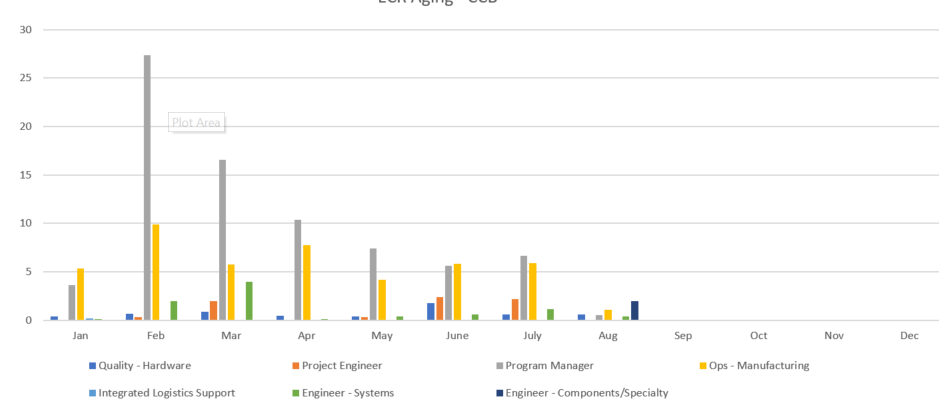
I want to create a graph like this:
I have a table of data for each month where I can calculate the average and create visuals with it, but how would I get access to that averages to create a chart like this with the average of each department for each month.
Solved! Go to Solution.
Hi
If your data table have one Dapartment column, one Value column to calculate average, one Month column. It is possible.
First, creat a Measure = AVERAGE(Value column)
Use Cluster Column Chart to show like your expected visual
You add Department column to "Axis", Measure average to "Value", and Month Column to "Legend"
Hi
If your data table have one Dapartment column, one Value column to calculate average, one Month column. It is possible.
First, creat a Measure = AVERAGE(Value column)
Use Cluster Column Chart to show like your expected visual
You add Department column to "Axis", Measure average to "Value", and Month Column to "Legend"
The Power BI Data Visualization World Championships is back! Get ahead of the game and start preparing now!
| User | Count |
|---|---|
| 38 | |
| 36 | |
| 33 | |
| 30 | |
| 28 |
| User | Count |
|---|---|
| 128 | |
| 88 | |
| 79 | |
| 67 | |
| 62 |