Don't miss your chance to take the Fabric Data Engineer (DP-600) exam for FREE! Find out how by attending the DP-600 session on April 23rd (pacific time), live or on-demand.
Learn moreJoin the FabCon + SQLCon recap series. Up next: Power BI, Real-Time Intelligence, IQ and AI, and Data Factory take center stage. All sessions are available on-demand after the live show. Register now
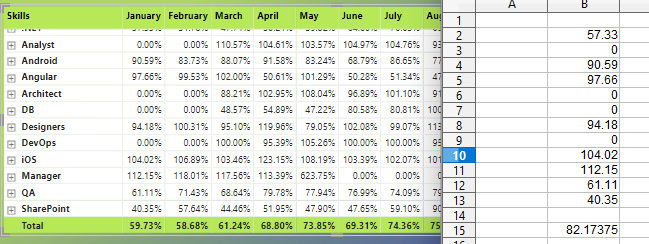
1. In Below matirx chart was to build & % was taken to show values but problem is by taking zeros the jan feb month of some fields the % reduced to 50%
2. But same Analyst or any other filed are getting 70% 80% for another months.
3. Our requirement is zero should mentioned but it should not impact on total & we need to get below excel menitoned % for table.
4. Zero shlould be kept like that only but in % we should not calculate that one.
Hi,
Share the download link of your PBI file with the measure already written. Do you want to change the average in the row total or the column total?
Hi Ashish thanks for asking but its not a measure its just data field we have taken into chart now we need to show % without impact of Zero but Zero should be shown in Table.
Hi,
As requested earlier, share the download link of the PBI file.
Check out the April 2026 Power BI update to learn about new features.
If you have recently started exploring Fabric, we'd love to hear how it's going. Your feedback can help with product improvements.
A new Power BI DataViz World Championship is coming this June! Don't miss out on submitting your entry.
| User | Count |
|---|---|
| 48 | |
| 40 | |
| 37 | |
| 20 | |
| 16 |
| User | Count |
|---|---|
| 68 | |
| 67 | |
| 30 | |
| 26 | |
| 26 |