I have a table and need to apply sensitivity on Year 2020 it works fine with all values coming :-
Base Data -
| Group | Financial Item | 2018 | 2019 | 2020 |
| OI | Net Interest | 177 | 179 | 164 |
| OI | Fee | 7 | 9 | 11 |
| TI | Oper Inc | 184 | 188 | 175 |
| TI | Inc All | -7 | -4 | 4 |
| Total | Total Inc | 177 | 184 | 179 |
If I dont use the group column and create the matrix with slicers itworks fine :-
| | Slicer Net Int | SlicerFee | | |
| | 25% | -15% | | |
| Financial Item | 2018 | 2019 | 2020 | Rev-2020 |
| Net Interest | 177 | 179 | 164 | 205 |
| Fee | 7 | 9 | 11 | 9.35 |
| Oper Inc | 184 | 188 | 175 | 214.35 |
| Inc All | -7 | -4 | 4 | 4 |
| Total Inc | 177 | 184 | 179 | 218.35 |
Measure Formula :-
WB_APAC_RFC_Perct =
VAR X1 = DIVIDE(
CALCULATE(SUM(WB_APAC[RFC 2020]),WB_APAC[Financial Item]="Net Interest"),
CALCULATE(SUM(WB_APAC[RFC 2020]),WB_APAC[Financial Item]="Operating Income"),1)
VAR X2 = DIVIDE(
CALCULATE(SUM(WB_APAC[RFC 2020]),WB_APAC[Financial Item]="Fee"),
CALCULATE(SUM(WB_APAC[RFC 2020]),WB_APAC[Financial Item]="Operating Income"),1)
VAR X3 = DIVIDE(
CALCULATE(SUM(WB_APAC[RFC 2020]),WB_APAC[Financial Item]="Other"),
CALCULATE(SUM(WB_APAC[RFC 2020]),WB_APAC[Financial Item]="Operating Income"),1)
RETURN
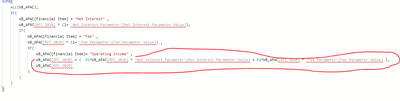
SUMX(WB_APAC, IF(WB_APAC[Financial Item] = "Net Interest" , WB_APAC[RFC 2020] * (1+ 'Net Interest Parameter'[Net Interest Parameter Value]),
IF(WB_APAC[Financial Item] = "Fee" , WB_APAC[RFC 2020] * (1+ 'Fee Parameter'[Fee Parameter Value]) ,
IF(WB_APAC[Financial Item]= "Operating Income" , WB_APAC[RFC 2020] + (((X1*WB_APAC[RFC 2020]) * 'Net Interest Parameter'[Net Interest Parameter Value]) + ((X2*WB_APAC[RFC 2020]) * 'Fee Parameter'[Fee Parameter Value]) 8),WB_APAC[RFC 2020])))))
But when I add group to matrix :- The Operating Income does not get calculated :-
| | | Slicer Net Int | SlicerFee | | |
| | | 25% | -15% | | |
| Group | Financial Item | 2018 | 2019 | 2020 | Rev-2020 |
| OI | Net Interest | 177 | 179 | 164 | 205 |
| OI | Fee | 7 | 9 | 11 | 9.35 |
| TI | Operating Income | 184 | 188 | 175 | 175 |
| TI | Income Allocated | -7 | -4 | 4 | 4 |
| | Total | 177 | 184 | 179 | 179 |