Join us at FabCon Atlanta from March 16 - 20, 2026, for the ultimate Fabric, Power BI, AI and SQL community-led event. Save $200 with code FABCOMM.
Register now!The Power BI Data Visualization World Championships is back! It's time to submit your entry. Live now!
Hi all,
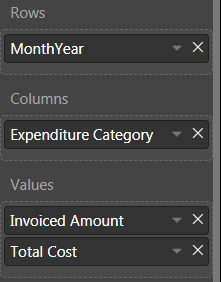
I've a question about making a simple matrix. When I select two measures then these measures will repeat in the whole matrix. Normally I can use "turn off stepped layout" from the row headers. But this won't work right now.
What I want (made for the picture with 2 seperated matrix'):
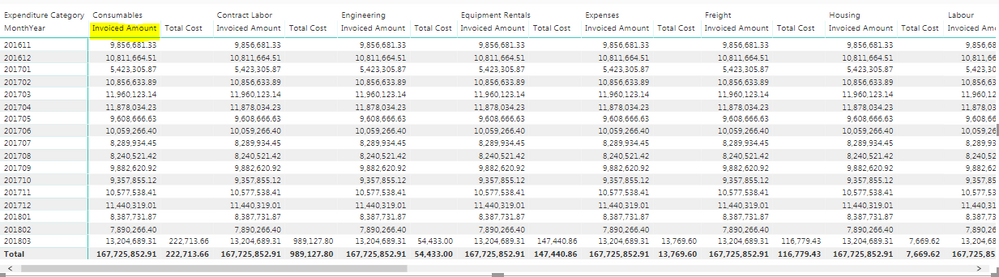
The Invoiced Amount should be displayed one time, as in the picture. What I now have:
You can see that in my matrix the "Invoiced Amount" is display multiple times. What I want is that "Invoiced Amount" is displayed one time and the "Expenditure Categories" with the right Amount.
Hope you can help me 🙂
You may try using SUMMARIZE Function to create a calculated table first.
The Power BI Data Visualization World Championships is back! It's time to submit your entry.
Check out the January 2026 Power BI update to learn about new features.
| User | Count |
|---|---|
| 71 | |
| 45 | |
| 34 | |
| 28 | |
| 23 |
| User | Count |
|---|---|
| 143 | |
| 121 | |
| 59 | |
| 40 | |
| 33 |