cancel
Showing results for 
Search instead for 
Did you mean: 

July 7 - July 17 | Round 2 of the Power BI Dataviz World Championships. Don't miss your chance! Learn more

Reply
dmoney7612
Helper II
Helper II

Matrix question- Excel exporting

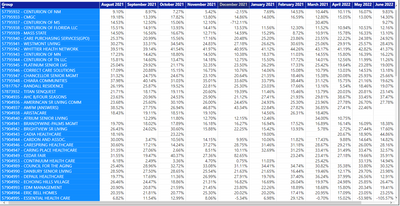
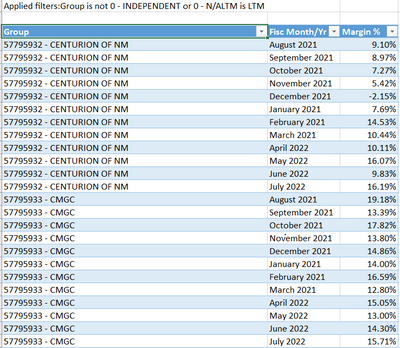
I have the below matrix and was trying to figure out a way to export to Excel in the same format with all the month columns listed out. As you can see in the 2nd snippet, the months are broken out in rows in stead of columns up top. Is there a way to alter the export format? Perhaps another visual instead of matrix would solve the issue but I'm not sure. Appreciate any insight!


dmoney7612_0-1629905757946.png


dmoney7612_1-1629905790060.png


1 ACCEPTED SOLUTION
nvprasad
Solution Sage
Solution Sage

Hi dmoney7612,


When you export matrix visual, data gets unpivoted in the exported excel.

You need to make a pivot table after exporting data into excel to get the same matrix visual look.

Appreciate a Kudos! 🙂
If this helps and resolves the issue, please mark it as a Solution! 🙂

Regards,
N V Durga Prasad


Did I answer your question? Mark my post as a solution! Appreciate your Kudos.
Follow me on LinkedIn.

View solution in original post

5 REPLIES 5
sfmike99
Advocate II
Advocate II

FYI, this feature is now live in preview mode (service only not desktop AFAIK):

https://ideas.powerbi.com/ideas/idea/?ideaid=b33fc4b3-9dae-4356-973d-d5ffe635ce15


A few bugs with column headers in preview, but definitely a welcome enhancement.

mahoneypat
Microsoft Employee
Microsoft Employee

FYI that this feature that is coming out in October.  Until then, making a pivot from the exported data is pretty quick to do once you've done it a couple times.

Export to Excel improvements for table and matrix visuals | Microsoft Docs


Pat


Did I answer your question? Mark my post as a solution! Kudos are also appreciated!

To learn more about Power BI, follow me on Twitter or subscribe on YouTube.


@mahoneypa HoosierBI on YouTube


Simple for sure but it usually messes with the order of the months in the columns

nvprasad
Solution Sage
Solution Sage

Hi dmoney7612,


When you export matrix visual, data gets unpivoted in the exported excel.

You need to make a pivot table after exporting data into excel to get the same matrix visual look.

Appreciate a Kudos! 🙂
If this helps and resolves the issue, please mark it as a Solution! 🙂

Regards,
N V Durga Prasad


Did I answer your question? Mark my post as a solution! Appreciate your Kudos.
Follow me on LinkedIn.

That's what I figured. So there is no work around or another visual that would export better?

Helpful resources

Announcements
FabCon and SQLCon Barcelona 2026

FabCon & SQLCon – Barcelona 2026

Join us in Barcelona for FabCon and SQLCon, the Fabric, Power BI, SQL, and AI community event. Save €200 with code FABCMTY200.

60 days of Data Days Carousel

Data Days 2026

Join Fabric Data Days 2026: 60 days of free live/on-demand sessions, challenges, study groups, and certification opportunities.

Power BI DataViz World Championships carousel

Power BI DataViz World Championships - June 2026

A new Power BI DataViz World Championship is coming this June! Don't miss out on submitting your entry.