Join us at FabCon Atlanta from March 16 - 20, 2026, for the ultimate Fabric, Power BI, AI and SQL community-led event. Save $200 with code FABCOMM.
Register now!The Power BI Data Visualization World Championships is back! Get ahead of the game and start preparing now! Learn more
Dear all,
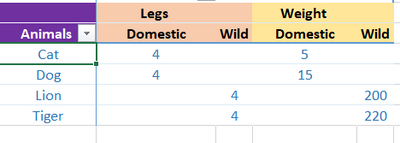
I have the below data in excel and I would like to create a pivot in PowerBI as shown below. But I am unable to achieve the view I need. (Column Header interchange) The below is just an example :
Sample data:
| Animals | Type | Legs | Weight |
| Lion | Wild | 4 | 200 |
| Tiger | Wild | 4 | 220 |
| Dog | Domestic | 4 | 15 |
| Cat | Domestic | 4 | 5 |
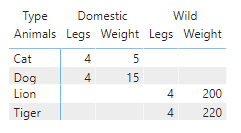
Currently in PowerBI:
Desired View:
I have come across few posts suggesting unpivotting / calculation groups as a probable solution. But the dataset is of huge capacity and dont think both are feasable. Are there any other ways to achieve the desired view?
Solved! Go to Solution.
Hi @Tiphany01
Thanks for reaching out to us.
You can try this, create the table
Table1 = GENERATE(
VALUES('Table'[Animals]),
{"Legs","Weight"})
then create a measure
Measure =
IF(MAX([Value])="Weight",
CALCULATE(SUM('Table'[Weight]),FILTER('Table',[Type]=MAX([Type])&&[Animals]=MAX('Table1'[Animals]))),
CALCULATE(SUM('Table'[Legs]),FILTER('Table',[Type]=MAX([Type])&&[Animals]=MAX('Table1'[Animals]))))
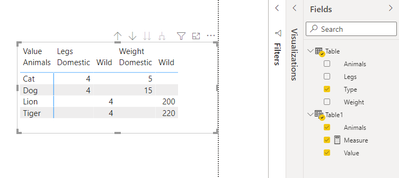
result
Best Regards,
Community Support Team _Tang
If this post helps, please consider Accept it as the solution to help the other members find it more quickly.
Hi @Tiphany01
Thanks for reaching out to us.
You can try this, create the table
Table1 = GENERATE(
VALUES('Table'[Animals]),
{"Legs","Weight"})
then create a measure
Measure =
IF(MAX([Value])="Weight",
CALCULATE(SUM('Table'[Weight]),FILTER('Table',[Type]=MAX([Type])&&[Animals]=MAX('Table1'[Animals]))),
CALCULATE(SUM('Table'[Legs]),FILTER('Table',[Type]=MAX([Type])&&[Animals]=MAX('Table1'[Animals]))))
result
Best Regards,
Community Support Team _Tang
If this post helps, please consider Accept it as the solution to help the other members find it more quickly.
@Tiphany01 , You need to unpivot the columns for that, Then only you will be able to move leg and weight up
https://radacad.com/pivot-and-unpivot-with-power-bi
other option
column header grouping
https://www.daxpatterns.com/dynamic-segmentation/
https://community.powerbi.com/t5/Desktop/Matrix-Display-Values-above-Columns/td-p/256905
https://community.powerbi.com/t5/Desktop/grouping-measure-results/td-p/456795
Check out the November 2025 Power BI update to learn about new features.
Advance your Data & AI career with 50 days of live learning, contests, hands-on challenges, study groups & certifications and more!
| User | Count |
|---|---|
| 59 | |
| 43 | |
| 42 | |
| 23 | |
| 17 |
| User | Count |
|---|---|
| 190 | |
| 121 | |
| 96 | |
| 65 | |
| 46 |