Learn from the best! Meet the four finalists headed to the FINALS of the Power BI Dataviz World Championships! Register now
Hi,
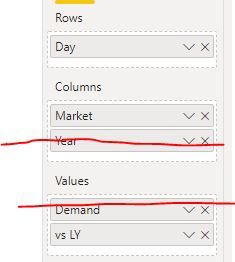
I have the following data and am trying to create a matrix to display the demand with day as row values and the market and year as column values.
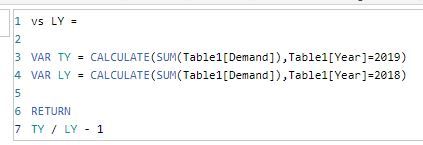
In addition to this, I would also like to display the year on year change for each day and market for which i've created a measure for
| Year | Day | Market | Demand |
| 2019 | Monday | UK | 120,000 |
| 2019 | Tuesday | UK | 115,000 |
| 2018 | Monday | UK | 130,000 |
| 2018 | Tuesday | UK | 113,000 |
| 2019 | Monday | US | 60,000 |
| 2019 | Tuesday | US | 72,000 |
| 2018 | Monday | US | 56,000 |
| 2018 | Tuesday | US | 83,000 |
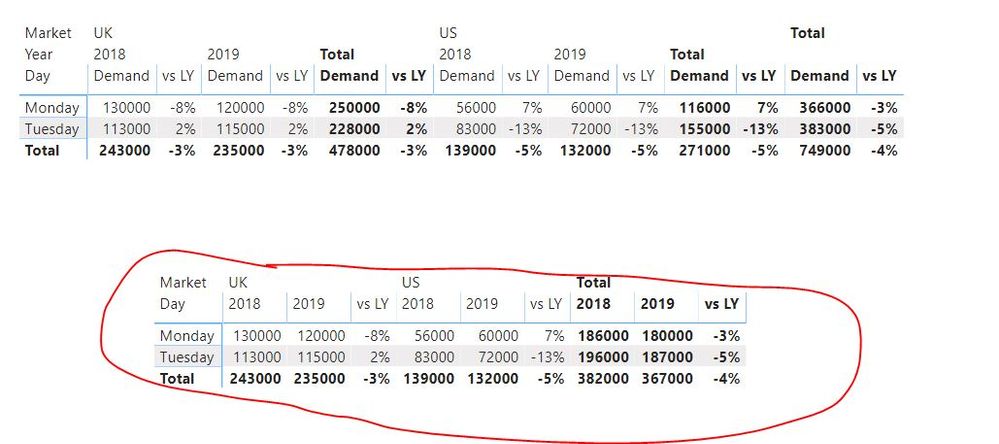
However, when I create the matrix with the 'vs LY' measure, it adds this measure after every year column, but I only want to add this at the end of each market column.
Actual:
Expectation:
| UK | US | |||||
| 2019 | 2018 | vs LY | 2019 | 2018 | vs LY | |
| Monday | 120,000 | 130,000 | -8% | 60,000 | 56,000 | 7% |
| Tuesday | 115,000 | 113,000 | 2% | 72,000 | 83,000 | -13% |
Is this possible?
Thanks
afk
Solved! Go to Solution.
HI, @bo_afk
Yes, you could get it.
just adjust it as below:
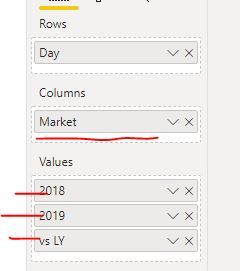
Create two SUM measure for 2018 and 2019
2018 = CALCULATE(SUM(Table1[Demand]),Table1[Year]=2018)
2019 = CALCULATE(SUM(Table1[Demand]),Table1[Year]=2019)
Then drag these two measure into Value instead of drag [Demand] directly, and remove Year column from the visual.
and here is sample pbix file, please try it.
Regards,
Lin
HI, @bo_afk
Yes, you could get it.
just adjust it as below:
Create two SUM measure for 2018 and 2019
2018 = CALCULATE(SUM(Table1[Demand]),Table1[Year]=2018)
2019 = CALCULATE(SUM(Table1[Demand]),Table1[Year]=2019)
Then drag these two measure into Value instead of drag [Demand] directly, and remove Year column from the visual.
and here is sample pbix file, please try it.
Regards,
Lin
Thanks for the response Lin.
Although, I have a lot of metrics in my report which means I need to create multiple 2018/2019 measures for each metric, but I guess this is the only option for now and does the job I need it to do.
👍
hi @bo_afk
Could you please tell me you still have other problem? If not, could you please mark the helpful replies as Answered? 😁
Regards,
Lin
If you have recently started exploring Fabric, we'd love to hear how it's going. Your feedback can help with product improvements.
A new Power BI DataViz World Championship is coming this June! Don't miss out on submitting your entry.
Share feedback directly with Fabric product managers, participate in targeted research studies and influence the Fabric roadmap.
| User | Count |
|---|---|
| 56 | |
| 33 | |
| 32 | |
| 18 | |
| 16 |
| User | Count |
|---|---|
| 65 | |
| 64 | |
| 44 | |
| 30 | |
| 28 |