Don't miss your chance to take the Fabric Data Engineer (DP-600) exam for FREE! Find out how by attending the DP-600 session on April 23rd (pacific time), live or on-demand.
Learn moreNext up in the FabCon + SQLCon recap series: The roadmap for Microsoft SQL and Maximizing Developer experiences in Fabric. All sessions are available on-demand after the live show. Register now
Hi,
I have the following data and am trying to create a matrix to display the demand with day as row values and the market and year as column values.
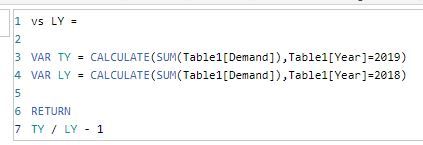
In addition to this, I would also like to display the year on year change for each day and market for which i've created a measure for
| Year | Day | Market | Demand |
| 2019 | Monday | UK | 120,000 |
| 2019 | Tuesday | UK | 115,000 |
| 2018 | Monday | UK | 130,000 |
| 2018 | Tuesday | UK | 113,000 |
| 2019 | Monday | US | 60,000 |
| 2019 | Tuesday | US | 72,000 |
| 2018 | Monday | US | 56,000 |
| 2018 | Tuesday | US | 83,000 |
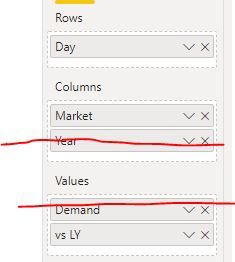
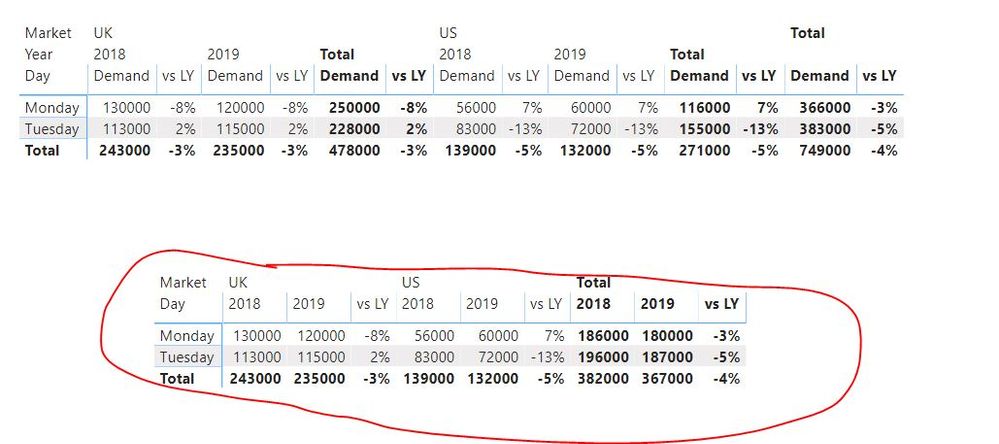
However, when I create the matrix with the 'vs LY' measure, it adds this measure after every year column, but I only want to add this at the end of each market column.
Actual:
Expectation:
| UK | US | |||||
| 2019 | 2018 | vs LY | 2019 | 2018 | vs LY | |
| Monday | 120,000 | 130,000 | -8% | 60,000 | 56,000 | 7% |
| Tuesday | 115,000 | 113,000 | 2% | 72,000 | 83,000 | -13% |
Is this possible?
Thanks
afk
Solved! Go to Solution.
HI, @bo_afk
Yes, you could get it.
just adjust it as below:
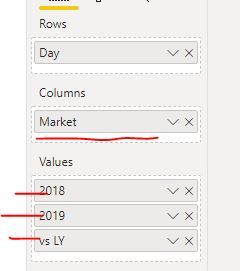
Create two SUM measure for 2018 and 2019
2018 = CALCULATE(SUM(Table1[Demand]),Table1[Year]=2018)
2019 = CALCULATE(SUM(Table1[Demand]),Table1[Year]=2019)
Then drag these two measure into Value instead of drag [Demand] directly, and remove Year column from the visual.
and here is sample pbix file, please try it.
Regards,
Lin
HI, @bo_afk
Yes, you could get it.
just adjust it as below:
Create two SUM measure for 2018 and 2019
2018 = CALCULATE(SUM(Table1[Demand]),Table1[Year]=2018)
2019 = CALCULATE(SUM(Table1[Demand]),Table1[Year]=2019)
Then drag these two measure into Value instead of drag [Demand] directly, and remove Year column from the visual.
and here is sample pbix file, please try it.
Regards,
Lin
Thanks for the response Lin.
Although, I have a lot of metrics in my report which means I need to create multiple 2018/2019 measures for each metric, but I guess this is the only option for now and does the job I need it to do.
👍
hi @bo_afk
Could you please tell me you still have other problem? If not, could you please mark the helpful replies as Answered? 😁
Regards,
Lin
If you have recently started exploring Fabric, we'd love to hear how it's going. Your feedback can help with product improvements.
A new Power BI DataViz World Championship is coming this June! Don't miss out on submitting your entry.
| User | Count |
|---|---|
| 46 | |
| 43 | |
| 39 | |
| 19 | |
| 15 |
| User | Count |
|---|---|
| 68 | |
| 67 | |
| 31 | |
| 27 | |
| 24 |