cancel
Showing results for 
Search instead for 
Did you mean: 

Vote for your favorite vizzies from the Power BI Dataviz World Championship submissions. Vote now!

Reply
joyhackett
Helper II
Helper II

Matrix format column group header

Hi,


I've seen variations of a solution for this, but nothing that specifically addresses this issue. Any help would be much appreciated!


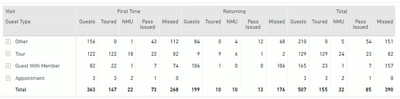
I have a simple matrix:

joyhackett_0-1708986061666.png

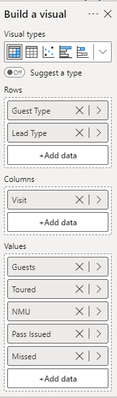
This is the data:

joyhackett_1-1708986091294.png


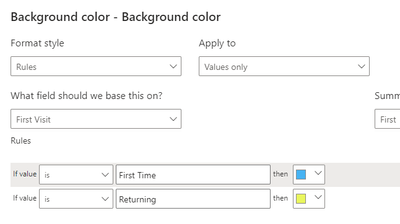
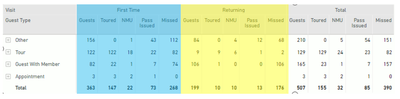
I need to set the background of the "First Time" group to blue and the background of the "Returning" group to yellow.  I can use the Cell Elements formatting to set the background color of the values, but it does not apply to the column header or column group header.

joyhackett_2-1708986248995.png


joyhackett_3-1708986304749.png


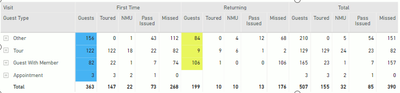
How can I conditionally set the column headers and column group headers so it looks like this?

joyhackett_4-1708986481168.png


1 ACCEPTED SOLUTION
Anonymous
Not applicable

Hi, @joyhackett 

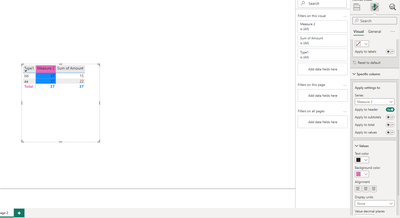
From my understanding, you can modify the header color individually through the Specific column. Please note that this is manual.

vjianpengmsft_0-1709014133360.png

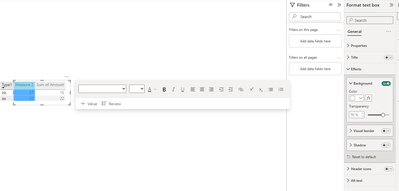
I thought of a possible solution. You can try to put a text box/rectangle with appropriate transparency on top of the Matrix, and set the conditional formatting color of this text box/rectangle to achieve the effect you want.

vjianpengmsft_1-1709014465438.png


How to Get Your Question Answered Quickly

Best Regards

Jianpeng Li

If this post helps, then please consider Accept it as the solution to help the other members find it more quickly.

View solution in original post

2 REPLIES 2
Anonymous
Not applicable

Hi, @joyhackett 

From my understanding, you can modify the header color individually through the Specific column. Please note that this is manual.

vjianpengmsft_0-1709014133360.png

I thought of a possible solution. You can try to put a text box/rectangle with appropriate transparency on top of the Matrix, and set the conditional formatting color of this text box/rectangle to achieve the effect you want.

vjianpengmsft_1-1709014465438.png


How to Get Your Question Answered Quickly

Best Regards

Jianpeng Li

If this post helps, then please consider Accept it as the solution to help the other members find it more quickly.

_AAndrade
Super User
Super User

Hi,

As far as I know it's not possible to do it as you want.


Did I answer your question? Mark my post as a solution! Kudos are welcome.

Proud to be a Super User!


Helpful resources

Announcements
Power BI DataViz World Championships

Power BI Dataviz World Championships

Vote for your favorite vizzies from the Power BI World Championship submissions!

Sticker Challenge 2026 Carousel

Join our Community Sticker Challenge 2026

If you love stickers, then you will definitely want to check out our Community Sticker Challenge!

January Power BI Update Carousel

Power BI Monthly Update - January 2026

Check out the January 2026 Power BI update to learn about new features.

FabCon Atlanta 2026 carousel

FabCon Atlanta 2026

Join us at FabCon Atlanta, March 16-20, for the ultimate Fabric, Power BI, AI and SQL community-led event. Save $200 with code FABCOMM.