Join us at FabCon Atlanta from March 16 - 20, 2026, for the ultimate Fabric, Power BI, AI and SQL community-led event. Save $200 with code FABCOMM.
Register now!The Power BI Data Visualization World Championships is back! Get ahead of the game and start preparing now! Learn more
Hi guys,
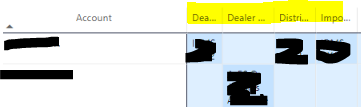
how to make the column header size in Matrix to be fix ?
Example here, the text is truncated. I've put Wrap : OFF and Auto-size : ON in this matter.
Thought by turn on Autosize, it will be depend on the text ? But if cannot, can we just specify the fixed width (size) ?
Thanks
@VoltesDev , You use
Wrap: On and Auto-size : on
or
Wrap : On and Auto-size : off and manually adjust the field
Hi @amitchandak ,
Yes, tried the 2nd one, however I more like to be automatic rather tham manually adjusted. The 1st looks not that good since it will make the column higher in length.
Thanks
The Power BI Data Visualization World Championships is back! Get ahead of the game and start preparing now!
| User | Count |
|---|---|
| 63 | |
| 55 | |
| 42 | |
| 41 | |
| 23 |
| User | Count |
|---|---|
| 165 | |
| 132 | |
| 118 | |
| 79 | |
| 53 |