cancel
Showing results for 
Search instead for 
Did you mean: 

Vote for your favorite vizzies from the Power BI Dataviz World Championship submissions. Vote now!

Reply
VoltesDev
Helper V
Helper V

Matrix fixed column header

Hi guys,


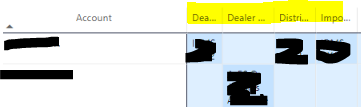
how to make the column header size in Matrix to be fix ?

VoltesDev_0-1654297159215.png

Example here, the text is truncated. I've put Wrap : OFF and Auto-size : ON in this matter.

Thought by turn on Autosize, it will be depend on the text ? But if cannot, can we just specify the fixed width (size)  ?


Thanks

2 REPLIES 2
amitchandak
Super User
Super User

@VoltesDev , You use

Wrap: On and Auto-size : on

or

Wrap : On and Auto-size : off and manually adjust the field

Share with Power BI Enthusiasts: Full Power BI Video (20 Hours) YouTube
Microsoft Fabric Series 60+ Videos YouTube
Microsoft Fabric Hindi End to End YouTube

Hi @amitchandak ,


Yes, tried the 2nd one, however I more like to be automatic rather tham manually adjusted. The 1st looks not that good since it will make the column higher in length.


Thanks 

Helpful resources

Announcements
Power BI DataViz World Championships

Power BI Dataviz World Championships

Vote for your favorite vizzies from the Power BI World Championship submissions!

Sticker Challenge 2026 Carousel

Join our Community Sticker Challenge 2026

If you love stickers, then you will definitely want to check out our Community Sticker Challenge!

January Power BI Update Carousel

Power BI Monthly Update - January 2026

Check out the January 2026 Power BI update to learn about new features.

FabCon Atlanta 2026 carousel

FabCon Atlanta 2026

Join us at FabCon Atlanta, March 16-20, for the ultimate Fabric, Power BI, AI and SQL community-led event. Save $200 with code FABCOMM.