Don't miss your chance to take exam DP-600 or DP-700 on us!
Request nowLearn from the best! Meet the four finalists headed to the FINALS of the Power BI Dataviz World Championships! Register now
Dear all,
I need to create table that show the differences between data in matrix.
| MATRIX | A | B | C | D | E |
| A | 100 | 55 | 77 | 88 | |
| B | -25 | 55 | -700 | 55 | |
| C | 55 | -33 | 55 | 22 | |
| D | 77 | 668 | 55 | 2 | |
| E | 88 | 33 | -55 | 55 |
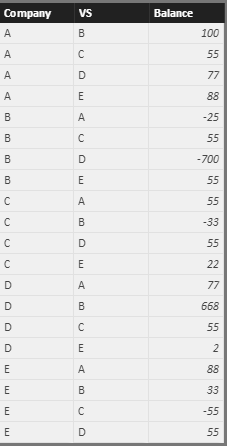
I have for example the below data (company, other company, balance vs other company)
| Company | VS | Balance |
| A | B | 100 |
| A | C | 55 |
| A | D | 77 |
| A | E | 88 |
| B | A | -25 |
| B | C | 55 |
| B | D | -700 |
| B | E | 55 |
| C | A | 55 |
| C | B | -33 |
| C | D | 55 |
| C | E | 22 |
| D | A | 77 |
| D | B | 668 |
| D | C | 55 |
| D | E | 2 |
| E | A | 88 |
| E | B | 33 |
| E | C | -55 |
| E | D | 55 |
for example:
company A think that company B owe her 100
company B think that her debt is onlt 25 (-25)
the input should be something like this:
| Company | VS | Company | VS | DIFF |
| A | B | 100 | -25 | 75 |
| A | C | 55 | 55 | 110 |
| A | D | 77 | 77 | 154 |
| A | E | 88 | 88 | 176 |
| B | C | 55 | -33 | 22 |
| B | D | -700 | 668 | -32 |
| B | E | 55 | 33 | 88 |
| C | D | 55 | 55 | 110 |
| C | E | 22 | -55 | -33 |
| D | E | 2 | 55 | 57 |
| total | 727 |
what should be the measure for DIFF column?
thanks a lot for your help!
Nir.
Solved! Go to Solution.
Hi @nirrobi,
Based on your description, you want to get the diff between current balance and compared companies’ balance, right?
If it is a case, you can refer to below steps:
Data table:
Measure: get the comparison companies’ balances
Comparison companies =
var currCom=LASTNONBLANK(Sheet1[Company],Sheet1[Company])
var currVS=LASTNONBLANK(Sheet1[VS],Sheet1[VS])
return
LOOKUPVALUE(Sheet1[Balance],Sheet1[Company],currVS,Sheet1[VS],currCom)
Measure: get the diff balance:
diff measure = var currBalance= MAX(Sheet1[Balance])
return
currBalance + [Comparison companies]
Result: (I drag these columns and measures to a table visual)
Notice: the measure works when the balance is not blank.
Regards,
Xiaoxin Sheng
Hi @nirrobi,
Based on your description, you want to get the diff between current balance and compared companies’ balance, right?
If it is a case, you can refer to below steps:
Data table:
Measure: get the comparison companies’ balances
Comparison companies =
var currCom=LASTNONBLANK(Sheet1[Company],Sheet1[Company])
var currVS=LASTNONBLANK(Sheet1[VS],Sheet1[VS])
return
LOOKUPVALUE(Sheet1[Balance],Sheet1[Company],currVS,Sheet1[VS],currCom)
Measure: get the diff balance:
diff measure = var currBalance= MAX(Sheet1[Balance])
return
currBalance + [Comparison companies]
Result: (I drag these columns and measures to a table visual)
Notice: the measure works when the balance is not blank.
Regards,
Xiaoxin Sheng
I am speechless!
thank.
Work like a charm.
Do you know a way that there wont be duplicate of comaprison?
for example A vs B is exactly the same as B vs A, so I dont want to show it twice.
Hi @nirrobi,
I think you can simply use distinct function to filter the duplicate records.
Table = DISTINCT(old table)
Then use new tables columns and measure to create the visual.
Regards,
Xiaoxin Sheng
Hi,
for which column?
I cant do it for column diff as AvsB can be equal to column DvsE for example.
Hi @nirrobi,
The function can also works on table.
I have modified the above reply and add a sample.
Regards,
Xiaoxin Sheng
Share feedback directly with Fabric product managers, participate in targeted research studies and influence the Fabric roadmap.
Check out the February 2026 Power BI update to learn about new features.
| User | Count |
|---|---|
| 51 | |
| 40 | |
| 37 | |
| 14 | |
| 14 |
| User | Count |
|---|---|
| 84 | |
| 71 | |
| 38 | |
| 29 | |
| 27 |