cancel
Showing results for 
Search instead for 
Did you mean: 

The Power BI Data Visualization World Championships is back! Get ahead of the game and start preparing now! Learn more

Reply
nirrobi
Helper V
Helper V

Matrix differences

Dear all,


I need to create table that show the differences between data in matrix.

MATRIXABCDE
A 100557788
B-25 55-70055
C55-33 5522
D7766855 2
E8833-5555 

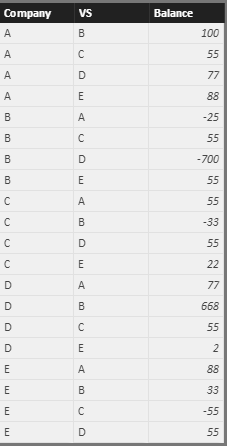
I have for example the below data (company, other company, balance vs other company)

CompanyVSBalance
AB100
AC55
AD77
AE88
BA-25
BC55
BD-700
BE55
CA55
CB-33
CD55
CE22
DA77
DB668
DC55
DE2
EA88
EB33
EC-55
ED55


for example:

   company A think that company B owe her 100

   company B think that  her debt is onlt 25 (-25)


the input should be something like this:

CompanyVSCompanyVSDIFF
AB100-2575
AC5555110
AD7777154
AE8888176
BC55-3322
BD-700668-32
BE553388
CD5555110
CE22-55-33
DE25557
total   727


what should be the measure for DIFF column?


thanks a lot for your help!


Nir.

1 ACCEPTED SOLUTION
Anonymous
Not applicable

Hi @nirrobi,


Based on your description, you want to get the diff between current balance and compared companies’ balance, right?

If it is a case, you can refer to below steps:

Data table:

Capture2.PNG


Measure: get the comparison companies’ balances


Comparison companies =
var currCom=LASTNONBLANK(Sheet1[Company],Sheet1[Company])
var currVS=LASTNONBLANK(Sheet1[VS],Sheet1[VS])
return
LOOKUPVALUE(Sheet1[Balance],Sheet1[Company],currVS,Sheet1[VS],currCom)


Measure: get the diff balance:

diff measure = var currBalance= MAX(Sheet1[Balance])
return
currBalance + [Comparison companies]

Result: (I drag these columns and measures to a table visual)


 Capture.PNG


Notice: the measure works when the balance is not blank.


Regards,
Xiaoxin Sheng


View solution in original post

5 REPLIES 5
Anonymous
Not applicable

Hi @nirrobi,


Based on your description, you want to get the diff between current balance and compared companies’ balance, right?

If it is a case, you can refer to below steps:

Data table:

Capture2.PNG


Measure: get the comparison companies’ balances


Comparison companies =
var currCom=LASTNONBLANK(Sheet1[Company],Sheet1[Company])
var currVS=LASTNONBLANK(Sheet1[VS],Sheet1[VS])
return
LOOKUPVALUE(Sheet1[Balance],Sheet1[Company],currVS,Sheet1[VS],currCom)


Measure: get the diff balance:

diff measure = var currBalance= MAX(Sheet1[Balance])
return
currBalance + [Comparison companies]

Result: (I drag these columns and measures to a table visual)


 Capture.PNG


Notice: the measure works when the balance is not blank.


Regards,
Xiaoxin Sheng


I am speechless!

thank.

Work like a charm.


Do you know a way that there wont be duplicate of comaprison?

for example A vs B is exactly the same as B vs A, so I dont want to show it twice.

Anonymous
Not applicable

Hi @nirrobi,


I think you can simply use distinct function to filter the duplicate records.


Table = DISTINCT(old table)


Then use new tables columns and measure to create the visual.


Regards,

Xiaoxin Sheng

Hi,


for which column?

I cant do it for column diff as AvsB can be equal to column DvsE for example.

Anonymous
Not applicable

Hi @nirrobi,


The function can also works on table.

I have modified the above reply and add a sample.


Regards,

Xiaoxin Sheng

Helpful resources

Announcements
Power BI DataViz World Championships

Power BI Dataviz World Championships

The Power BI Data Visualization World Championships is back! Get ahead of the game and start preparing now!

December 2025 Power BI Update Carousel

Power BI Monthly Update - December 2025

Check out the December 2025 Power BI Holiday Recap!

FabCon Atlanta 2026 carousel

FabCon Atlanta 2026

Join us at FabCon Atlanta, March 16-20, for the ultimate Fabric, Power BI, AI and SQL community-led event. Save $200 with code FABCOMM.