cancel
Showing results for 
Search instead for 
Did you mean: 

July 7 - July 17 | Round 2 of the Power BI Dataviz World Championships. Don't miss your chance! Learn more

Reply
ezequiel
Microsoft Employee
Microsoft Employee

Matrix data

Hi,


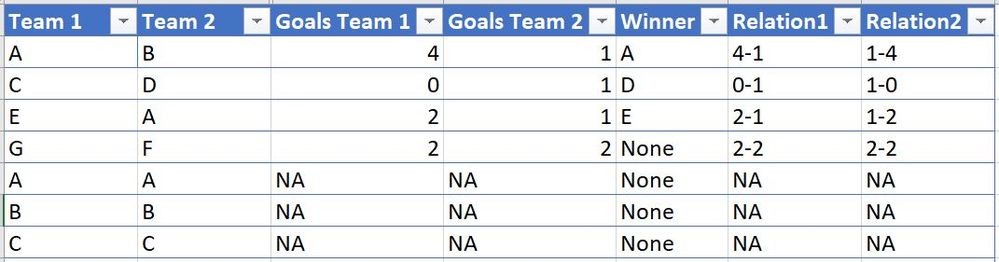
I'm building a fixture-like matrix for a soccer tournament with 10 teams. All plays with each other, so I'll have a 10x10 matrix with different combinations of results, except for the accross diagonal line (as Team 1 vs Team 1 will not generate a result). I though about building a simple table in excel with this structure:


Capture.JPG


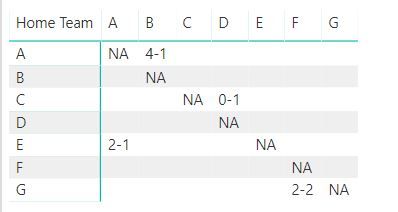
When I build the matrix in PowerBI, adding "Relation1" as values, I'm getting this:


Capture.JPG

I'm facing 2 issues:


1. It is only showing the results from the rows point of view, for example, it is populating the result of AB but not BA. I'm not getting the reason of this

2. is it possible to show the opposite result that I have in my field called "Relation2" if I see this from one team or the other? On the example above the value within BA should be 1-4


I appreciate your help


Ezequiel

1 ACCEPTED SOLUTION
Anonymous
Not applicable

Hi @ezequiel,


It is possible to achieve your requirement, please refer to below steps:


1. Create two calculated tables to store summarize distinct team names from original table.(not exist relationship)

T1 =
DISTINCT ( UNION ( VALUES ( Sheet1[Team1] ), VALUES ( Sheet1[Team2] ) ) )

T2 =
DISTINCT ( UNION ( VALUES ( Sheet1[Team2] ), VALUES ( Sheet1[Team1] ) ) )

2. Write a measure to get row label and column label to compare and look up result from original table.

Result = 
VAR lookup1 =
    LOOKUPVALUE (
        Sheet1[Relation1],
        Sheet1[Team1], SELECTEDVALUE ( 'T1'[Team1] ),
        Sheet1[Team2], SELECTEDVALUE ( 'T2'[Team2] )
    )
VAR lookup2 =
    LOOKUPVALUE (
        Sheet1[Relation2],
        Sheet1[Team1], SELECTEDVALUE ( 'T2'[Team2] ),
        Sheet1[Team2], SELECTEDVALUE ( 'T1'[Team1] )
    )
RETURN
    IF (
        lookup1 = BLANK ()
            && lookup2 = BLANK (),
        IF ( SELECTEDVALUE ( T1[Team1] ) = SELECTEDVALUE ( T2[Team2] ), "NA" ),
        IF ( lookup1 <> BLANK (), lookup1, lookup2 )
    )

3. Use T1, T2 and above measure to create matrix visual.
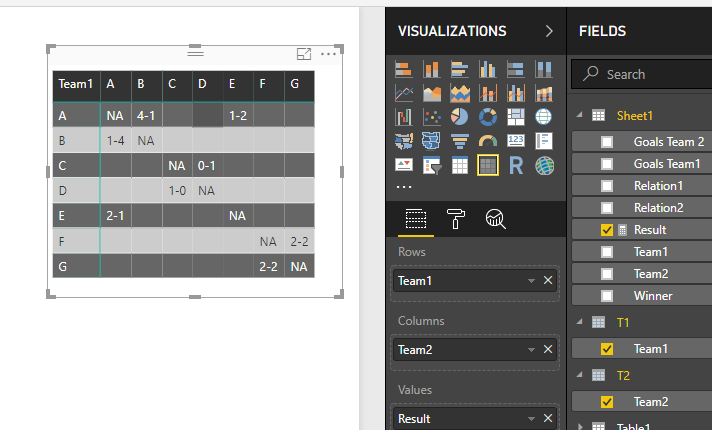
12.PNG


Regards,

Xiaoxin Sheng

View solution in original post

1 REPLY 1
Anonymous
Not applicable

Hi @ezequiel,


It is possible to achieve your requirement, please refer to below steps:


1. Create two calculated tables to store summarize distinct team names from original table.(not exist relationship)

T1 =
DISTINCT ( UNION ( VALUES ( Sheet1[Team1] ), VALUES ( Sheet1[Team2] ) ) )

T2 =
DISTINCT ( UNION ( VALUES ( Sheet1[Team2] ), VALUES ( Sheet1[Team1] ) ) )

2. Write a measure to get row label and column label to compare and look up result from original table.

Result = 
VAR lookup1 =
    LOOKUPVALUE (
        Sheet1[Relation1],
        Sheet1[Team1], SELECTEDVALUE ( 'T1'[Team1] ),
        Sheet1[Team2], SELECTEDVALUE ( 'T2'[Team2] )
    )
VAR lookup2 =
    LOOKUPVALUE (
        Sheet1[Relation2],
        Sheet1[Team1], SELECTEDVALUE ( 'T2'[Team2] ),
        Sheet1[Team2], SELECTEDVALUE ( 'T1'[Team1] )
    )
RETURN
    IF (
        lookup1 = BLANK ()
            && lookup2 = BLANK (),
        IF ( SELECTEDVALUE ( T1[Team1] ) = SELECTEDVALUE ( T2[Team2] ), "NA" ),
        IF ( lookup1 <> BLANK (), lookup1, lookup2 )
    )

3. Use T1, T2 and above measure to create matrix visual.

12.PNG


Regards,

Xiaoxin Sheng

Helpful resources

Announcements
FabCon and SQLCon Barcelona 2026

FabCon & SQLCon – Barcelona 2026

Join us in Barcelona for FabCon and SQLCon, the Fabric, Power BI, SQL, and AI community event. Save €200 with code FABCMTY200.

60 days of Data Days Carousel

Data Days 2026

Join Data Days 2026: 60 days of free live/on-demand sessions, challenges, study groups, and certification opportunities.

Power BI DataViz World Championships carousel

Power BI DataViz World Championships - June 2026

A new Power BI DataViz World Championship is coming this June! Don't miss out on submitting your entry.

Top Solution Authors