cancel
Showing results for 
Search instead for 
Did you mean: 

The Power BI Data Visualization World Championships is back! Get ahead of the game and start preparing now! Learn more

Reply
ezequiel
Microsoft Employee
Microsoft Employee

Matrix data

Hi,


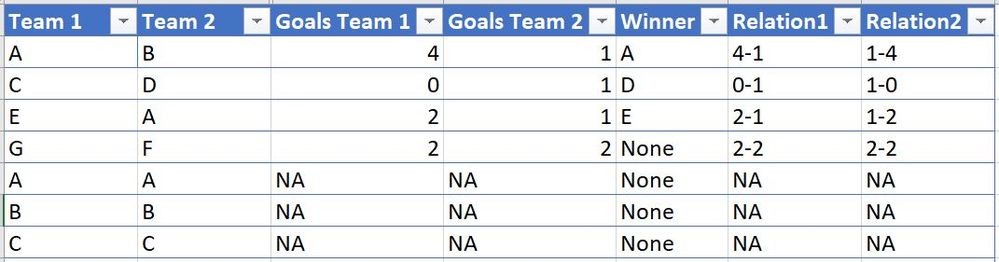
I'm building a fixture-like matrix for a soccer tournament with 10 teams. All plays with each other, so I'll have a 10x10 matrix with different combinations of results, except for the accross diagonal line (as Team 1 vs Team 1 will not generate a result). I though about building a simple table in excel with this structure:


Capture.JPG


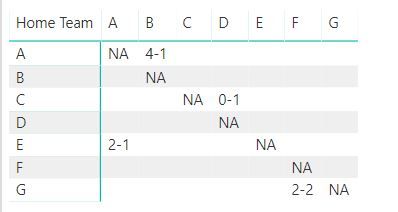
When I build the matrix in PowerBI, adding "Relation1" as values, I'm getting this:


Capture.JPG

I'm facing 2 issues:


1. It is only showing the results from the rows point of view, for example, it is populating the result of AB but not BA. I'm not getting the reason of this

2. is it possible to show the opposite result that I have in my field called "Relation2" if I see this from one team or the other? On the example above the value within BA should be 1-4


I appreciate your help


Ezequiel

1 ACCEPTED SOLUTION
Anonymous
Not applicable

Hi @ezequiel,


It is possible to achieve your requirement, please refer to below steps:


1. Create two calculated tables to store summarize distinct team names from original table.(not exist relationship)

T1 =
DISTINCT ( UNION ( VALUES ( Sheet1[Team1] ), VALUES ( Sheet1[Team2] ) ) )

T2 =
DISTINCT ( UNION ( VALUES ( Sheet1[Team2] ), VALUES ( Sheet1[Team1] ) ) )

2. Write a measure to get row label and column label to compare and look up result from original table.

Result = 
VAR lookup1 =
    LOOKUPVALUE (
        Sheet1[Relation1],
        Sheet1[Team1], SELECTEDVALUE ( 'T1'[Team1] ),
        Sheet1[Team2], SELECTEDVALUE ( 'T2'[Team2] )
    )
VAR lookup2 =
    LOOKUPVALUE (
        Sheet1[Relation2],
        Sheet1[Team1], SELECTEDVALUE ( 'T2'[Team2] ),
        Sheet1[Team2], SELECTEDVALUE ( 'T1'[Team1] )
    )
RETURN
    IF (
        lookup1 = BLANK ()
            && lookup2 = BLANK (),
        IF ( SELECTEDVALUE ( T1[Team1] ) = SELECTEDVALUE ( T2[Team2] ), "NA" ),
        IF ( lookup1 <> BLANK (), lookup1, lookup2 )
    )

3. Use T1, T2 and above measure to create matrix visual.
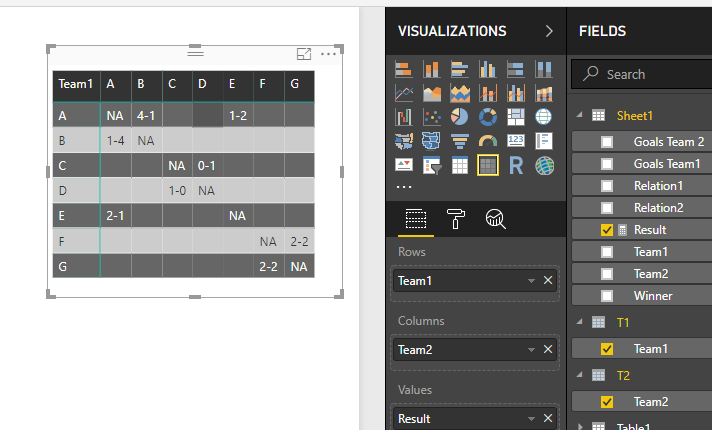
12.PNG


Regards,

Xiaoxin Sheng

View solution in original post

1 REPLY 1
Anonymous
Not applicable

Hi @ezequiel,


It is possible to achieve your requirement, please refer to below steps:


1. Create two calculated tables to store summarize distinct team names from original table.(not exist relationship)

T1 =
DISTINCT ( UNION ( VALUES ( Sheet1[Team1] ), VALUES ( Sheet1[Team2] ) ) )

T2 =
DISTINCT ( UNION ( VALUES ( Sheet1[Team2] ), VALUES ( Sheet1[Team1] ) ) )

2. Write a measure to get row label and column label to compare and look up result from original table.

Result = 
VAR lookup1 =
    LOOKUPVALUE (
        Sheet1[Relation1],
        Sheet1[Team1], SELECTEDVALUE ( 'T1'[Team1] ),
        Sheet1[Team2], SELECTEDVALUE ( 'T2'[Team2] )
    )
VAR lookup2 =
    LOOKUPVALUE (
        Sheet1[Relation2],
        Sheet1[Team1], SELECTEDVALUE ( 'T2'[Team2] ),
        Sheet1[Team2], SELECTEDVALUE ( 'T1'[Team1] )
    )
RETURN
    IF (
        lookup1 = BLANK ()
            && lookup2 = BLANK (),
        IF ( SELECTEDVALUE ( T1[Team1] ) = SELECTEDVALUE ( T2[Team2] ), "NA" ),
        IF ( lookup1 <> BLANK (), lookup1, lookup2 )
    )

3. Use T1, T2 and above measure to create matrix visual.

12.PNG


Regards,

Xiaoxin Sheng

Helpful resources

Announcements
Power BI DataViz World Championships

Power BI Dataviz World Championships

The Power BI Data Visualization World Championships is back! Get ahead of the game and start preparing now!

December 2025 Power BI Update Carousel

Power BI Monthly Update - December 2025

Check out the December 2025 Power BI Holiday Recap!

FabCon Atlanta 2026 carousel

FabCon Atlanta 2026

Join us at FabCon Atlanta, March 16-20, for the ultimate Fabric, Power BI, AI and SQL community-led event. Save $200 with code FABCOMM.

Top Solution Authors