Get certified for free when you join Fabric Data Days 2026 and dive into Fabric, Power BI, SQL, AI, and other essential data skills.
Join nowJuly 7 - July 17 | Round 2 of the Power BI Dataviz World Championships. Don't miss your chance! Learn more
Hi,
Is there an easy way to collapse all rows in Matrix chart with "+/- icons" rather than manually clicking on "-" icon next to each expanded row?
Thanks
Solved! Go to Solution.
Hi @Peter_ ,
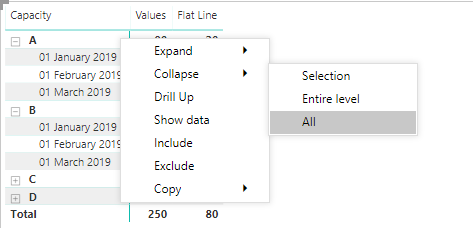
If you right click the column(s) where you have the +/- you can colapse or expand selection, entire level or all:
This works with any number of levels you may add to your matrix, and on stepped and non stepped layout.
Regards,
MFelix
Regards
Miguel Félix
Proud to be a Super User!
Check out my blog: Power BI em PortuguêsHi @Peter_ ,
If you right click the column(s) where you have the +/- you can colapse or expand selection, entire level or all:
This works with any number of levels you may add to your matrix, and on stepped and non stepped layout.
Regards,
MFelix
Regards
Miguel Félix
Proud to be a Super User!
Check out my blog: Power BI em PortuguêsHi Miguel.
Thank you very much for the solution to this question.
Is there a way to do this without right-clicking the symbol?
Like in a button or an option visible to the web user?
Thanks.
Hi @danielcvs,
On the icons on top of the visual you have 4 buttons
Arrow pointing up - goes to the top level
Arrow pointing down - turns on click on mouse to drill down
Two arrows - go to next level (does not show higher level)
One splitting arrow goes to the last level
This should help you.
Regards
Miguel Félix
Proud to be a Super User!
Check out my blog: Power BI em PortuguêsJoin us in Barcelona for FabCon and SQLCon, the Fabric, Power BI, SQL, and AI community event. Save €200 with code FABCMTY200.
Check out the July 2026 Power BI update to learn about new features.
Join Data Days 2026: 60 days of free live/on-demand sessions, challenges, study groups, and certification opportunities.
| User | Count |
|---|---|
| 30 | |
| 25 | |
| 23 | |
| 22 | |
| 13 |
| User | Count |
|---|---|
| 49 | |
| 32 | |
| 19 | |
| 17 | |
| 17 |