We've captured the moments from FabCon & SQLCon that everyone is talking about, and we are bringing them to the community, live and on-demand. Starts on April 14th. Register now
Hi,
Is there an easy way to collapse all rows in Matrix chart with "+/- icons" rather than manually clicking on "-" icon next to each expanded row?
Thanks
Solved! Go to Solution.
Hi @Peter_ ,
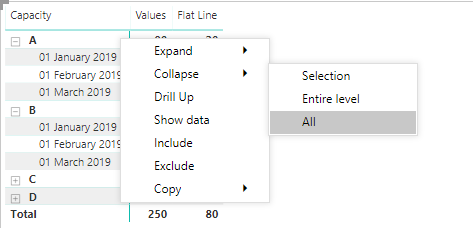
If you right click the column(s) where you have the +/- you can colapse or expand selection, entire level or all:
This works with any number of levels you may add to your matrix, and on stepped and non stepped layout.
Regards,
MFelix
Regards
Miguel Félix
Proud to be a Super User!
Check out my blog: Power BI em PortuguêsHi @Peter_ ,
If you right click the column(s) where you have the +/- you can colapse or expand selection, entire level or all:
This works with any number of levels you may add to your matrix, and on stepped and non stepped layout.
Regards,
MFelix
Regards
Miguel Félix
Proud to be a Super User!
Check out my blog: Power BI em PortuguêsHi Miguel.
Thank you very much for the solution to this question.
Is there a way to do this without right-clicking the symbol?
Like in a button or an option visible to the web user?
Thanks.
Hi @danielcvs,
On the icons on top of the visual you have 4 buttons
Arrow pointing up - goes to the top level
Arrow pointing down - turns on click on mouse to drill down
Two arrows - go to next level (does not show higher level)
One splitting arrow goes to the last level
This should help you.
Regards
Miguel Félix
Proud to be a Super User!
Check out my blog: Power BI em PortuguêsIf you have recently started exploring Fabric, we'd love to hear how it's going. Your feedback can help with product improvements.
A new Power BI DataViz World Championship is coming this June! Don't miss out on submitting your entry.
Share feedback directly with Fabric product managers, participate in targeted research studies and influence the Fabric roadmap.
| User | Count |
|---|---|
| 54 | |
| 39 | |
| 32 | |
| 17 | |
| 15 |
| User | Count |
|---|---|
| 64 | |
| 63 | |
| 37 | |
| 36 | |
| 22 |