cancel
Showing results for 
Search instead for 
Did you mean: 

The FabCon + SQLCon recap series starts April 14th at 8am Pacific. If you’re tracking where AI is going inside Fabric, this first session is a can't miss. Register now

Reply
Jwhitehead
Frequent Visitor

Matrix Visual Formatting

I am pretty sure this is not possible, so I think it will become a development request, but want to confirm and see if anyone has a solution.


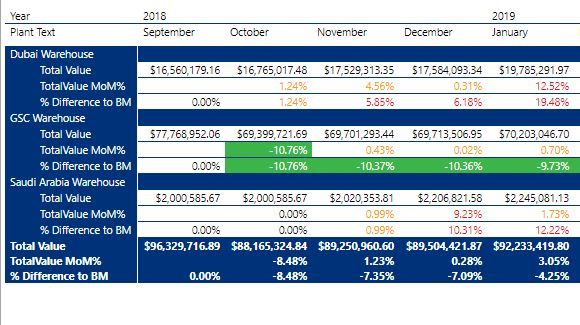
I am using the Matrix visual and a stepped layout with 1 Row field, 1 Column - Date Hierarchy field, and 3 value fields, as seen below.

Matrix Visual.JPG


I would like to have the Row Header (The Warehouses) formatted to stand out from the stepped value row headers (Total Value, TotalValue MoM%, % Difference to BM), by having a different font, font color, and background color.  I cannot simply change the alternate font and background colors, as that would cause one of the stepped value row headers to be formatted like the main row header.  Any ideas?

1 ACCEPTED SOLUTION
v-lionel-msft
Community Support
Community Support

Hi @Jwhitehead ,


As tested, it's impossible to achieve the idea completely in current version (2.78.5740.721 64-bit (February 2020)).

I suggest you submit an idea .

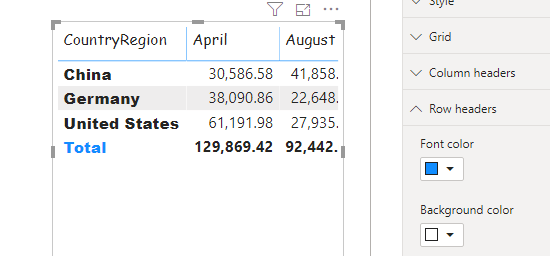
h6.PNG


Best regards,
Lionel Chen

If this post helps, then please consider Accept it as the solution to help the other members find it more quickly.

View solution in original post

3 REPLIES 3
v-lionel-msft
Community Support
Community Support

Hi @Jwhitehead ,


As tested, it's impossible to achieve the idea completely in current version (2.78.5740.721 64-bit (February 2020)).

I suggest you submit an idea .

h6.PNG


Best regards,
Lionel Chen

If this post helps, then please consider Accept it as the solution to help the other members find it more quickly.

@parry2k  and @v-lionel-msft ,


Thank you both for looking into this and the quick response. I was hopeful that I was just missing something... haha. I will submit as an idea for improvement.


Thank You,


Josh

parry2k
Super User
Super User

@Jwhitehead Unfortunately I don't think there is an option available to define the format for each hierarchy level. I'm sure there is an idea on this on ideas forum, if not than create one. Great question though.


Would appreciate Kudos 🙂 if my solution helped.


Subscribe to the @PowerBIHowTo YT channel for an upcoming video on List and Record functions in Power Query!!

Learn Power BI and Fabric - subscribe to our YT channel - Click here: @PowerBIHowTo

If my solution proved useful, I'd be delighted to receive Kudos. When you put effort into asking a question, it's equally thoughtful to acknowledge and give Kudos to the individual who helped you solve the problem. It's a small gesture that shows appreciation and encouragement! ❤


Did I answer your question? Mark my post as a solution. Proud to be a Super User! Appreciate your Kudos 🙂
Feel free to email me with any of your BI needs.

Helpful resources

Announcements
New to Fabric survey Carousel

New to Fabric Survey

If you have recently started exploring Fabric, we'd love to hear how it's going. Your feedback can help with product improvements.

Power BI DataViz World Championships carousel

Power BI DataViz World Championships - June 2026

A new Power BI DataViz World Championship is coming this June! Don't miss out on submitting your entry.

Join our Fabric User Panel

Join our Fabric User Panel

Share feedback directly with Fabric product managers, participate in targeted research studies and influence the Fabric roadmap.

March Power BI Update Carousel

Power BI Community Update - March 2026

Check out the March 2026 Power BI update to learn about new features.