cancel
Showing results for 
Search instead for 
Did you mean: 

Get Fabric Certified for FREE during Fabric Data Days. Don't miss your chance! Request now

Reply
Leeny127
Frequent Visitor

Matrix Values are not Affected by Date Slicer

Hello - I have a matrix that shows "# of Packages Reviewed" (and other values seen below) for various people. The values are all calculated by measures.  Next, I have a "Months" slicer that should filter all values for each person that month. The source tables for the slicer and matrix are tied by a relationship.


Problem: the slicer does not seem to effect the measure values.

Example (image 1😞 the "# of Packages Reviewed" for Cam shows 2, which is the total number he has reviewed for all months. The filter is set to July and should only show 1 package for Cam.


I have searched the forums but no solution seems to work for my scenario. Any guidance is appreciated!


Here are the measures used:

# Packages Reviewed:  COUNTX(FILTER('Count_Paralender_Merge','Count_Paralender_Merge'[Paralender Unique Value]>0),'Count_Paralender_Merge'[Paralender Unique Value])

# of Errors = IF('Count_Paralender_Merge'[Yes No #] = 0,'Count_Paralender_Merge'[Count of Y/N Values],0)

# of Fields Possible = IF('Count_Paralender_Merge'[Yes No #] = 1,'Count_Paralender_Merge'[# of Fields],0)

Error% = DIVIDE(SUM('Count_Paralender_Merge'[# of Errors]),SUM('Count_Paralender_Merge'[# of Fields Possible]))

# Correct = IF('Count_Paralender_Merge'[Yes No #] = 1,'Count_Paralender_Merge'[Count of Y/N Values],0)


Image 1
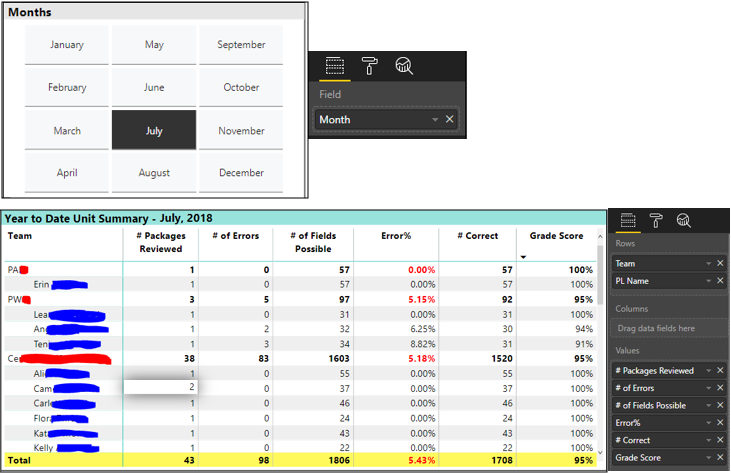
Visuals.PNG 


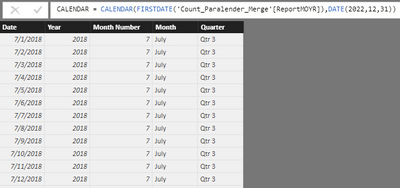
Image 2 - CALENDAR Table


5_CALENDAR Table.PNG 


Image 3 - Table Relationships

   6_Table Relationship.PNG

5 REPLIES 5
Leeny127
Frequent Visitor

@Greg_DecklerAfter reading more similar posts, I think my error is not referencing the related table within the formula...but I'm still lost on how to make it work.  Here's what I have so far:


Table 1 - has IDs and dates (ocurring multiple times)

Table 2 - has column of unique dates and the month in text

Table 1 & 2 are related by their date columns, Many : 1


I have two measures:

1) Count of IDs = COUNTX (FILTER ('Table_1', 'Table_1[ID] > 0), 'Table_1'[ID])

2) Filtered by Month = CALCULATE ('Table_1'[Count of IDs], ALLSELECTED ('Table_2'[Month]) )


Visuals:

Slicer - Table_2 [Month]

Matrix - Table_1 [ID] as Rows; (Measure 2) 'Filtered by Month' as a value


How can I get the Month selected in the slicer to filter the Measure 2 values for only that month selected?


EXAMPLE...


SLICER

January  February  March  April               ------->           January  February  March  April


MATRIX (No month selected in slicer)                          MATRIX (January selected in slicer)

 ID      Measure 2 - Filtered by Month      ------->          ID      Measure 2 - Filtered by Month

 1.1        1                                                                        1.1        1    id 1 only showed up in Table_1 one time for January

 2.7        1                                                                        6.5        2    id 6 only showed up in Table_1 two times for January

 6.5        3                                                                                            ids 2.7 & 9.1 didn't show up at all for month of January

 9.1        2

Greg_Deckler
Community Champion
Community Champion

Are you sure that the direction of the relationship is correct?


Follow on LinkedIn
@ me in replies or I'll lose your thread!!!
Instead of a Kudo, please vote for this idea
Become an expert!: Enterprise DNA
External Tools: MSHGQM
YouTube Channel!: Microsoft Hates Greg
Latest book!:
DAX For Humans

DAX is easy, CALCULATE makes DAX hard...

@Greg_Deckler I believe so...when I change the Cross filter direction, it still has no effect on the values but does mess up the 'Months' visual display (only showing two months in the slicer).


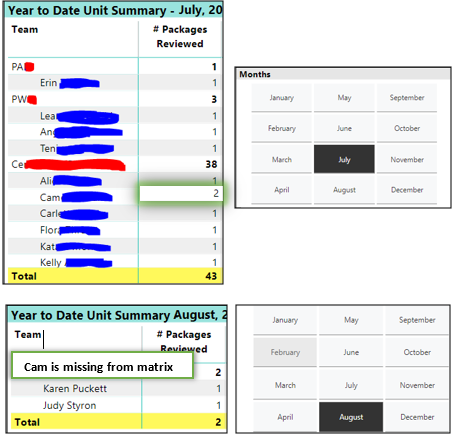
It has to be something with the measures because the date slicer does filter the matrix Rows (Team and PL Name); it just doesn't filter the values...for instance:


Cam has reviewed 2 packages

- one in July  - one in Aug


When the 'July' filter is applied, the matrix shows both of Cam's reviews

When the 'Aug' filter is applied, the matrix shows none of his reviews.

Comparison.PNG


So the measure is counting all of the person's package reviews and displaying them only in the first month they did them.

Hi @Leeny127,

Could you please share the pbix file is possible?


Regards,

Daniel He

Community Support Team _ Daniel He
If this post helps, then please consider Accept it as the solution to help the other members find it more quickly.

@v-danhe-msft Thank you for your reply.  I am unable to share the pbix per my company's security rules.

Helpful resources

Announcements
November Power BI Update Carousel

Power BI Monthly Update - November 2025

Check out the November 2025 Power BI update to learn about new features.

Fabric Data Days Carousel

Fabric Data Days

Advance your Data & AI career with 50 days of live learning, contests, hands-on challenges, study groups & certifications and more!

FabCon Atlanta 2026 carousel

FabCon Atlanta 2026

Join us at FabCon Atlanta, March 16-20, for the ultimate Fabric, Power BI, AI and SQL community-led event. Save $200 with code FABCOMM.

Top Solution Authors
Top Kudoed Authors