This time we’re going bigger than ever. Fabric, Power BI, SQL, AI and more. We're covering it all. You won't want to miss it.
Learn moreDid you hear? There's a new SQL AI Developer certification (DP-800). Start preparing now and be one of the first to get certified. Register now
Hi All! Can I take different values for 'Total Column' and 'Values' in Matrix or Matrix Preview?
I have 6 calculated measures/columns. Those are Target Qty, Ach Qty, Ach%, Target Value $, Ach Val $, Val%.
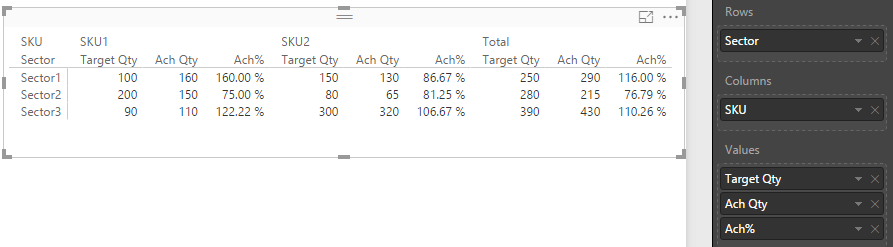
The matrix I need is like below:
SKU 1 and SKU 2 columns should be quantities and 'Total Column' should be sum of values of both SKUs.
Please help!
Thank You!
Solved! Go to Solution.
Hi @Anonymous,
Based on below data view structure (in my test, Target Qty, Ach Qty, Ach%, Target Value , Ach Value, Val% are all calculated columns), we can get the desired matrix output.
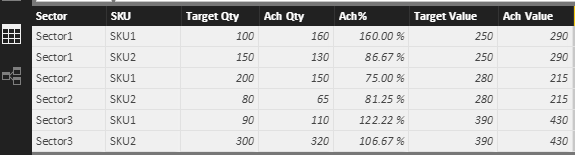
First, we should add an extra column into above table.
Total = "Total"
Then, create several calculated tables.
New Table1 =
SELECTCOLUMNS (
Matrix,
"Sector", Matrix[Sector],
"SKU", Matrix[Total],
"Target Qty", Matrix[Target Value],
"Ach Qty", Matrix[Ach Value],
"Ach%", Matrix[Val%]
)
New Table1_1 =
SUMMARIZE (
'New Table1',
'New Table1'[Sector],
"SKU", LASTNONBLANK ( 'New Table1'[SKU], 1 ),
"Target Qty", AVERAGE ( 'New Table1'[Target Qty] ),
"Ach Qty", AVERAGE ( 'New Table1'[Ach Qty] ),
"Ach%", AVERAGE ( 'New Table1'[Ach%] )
)
New Table2 =
UNION (
SELECTCOLUMNS (
Matrix,
"Sector", Matrix[Sector],
"SKU", Matrix[SKU],
"Target Qty", Matrix[Target Qty],
"Ach Qty", Matrix[Ach Qty],
"Ach%", Matrix[Ach%]
),
'New Table1_1'
)
Then, we can add a matrix whose fields are referring to 'New Table2'.
Best regards,
Yuliana Gu
Hi @Anonymous,
Based on below data view structure (in my test, Target Qty, Ach Qty, Ach%, Target Value , Ach Value, Val% are all calculated columns), we can get the desired matrix output.
First, we should add an extra column into above table.
Total = "Total"
Then, create several calculated tables.
New Table1 =
SELECTCOLUMNS (
Matrix,
"Sector", Matrix[Sector],
"SKU", Matrix[Total],
"Target Qty", Matrix[Target Value],
"Ach Qty", Matrix[Ach Value],
"Ach%", Matrix[Val%]
)
New Table1_1 =
SUMMARIZE (
'New Table1',
'New Table1'[Sector],
"SKU", LASTNONBLANK ( 'New Table1'[SKU], 1 ),
"Target Qty", AVERAGE ( 'New Table1'[Target Qty] ),
"Ach Qty", AVERAGE ( 'New Table1'[Ach Qty] ),
"Ach%", AVERAGE ( 'New Table1'[Ach%] )
)
New Table2 =
UNION (
SELECTCOLUMNS (
Matrix,
"Sector", Matrix[Sector],
"SKU", Matrix[SKU],
"Target Qty", Matrix[Target Qty],
"Ach Qty", Matrix[Ach Qty],
"Ach%", Matrix[Ach%]
),
'New Table1_1'
)
Then, we can add a matrix whose fields are referring to 'New Table2'.
Best regards,
Yuliana Gu
Check out the April 2026 Power BI update to learn about new features.
Sign up to receive a private message when registration opens and key events begin.
If you have recently started exploring Fabric, we'd love to hear how it's going. Your feedback can help with product improvements.
| User | Count |
|---|---|
| 34 | |
| 31 | |
| 25 | |
| 20 | |
| 16 |
| User | Count |
|---|---|
| 61 | |
| 49 | |
| 28 | |
| 23 | |
| 23 |