Join us at FabCon Atlanta from March 16 - 20, 2026, for the ultimate Fabric, Power BI, AI and SQL community-led event. Save $200 with code FABCOMM.
Register now!The Power BI Data Visualization World Championships is back! Get ahead of the game and start preparing now! Learn more
Solved! Go to Solution.
Hi @Clint ,
Try to make the following change, however without any data is difficult to pin point the correct syntax
Project Desc in Scope =
SWITCH (
TRUE (),
ISINSCOPE ( 'Exceptions Reporting'[Description] ), BLANK (),
ISINSCOPE ( 'Projects'[Project Name] ), MAX ( 'Projects'[Project Description] )
)
Regards
Miguel Félix
Proud to be a Super User!
Check out my blog: Power BI em PortuguêsHi @Clint ,
Based on what you refer you may need a ISINSCOPE has you refered however this needs to be calculated in the correct way since if you do a isinscope for the program name that is the parent that will return values in all lines.
Another option can be the HASONEVALUE for the exception.
Can you please share a mockup data or sample of your PBIX file. You can use a onedrive, google drive, we transfer or similar link to upload your files.
If the information is sensitive please share it trough private message.
Regards
Miguel Félix
Proud to be a Super User!
Check out my blog: Power BI em PortuguêsHi Miguel,
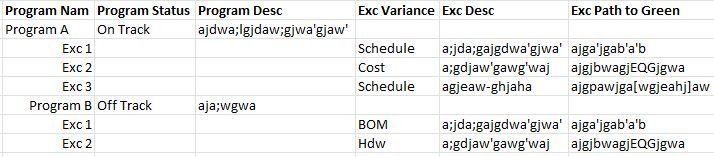
The image I attached is a mock-up of what the report should look like. Here is the measure I tried to use to get the Program related data to show only at the Program level:
Hi @Clint ,
Try to make the following change, however without any data is difficult to pin point the correct syntax
Project Desc in Scope =
SWITCH (
TRUE (),
ISINSCOPE ( 'Exceptions Reporting'[Description] ), BLANK (),
ISINSCOPE ( 'Projects'[Project Name] ), MAX ( 'Projects'[Project Description] )
)
Regards
Miguel Félix
Proud to be a Super User!
Check out my blog: Power BI em PortuguêsThank you Miguel - That did the trick. Much appreciated.
The Power BI Data Visualization World Championships is back! Get ahead of the game and start preparing now!
| User | Count |
|---|---|
| 57 | |
| 48 | |
| 35 | |
| 34 | |
| 21 |
| User | Count |
|---|---|
| 143 | |
| 122 | |
| 100 | |
| 80 | |
| 57 |